


Overview
ChatGPT extension to summarize website & text, rephrase, paraphrase or translate selected text in one shortcut. AI summarizer.
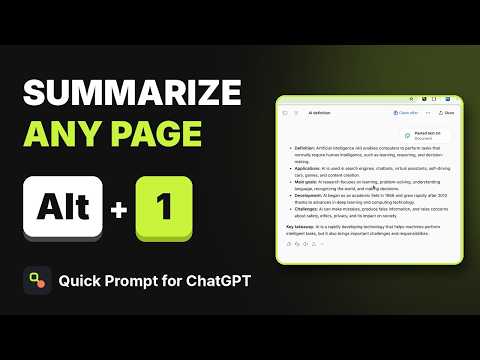
Quick Prompt for ChatGPT is a ChatGPT extension and AI writing assistant that lets you summarize any website or selected text, rephrase, paraphrase, translate, and rewrite with one keyboard shortcut. No copy-paste, no tab juggling. Your prompt plus the page content go straight into ChatGPT. Free to use with 10 sends per day. ⚡ ONE SHORTCUT, ANY PAGE Press Alt+Shift+G on any article, email, doc, or forum thread. Quick Prompt grabs the selected text (or the whole page), drops it into your chosen prompt, and opens ChatGPT with everything ready to send. ✨ KEY FEATURES - Summarize website: get the key points of a long article, report, or blog post in seconds with AI summarization - Summarize text: highlight a paragraph and get a short summary instantly - Make it shorter: turn wordy text into a clear, concise version - Rephrase & paraphrase: a built-in AI paraphraser that rewrites sentences in a different tone (formal, casual, friendly, professional) - Translate: translate selected text or the whole page into any language ChatGPT supports - Explain & fix grammar: simplify complex text or correct spelling and grammar - Custom prompts: write your own prompts with the {{SELECTED_TEXT}} placeholder, so any task becomes one click - Prompt library: edit, delete, and drag-and-drop to reorder your prompts - Import / export prompts as JSON: back up your library or share it with your team - Multilingual interface: English, Tiếng Việt, 日本語, 한국어, 简体中文, 繁體中文, हिन्दी, Português, Русский, Українська 🚀 HOW TO USE 1. Install Quick Prompt for ChatGPT and pin it to your toolbar. 2. Open any web page and select text (or select nothing to use the whole page). 3. Press Alt+Shift+G (or click the extension icon) and choose a prompt: Summarize, Translate, Rephrase, or your own. 4. ChatGPT opens with your prompt and content filled in. Read your AI summary, translation, or rewrite. 🔒 PRIVACY FIRST - Text is sent directly from your browser to ChatGPT. No middle server, no tracking of your page content. - No API key needed. It works with your existing ChatGPT account. - Your prompts are stored locally in your browser. 💡 WHO IS IT FOR? Students summarizing research, writers who want an AI writer to rephrase and paraphrase drafts, professionals translating emails, and anyone who wants a faster AI summarizer without copy-pasting into OpenAI chat. ❓ FAQ Q: Is it free? A: Yes. The free plan includes 10 sends per day. Only sending a prompt to ChatGPT counts; creating, editing, and organizing prompts is always free. Upgrade to Pro for unlimited sends. Q: Do I need an OpenAI API key? A: No. Quick Prompt uses the ChatGPT website you are already logged into. Q: Does it work on every website? A: It works on most web pages. Chrome blocks extensions on some internal pages such as chrome:// pages and the Chrome Web Store. Q: Can I change the keyboard shortcut? A: Yes. Go to chrome://extensions/shortcuts and set any key combination you like. Q: Can I use my own prompts? A: Yes. Create unlimited custom prompts and use {{SELECTED_TEXT}} to insert the selected text or page content. 📩 SUPPORT Questions or feedback: hudatech.extensions@gmail.com Website: https://hudatech.store Quick Prompt for ChatGPT is built by HuDaTech. This is an independent extension and is not affiliated with, endorsed by, or sponsored by OpenAI. ChatGPT is a trademark of OpenAI.
0 out of 5No ratings
Details
- Version1.0.1
- UpdatedNovember 29, 2026
- Size801KiB
- Languages10 languages
- DeveloperWebsite
Email
hudatech.extensions@gmail.com - Non-traderThis developer has not identified itself as a trader. For consumers in the European Union, please note that consumer rights do not apply to contracts between you and this developer.
Privacy

Quick Prompt for ChatGPT: Summarize Website & Text, Rephrase, Translate has disclosed the following information regarding the collection and usage of your data. More detailed information can be found in the developer's privacy policy.
Quick Prompt for ChatGPT: Summarize Website & Text, Rephrase, Translate handles the following:
This developer declares that your data is
- Not being sold to third parties, outside of the approved use cases
- Not being used or transferred for purposes that are unrelated to the item's core functionality
- Not being used or transferred to determine creditworthiness or for lending purposes