

AI Host Assistant for Airbnb
6 ratings
)
Overview
Tools for Airbnb hosts: income and owner statements, market readings, listing signals, competitors, guest screening, AI replies
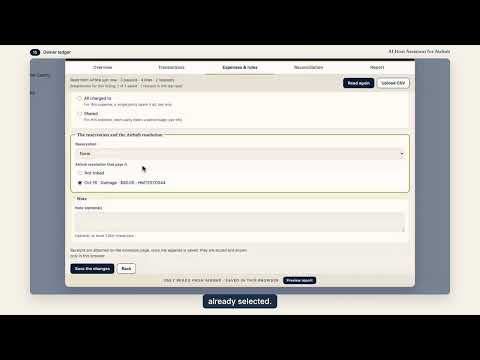
AI Host Assistant for Airbnb adds tools to the Airbnb pages you already use as a host: the multicalendar, the inbox and the listing editor. It reads what those pages and your own account already show, and gives it back as money figures, owner statements, market readings, a verdict on your listing, a screening of the guest and a draft reply, each on the page where you need it. Built by an Airbnb Superhost, for Airbnb hosts. There is no separate app to open. Install it, go to Airbnb, and each tool appears next to the thing it works on. There is no subscription, and the AI features use your own OpenAI key (more on that below). Not affiliated with, endorsed by, or sponsored by Airbnb, Inc. 🧰 WHAT IT DOES, IN THE ORDER MOST HOSTS CARE ABOUT The list starts with money, then visibility, then guests. 💶 MONEY 📆 MONTH INSIGHT AND NET — in the multicalendar Every month has a collapsible card, closed by default. It is read when you open it, and "Read again" brings it up to date. It has four tabs: ▪️ Money: what has been paid, what is still to be paid and what is unsold. The main figure is "Left for you", which is what remains after Airbnb's fee and the cleaning fee. The cleaning fee is subtracted once. When a reservation does not show its cleaning fee separately, the card uses your listing's fee and marks the figure as an estimate. You also get booked, free and blocked nights, occupancy, RevPAR and your asking price. Occupancy is shown the way Airbnb's performance page counts it, next to the calendar's own count. A "?" beside each figure explains how it is worked out. ▪️ Funnel: impressions, page views and the rates between the steps, plus, for the current and coming months, what changed since your previous reading. ▪️ Market: your month against similar listings (see "Market pulse" below). ▪️ Demand: bookings, average stay, guests, reviews, lead time, saves and cancellations. The net you would receive also appears under the price of each night that can still be booked. 📒 OWNER LEDGER — "Owner ledger" in the multicalendar For co-hosts and managers who answer to the owner of a home: a monthly statement for each listing. For each party it puts side by side what Airbnb paid them, what the agreement you enter says they are owed, and the adjustment between the two: who owes whom, and how much. It reads the month's payouts from Airbnb only when you press "Read from Airbnb", or takes the earnings CSV you export from Airbnb, and keeps them in your browser, apart for each Airbnb account. You decide what each extraordinary line is, add expenses, close the month and record the settlements; a closed month keeps its version, and the statement prints or saves as a PDF from your browser. Three AI helpers ("Suggest categories", "Read my notes" and "Draft a comment") only suggest, work only with your own OpenAI key, and change nothing until you save it yourself. 📊 YEAR IN FIGURES — "Year in numbers" in the year view The twelve months of the year on screen in one panel: money, nights, occupancy (Airbnb's and the calendar's), and the monthly impressions and page views. A button reads the funnel of the months you have never opened, one after another. It tells you how many readings that takes before you press it, and you can stop it. 📈 MARKET PULSE — "Market pulse" in the year view Your listing against the similar listings Airbnb itself shows for it. A row of twelve months gives two bars per month: the MPI, which compares your occupancy with theirs, and the RGI, which compares your revenue per night with theirs. Open any month, or the last 30 days, for a one-period analysis with bars for occupancy, average rate and revenue per night. "Six windows" and "Night by night" are two more views of the same comparison, and a "How it adds up" note shows each calculation. 🕐 GOLDEN WINDOW — "Golden window" in the year view How many days before arrival your guests book at the highest nightly price, with the range and the number of reservations behind it. Three cards follow: "How it is going" compares with your previous measurement, "Where you charge less" shows at what lead time your price is lowest, and says so when there are too few reservations to be sure, and "What to do" suggests a raise of at most 12 percent, presented as a ceiling. Airbnb keeps no history of the prices a calendar showed, so the extension records your calendar's prices once a day for the listings you have measured (see Privacy). 🌙 EXTRA NIGHTS — "Extra nights" in the year view Shows which reservations have free nights right next to them. You can offer those nights at your calendar price, or sell them only by extending the reservation, and the panel explains how to make the change in Airbnb. It changes nothing there. Once you have opened Extra nights for a listing, a background check every six hours also marks the ones that need a second look because a new reservation or a cancellation changed what sits next to them, without Chrome notifications. 🗓 DAYS OF THE WEEK — "Days of the week" in the year view Your performance by day of the week, so you can see which days earn the most and which ones stay empty. 🟩 BOOKING WINDOW — a switch in the year view Marks in green on the calendar the stretch of nights guests are booking now, based on your average lead time as Airbnb reports it. It reads that figure once and remembers it for 12 hours. ⏱ BOOKING PACE — inside "Signals" Adds up the nights sold in the last 30 days, dated by the day of the booking and net of cancellations, and compares them with the same 30 days a year ago or, if the listing does not have a year of history yet, with your median over the six previous periods. It says whether you are on track, and the verdict is given in nights. The money tools use no AI, with two exceptions that you start yourself: the ⚡ in the inbox can write up the Extra nights offer you prepare, and the Owner ledger has the three AI helpers described above. 👁 VISIBILITY 🩺 SIGNALS — "Signals" in the year view Thirteen factors read from your own dashboard, each with a green, amber or red light, with what it is, what it does to you and why it has that color right now: first-page impressions, click from search, books after visiting, occupancy, recent reviews, host cancellations, resolution-center cases, response rate, price against Airbnb's equilibrium price, real beds registered, cleaning-fee weight, Airbnb's open opportunities and your cancellation policy. Two more, your first photos and your title and description, get an AI opinion and stay gray, so they do not count towards the verdict. Each signal has a button to the Airbnb page where you can see it or change it. Ask for a plan and it writes one step for each red or amber factor, in priority order, each with how to check that it worked and by when. 🔎 FILTER BOXES AND COMPETITORS — in the listing editor ▪️ "Find filter gaps": guests filter, and every box they check hides every listing without it. This tool counts, box by box, how many of your competitors according to Airbnb (the similar listings Airbnb shows for your base price) have each one. You see which boxes almost none of them check, and which ones most of them check and you do not. Every count is exact, for example 18 of 47. An optional step checks whether Airbnb actually returns your listing for a few filters in your area, and tells you its cost first. ▪️ "See competitors": the list of similar listings with photo, linked title, type, rating, the booked price according to Airbnb and approximate distance, your own listing at the top, and the medians. "Compare amenities" puts you next to any competitor: only you, in common, only them. The list shows who entered and who left and re-reads itself once a day. It tells you its cost first, since it reads each competitor's public page one at a time. 📝 AUDIT MY COPY — in the listing editor Reads all nine texts of your listing in full: title, description, the space, guest access, interaction, other things to note, neighborhood, getting around and house rules, in every language you have. It audits one language at a time, the one you choose, and warns you when a text is missing in another language. It tells you how it sounds to someone who does not know you yet, with a "Hospitality of the tone" score out of 100. It points at where a rule reads as a threat and how to say the same thing without losing the booking. Fixed rules catch fines, threats and capital letters, and every suggestion is checked so that it does not change times, figures or what you forbid. 👤 GUESTS 🔍 GUEST SCREENING — in the inbox, under the reservation details Before you say yes, you can see who is booking: their public Airbnb profile, how long they have been on the platform, whether their identity is verified, the stars they gave and the reviews other hosts wrote about them. Two more things Airbnb's screen does not show: 🔁 Do they review back? We look at the hosts who reviewed them, over their last five stays, and show in how many of those they left a review in return and what they wrote. When a stay cannot be read, it says so. 🤖 An AI reading of their record: what the pattern of their stays says, with the exact sentences it rests on. The AI reading looks at how they behaved in their stays, and it does not judge who they are. ⚡ REPLY DRAFTER — in the inbox, next to the message box Click the ⚡ and a window opens. Press "Generate" and the extension reads the thread, the reservation, your listing, your Airbnb quick replies on the subject and your voice profile, and writes a draft in your voice that you can edit. "Adjust" changes the draft you have in front of you: shorter, warmer, more formal, another language, or whatever you type, and ◀ ▶ move between versions. Choose a tone, including one for when something went wrong and one for a no. Tell it what the thread does not know, like "the elevator is out until Thursday", and it uses that when writing. When the guest asks for something only you decide, such as an early check-in, it asks you Yes or No first. Each draft flags amounts, times, codes, links or phone numbers that do not come from anything it read, and refunds or discounts you did not offer. "Insert message" puts the draft in Airbnb's message box and nothing is sent until you press Send yourself. The ⚡ needs your OpenAI key. The voice profile is optional and asks your permission. It learns how long your replies are, your greetings, whether you use "tú" or "usted", and a few of your replies as examples, without names or figures. You can see and delete it in "Your profile". 🌍 LANGUAGES The interface is available in English and Spanish. Replies can be drafted in the guest's own language or in English, Spanish, French, Italian, German, Portuguese, Dutch or Catalan. The extension works on airbnb.com and on the Airbnb market domains it supports (airbnb.es, airbnb.mx and others). 🎬 VIDEO GUIDES A small "Video guide" popup in the bottom-right corner of Airbnb offers a video for the tool on screen. You can close it or turn it off in the options. Nothing is loaded from YouTube until you press play. 🔒 PRIVACY AND DATA 🔹 Before anything is sent to OpenAI, the extension shows you what it reads and where it goes. Decline, and nothing is sent. Tools that only read your own figures from Airbnb, and send nothing to AI, do not show that dialog; what they read stays in your browser unless you press an AI button. 🔹 Your OpenAI key stays in your Chrome profile and is sent only to OpenAI, with the request it pays for. Our servers never see it. 🔹 What reaches OpenAI is what a tool needs, when you press its button: your listing's figures, texts and first photos for a Signals plan or opinion, the texts of your listing for an audit, a guest's public profile, the reviews about them and by them and part of the conversation for a screening, for the Owner ledger's AI helpers, the text Airbnb gives a payout line, the notes you paste or the month's figures; and for a reply the conversation, the reservation, your listing's texts, up to four of your Airbnb quick replies on the subject (without codes or keys) and your listing's public page (capacity, beds, amenities). The voice profile, if you allow it, sends the style it learned and a few example replies, without names or figures. With your own key, it goes from your browser to OpenAI directly and does not pass through our servers. 🔹 Our servers store your account profile: email and name, language, extension version, sign-up and last sign-in dates, the hour you last used it, and your plan. This version adds nothing else: no usage count, no conversations, no guests, no listing text. The usage counts and device identifiers that earlier versions sent stay on our server until you ask us to delete them. 🔹 Three readings run in the background, for your own listings only, and only while you are signed in. A timer wakes the extension every six hours for them. Signals re-reads the figures of a listing you read there, and the golden window records the calendar of a listing you measured, each at most once a day per listing. Extra nights reads one page of your reservation list, at most every six hours, only for listings where you have opened Extra nights. What they read stays in your browser unless you press an AI button in Signals, and one switch in the options ("Daily background reading") turns all three off. "See competitors" and "Find filter gaps" also re-read the competitors' list once a day when you open them. 🔹 To know which Airbnb account is signed in when it works in the background, the extension reads Airbnb's own account cookie, only to take the account number from it. It writes no cookie and sends that number nowhere. 🔹 Nothing is ever written to Airbnb: no messages sent, no prices changed, no bookings touched. The extension reads with your own session. 🔹 If you sign in on our website (str-host-assistant.web.app), the extension signs in with the same account, and the other way round. Nothing else crosses between them. 💎 NO SUBSCRIPTION — YOUR OWN OPENAI KEY ▪️ No subscription, and no usage limit in the extension ▪️ The AI features (the AI-written Signals plan and the opinions, the audit, guest screening, the reply drafter and the Owner ledger's three helpers) use your own OpenAI API key, set once in the extension options. OpenAI bills you directly for what you use ▪️ We charge nothing on top of that 🚀 GETTING STARTED 1. Install the extension and open airbnb.com 2. Sign in with Google when asked. We keep your email and name and the short profile described above 3. Right-click the extension icon → Options → paste your OpenAI API key → Save. Without a key, everything that does not use AI still works: Signals writes its plan from templates and the audit runs on its fixed rules 4. Open the multicalendar: every month has its card, and the year view has "Year in numbers", "Days of the week", "Golden window", "Market pulse", "Extra nights", "Signals" and "Owner ledger" 5. Open a guest conversation: the strip under the reservation details screens the guest, and the ⚡ next to the message box opens the reply drafter, where you press "Generate" 6. Open the listing editor for "Audit my copy", "Find filter gaps" and "See competitors" 📋 REQUIREMENTS ▪️ Google Chrome ▪️ An Airbnb host account with at least one listing ▪️ An OpenAI API key for the AI features. Get one at platform.openai.com ▪️ A Google account for sign-in 📩 SUPPORT Website: https://str-host-assistant.web.app · Report a problem on GitHub (the link is in the extension options) · strcopilot@gmail.com "AI Host Assistant for Airbnb is not affiliated with, endorsed by, or sponsored by Airbnb, Inc. or OpenAI."
5 out of 56 ratings
Details
- Version3.2.1
- UpdatedNovember 12, 2026
- Offered byjomendez
- Size3.56MiB
- Languages2 languages
- DeveloperJose Mendez Perez
13375 SW 42nd Terrace Miami, FL 33175-3940 USEmail
strcopilot@gmail.comPhone
+1 786-486-1561 - TraderThis developer has identified itself as a trader per the definition from the European Union and committed to only offer products or services that comply with EU laws.
Privacy

AI Host Assistant for Airbnb has disclosed the following information regarding the collection and usage of your data. More detailed information can be found in the developer's privacy policy.
AI Host Assistant for Airbnb handles the following:
This developer declares that your data is
- Not being sold to third parties, outside of the approved use cases
- Not being used or transferred for purposes that are unrelated to the item's core functionality
- Not being used or transferred to determine creditworthiness or for lending purposes
Support
For help with questions, suggestions, or problems, visit the developer's support site