

HarmonySync
3 ratings
)
Overview
Universal Music Playlist Migration Platform
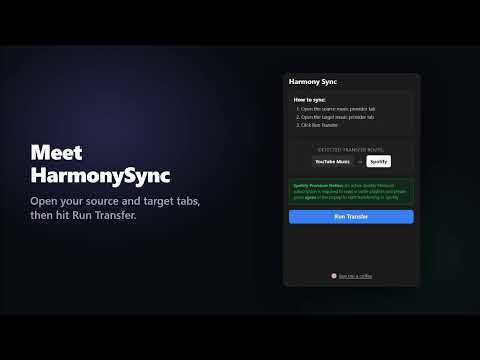
Harmony Sync: The Ultimate Playlist Converter & Music Transfer Extension Harmony Sync is a lightweight, fully automated Chrome extension that lets you instantly convert, migrate, and transfer your favorite playlists between major streaming platforms like Spotify, YouTube Music, Apple Music, Tidal, and Deezer. Stop wasting time manually searching for songs or paying expensive monthly subscriptions for third-party syncing services. Whether you are switching music streaming providers or just sharing playlists with friends, Harmony Sync runs directly in your browser. It leverages a smart matching engine to find, match, and save your tracks across platforms in real-time. Key Features Universal Playlist Migration: Seamlessly export and import playlists from Spotify, Apple Music, YouTube Music, Tidal, and Deezer. Easily move your entire music library to your active Spotify, Apple Music, or YouTube Music accounts. Smart Metadata Matching Engine: Automatically sanitizes track titles and cross-references artists to ensure the highest possible match accuracy when converting songs between platforms. Real-Time Transfer Tracking: Watch your bulk music transfer progress live with a built-in stopwatch, exact song processing counts, and an accurate ETA. Auto-Playlist Creation: Automatically generates a newly sequenced, organized playlist in your destination streaming account—no manual setup needed. 100% Free & Frictionless Setup: No third-party accounts, premium paywalls, or external dashboard logins required. Install the extension and start syncing your music immediately. How to Move Your Music in 4 Simple Steps Open a tab with the source playlist you want to export. Open a second tab for your destination music streaming platform. Click the Harmony Sync extension icon. Verify the auto-detected route (e.g., Tidal ➔ YouTube Music) and click Run Transfer. Privacy & Security First Harmony Sync operates entirely locally within your browser. Your authentication tokens, private playlists, and library data are never routed through, stored on, or analyzed by external developer servers. The extension communicates directly and exclusively with the official APIs of your selected music platforms for completely secure playlist synchronization.
5 out of 53 ratings
Details
- Version1.3.1
- UpdatedOctober 3, 2026
- Size773KiB
- LanguagesEnglish
- Developer
Email
arvinth.balasubramanian@gmail.com - Non-traderThis developer has not identified itself as a trader. For consumers in the European Union, please note that consumer rights do not apply to contracts between you and this developer.
Privacy

HarmonySync has disclosed the following information regarding the collection and usage of your data. More detailed information can be found in the developer's privacy policy.
HarmonySync handles the following:
This developer declares that your data is
- Not being sold to third parties, outside of the approved use cases
- Not being used or transferred for purposes that are unrelated to the item's core functionality
- Not being used or transferred to determine creditworthiness or for lending purposes
Support
For help with questions, suggestions, or problems, visit the developer's support site