

Send to Google Tasks

Overview
Send the page or link you are on to Google Tasks with one click, optionally with a due date.
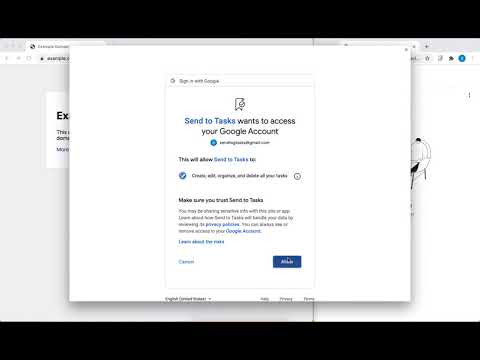
Send to Google Tasks is a Chrome extension that does one simple thing: it sends the page or link you're on to Google Tasks. How to use it: - Click the toolbar button, or right-click a page and choose "Send to Google Tasks". The task gets the page title, and the address goes in its notes. Text you had selected goes into the notes too. - Right-click a link and choose "Send link to Google Tasks" to save the link instead. - Right-click and choose "Send with a due date" for today, tomorrow or in a week. - The first time, Google asks you to sign in and allow access to Google Tasks. After that it doesn't ask again while the browser is open. - A notification tells you whether each send worked. Click it to open the list. Options: the task list to use, a default due date, a black, white or blue toolbar icon, and Sign out to switch Google accounts. Privacy: the extension talks only to Google, and only when you send something. It keeps nothing about the pages you send, and there's no server of mine involved. Details: https://send-to-google-tasks.github.io/privacy Change log: - v1.8 @ 2026-10-25: rewritten. Sign-in asks once per browser session instead of up to three times per send, and every send ends with a notification saying whether it worked. The due date can be today. New "Send with a due date" menu, selected text in the notes, a blue icon, and Sign out in the options. - v1.7 @ 2023-12-02: allow setting default due date via option menu. - v1.6 @ 2023-05-19: white outline icon is now available via option menu. - v1.5 @ 2023-03-10: provide visual hint in badge when saving task. - v1.4 @ 2022-11-26: support browsers other than Google Chrome, like Microsoft Edge. - v1.3 @ 2022-11-24: use manifest v3. Attribution for the icons and graphics: - Icons are made by Pixel perfect (https://www.flaticon.com/authors/pixel-perfect) from Flaticon (https://www.flaticon.com).
4.1 out of 528 ratings
Details
- Version1.8
- UpdatedOctober 27, 2026
- Size129KiB
- LanguagesEnglish (United States)
- DeveloperWebsite
Email
yukinying+webstore@gmail.com - Non-traderThis developer has not identified itself as a trader. For consumers in the European Union, please note that consumer rights do not apply to contracts between you and this developer.
Privacy

Send to Google Tasks has disclosed the following information regarding the collection and usage of your data. More detailed information can be found in the developer's privacy policy.
Send to Google Tasks handles the following:
This developer declares that your data is
- Not being sold to third parties, outside of the approved use cases
- Not being used or transferred for purposes that are unrelated to the item's core functionality
- Not being used or transferred to determine creditworthiness or for lending purposes
Support
For help with questions, suggestions, or problems, please open this page on your desktop browser