

jobwatch: Application Filler

Overview
Fills job application forms from your details and your earlier answers. You review every field and press Submit yourself.
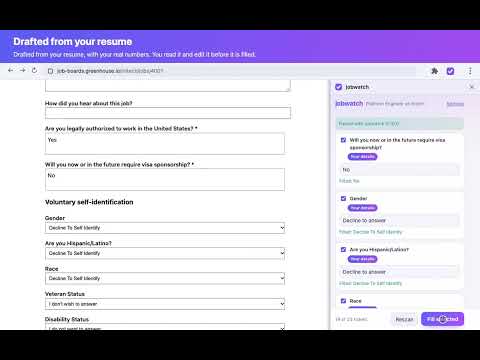
Fill job applications from your own details and earlier answers, and review every field before it reaches the form. You press Submit yourself. jobwatch for Chrome is the browser half of jobwatch, a free, open-source job search tracker that runs on your own computer. Open an application, click the jobwatch icon, and Chrome's side panel shows what it can fill, each field marked with where the value came from, before anything is written. It needs the jobwatch app: install it (https://github.com/vinayvobbili/jobwatch) and run `jobwatch` on the same computer. Without it the extension does nothing. How it works • Click the jobwatch icon on an application page, then Fill this application. • Each field is a row with a badge: Your details (name, email, phone, links, work authorization), Past answer (an answer you gave on an earlier application, with the question and company it came from), Draft (written by jobwatch for a question nothing matched, never filled until you tick it) or Resume (the file jobwatch keeps for that job). • Edit any value, tick the rows you want, press Fill selected. • Read the form and submit it yourself. The extension never clicks Submit, Next or any button that sends the form. • When you press the form's own Submit, jobwatch keeps the answers as they stood (your edits included) in that job's application package, and the panel says so. That alone never marks the job applied: only a confirmation page does. Your answers are kept for the next form and for interview prep. • On a LinkedIn job, press Open the company's posting and the extension presses LinkedIn's Apply button for you, so the company's own page opens. jobwatch reads the posting there. On a company page it can't read, press Save this posting to jobwatch. • On a LinkedIn, Indeed or Ladders list of jobs, press Read the jobs on this list to send the list's job cards to your jobwatch. While you browse LinkedIn and Indeed, the job cards you see are also noted on your computer (not on Ladders), and nothing leaves it until you press Import. A checkbox in the side panel turns this off. • When your jobwatch holds a LinkedIn or Indeed job with no posting text, its Read posting button opens that job in a tab behind the one you are on. The extension reads the job's description there, gives it to your jobwatch and closes the tab. It reads only a page your own jobwatch opened. • On a LinkedIn conversation with a recruiter, press Draft reply to this conversation. The extension reads that one open conversation and gives it to your jobwatch, which writes a draft with the model on your computer. The panel shows the draft, warnings and what to check, and says where it was written. Put in the message box types it into LinkedIn's box. The extension never presses Send: you read it and send it yourself. • On a job's page, press ATS check to see which of the posting's keywords the resume jobwatch keeps for that job doesn't show (checked by jobwatch on your computer, with no model, and nothing is changed). Press Cover letter to have jobwatch draft one with the model on your computer and keep it with the job. The panel shows the letter to edit and copy. Fill the cover letter box puts it in the form's own cover letter box only if that box is empty (Replace is a second, separate press) and never presses Submit. Works with • Greenhouse, Lever and Ashby application forms, including a Greenhouse form embedded in a company's own page. • Other single-page application forms, on a best-effort basis. • LinkedIn, Indeed and Ladders lists of jobs. • Fields another tool (Chrome autofill, a password manager) already filled are left alone. Privacy • On application forms it reads only the tab where you click the icon, and only when you press Fill this application. • Page content and your answers go only to the jobwatch on your own computer (127.0.0.1). The authors run no server and receive nothing. • A draft is written by the model you chose in jobwatch's settings: one on your own computer, or a cloud API you set up with your own key. • On LinkedIn, Indeed and Ladders it reads only the job cards of a list (job number, title, company, place, pay, how long ago it was posted, and on Ladders the job's page address), and on a LinkedIn job page only the address. It reads Ladders only on the tab where you click the icon. It presses LinkedIn's Apply button only when you ask, and never Easy Apply or Submit. • Only when you press Draft reply, it reads the one LinkedIn conversation that is open (the messages already on screen, no scrolling, no other conversation) and gives it to your jobwatch. It never presses Send. If you set jobwatch to use a cloud model for replies, jobwatch (not the extension) sends the conversation to it, and the panel says so. • When you press Fill this application, ATS check or Cover letter, the extension sends your jobwatch the page's address and the company and job title the page shows, so it can tell which job you mean. It reads nothing else for them; the page's fields are looked at for a cover letter box only to offer to fill it, and nothing from them is kept or sent. • No analytics, tracking or advertising. Support: https://github.com/vinayvobbili/jobwatch/issues
0 out of 5No ratings
Details
- Version0.13.0
- UpdatedNovember 26, 2026
- Offered byvinayvobbilichetty11
- Size83.19KiB
- LanguagesEnglish
- Developer
Email
vinayvobbilichetty11@gmail.com - Non-traderThis developer has not identified itself as a trader. For consumers in the European Union, please note that consumer rights do not apply to contracts between you and this developer.
Privacy

jobwatch: Application Filler has disclosed the following information regarding the collection and usage of your data. More detailed information can be found in the developer's privacy policy.
jobwatch: Application Filler handles the following:
This developer declares that your data is
- Not being sold to third parties, outside of the approved use cases
- Not being used or transferred for purposes that are unrelated to the item's core functionality
- Not being used or transferred to determine creditworthiness or for lending purposes
Support
For help with questions, suggestions, or problems, visit the developer's support site