

X-Zenith – Zen & Command Mode for X

Overview
Distraction-free reading, a decluttered layout, and power tools (command search, notes dock, thread unroller) for X.
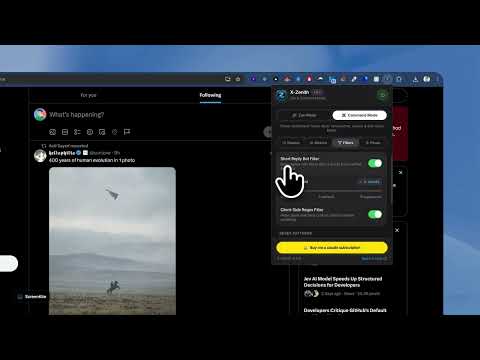
X-Zenith turns x.com into two clean, switchable workspaces: a calm reading mode and a power-user command mode. One shortcut (⌘/Ctrl + Shift + Z) flips between them. ZEN MODE — read without the noise • Centred feed with an adjustable width (600–900 px) — no more narrow column lost in a wide screen • Right column removed: no Premium prompts, no trends, no "Who to follow" • Left nav trimmed to what you actually use (hide Grok, Premium, Creator Studio, Articles, More), or collapse it to a compact 68 px icon dock • Vanity metrics (likes, reposts, views) hidden until you hover — judge posts on their content, not their numbers • Chronological "Following" tab selected automatically • True-black background for OLED screens and a custom accent colour COMMAND MODE — power tools where the trends used to be • Notes dock: jot ideas and draft posts while you read; autosaves, with word count, copy and clear • Pinned list / quick search launcher • Command search (⌘/Ctrl + \): one box for everything — search posts and switch filters with Tab (Latest, Top, People, Media, Lists), type @handle to jump to a profile or see their posts, #tag for hashtags, paste a link to open it, add operators like from:, since:, min_faves:, filter:media with one click, and reuse recent searches. Live account suggestions appear as you type. • Thread unroller: an "Unroll" button on threads opens the whole thread in a clean overlay and copies it as Markdown • Bot defence: dim short replies from verified accounts (set your own word threshold) and hide posts matching your own regex patterns • Keyboard: J / K to move between posts, ⌘/Ctrl + Shift + C to copy a clean post link with tracking parameters stripped BUILT TO STAY OUT OF YOUR WAY • Every layout change respects X's own responsive breakpoints — no horizontal scrolling, no broken sticky headers, no clipped images or dialogs • Everything is a toggle. Turn any feature off, or hit the power button to return to stock X instantly • Settings sync across your signed-in Chrome browsers; notes stay on the device PRIVATE BY DESIGN • No account, no analytics, no tracking, no remote code • Nothing leaves your browser. The optional account-suggestion feature asks x.com itself for matches using the session you're already signed in with — the same request X's own search box makes — and you can switch it off Works on x.com and twitter.com. Requires Chrome 105 or newer.
0 out of 5No ratings
Details
- Version1.0.0
- UpdatedSeptember 22, 2026
- Offered byrupamshil
- Size168KiB
- LanguagesEnglish
- Developer
Email
rupamshil111@gmail.com - Non-traderThis developer has not identified itself as a trader. For consumers in the European Union, please note that consumer rights do not apply to contracts between you and this developer.
Privacy

This developer declares that your data is
- Not being sold to third parties, outside of the approved use cases
- Not being used or transferred for purposes that are unrelated to the item's core functionality
- Not being used or transferred to determine creditworthiness or for lending purposes
Support
For help with questions, suggestions, or problems, please open this page on your desktop browser