


總覽
匯出 X (Twitter) 搜尋結果為 CSV、Excel 或 JSON | 抓取貼文、用戶、媒體和列表
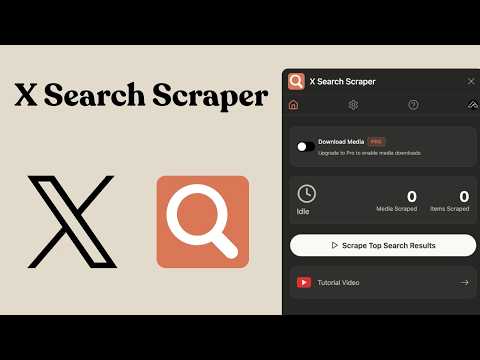
🚀 X Search Scraper – Export X (Twitter) Search Results to CSV, Excel, JSON X Search Scraper is a powerful X (Twitter) scraper and data export extension that helps you collect and export search results directly from X. With just one click, you can scrape tweets, users, media, and lists from X search pages and export the data into structured formats like CSV, Excel (XLSX), or JSON for analysis. Whether you’re doing social media research, marketing analysis, lead generation, trend monitoring, or data collection, X Search Scraper makes Twitter data extraction fast, simple, and reliable. Perfect for marketers, researchers, analysts, journalists, founders, and growth hackers who need an easy way to export Twitter data and scrape X search results without coding or APIs. 1️⃣ Export X (Twitter) Search Results Instantly 🔎 Scrape and download data directly from X search result pages including: • Top posts • Latest tweets • People (user profiles) • Media (images & videos) • Lists Collect structured Twitter search data including tweets, usernames, timestamps, engagement metrics, and more. Great for Twitter lead generation, influencer discovery, competitor analysis, and social listening. 2️⃣ Multiple Export Formats for Data Analysis 📊 Export scraped Twitter data into formats that work with your favorite tools: • CSV export for spreadsheets • Excel (XLSX) export for advanced analysis • JSON export for developers and automation Analyze your Twitter data in: • Microsoft Excel • Google Sheets • Airtable • Python / R • Data analytics tools Perfect for Twitter analytics, social media data mining, and marketing reports. 3️⃣ Export Twitter Images & Videos Automatically 🖼️🎥 Need to download media from tweets? X Search Scraper can extract and organize media files from tweets, including: • Tweet images • Tweet videos • Media posts from search results Media files are automatically organized into separate folders for each tweet, making them easy to manage and analyze. Perfect for: • Content research • Media archiving • Social media monitoring 4️⃣ Fast Twitter Data Scraping ⚡ Collect large volumes of X search results quickly and efficiently. No need for: • APIs • Developer accounts • Coding knowledge Simply run a search on X and start scraping instantly. Ideal for: • Twitter market research • Lead generation • Academic research • Social media intelligence 5️⃣ Privacy-First Twitter Scraper 🔒 Your privacy is our priority. All scraping happens locally inside your browser. ✔ No data sent to external servers ✔ No tracking of your searches ✔ No storage of your exported data Your Twitter data remains completely private and secure on your device. 6️⃣ One-Click Integration with X (Twitter) 🖱️ X Search Scraper integrates seamlessly with the X search interface. Just: • Run a search on X • Click the export button • Download your results No complicated setup required. The workflow is designed to be simple, fast, and beginner-friendly. 📥 How to Export X (Twitter) Search Results Follow these simple steps to start scraping Twitter search results: 1️⃣ Open X (Twitter) Go to the X website and perform a search. 2️⃣ Choose a Search Tab Select the data you want to export: • Top • Latest • People • Media • Lists 3️⃣ Click the Export Button The X Search Scraper download button appears next to the tab. 4️⃣ Choose Export Format Select your preferred format: • CSV • Excel (XLSX) • JSON 5️⃣ Download Your Data Your Twitter search results will be exported instantly. 💡 Use Cases for X Search Scraper X Search Scraper is widely used for: 📈 Social media marketing 📊 Twitter analytics 🔎 Lead generation from Twitter 🧠 Market research 📚 Academic research 📰 Journalism and trend monitoring 🤖 Data collection for AI training 🏢 Competitor analysis 🔐 Data Privacy Your data always stays on your own device. X Search Scraper does not store, transmit, or process your scraped Twitter data on external servers. All exports are generated locally in your browser for maximum security and privacy. 💎 In-App Purchases X Search Scraper follows a freemium model. Free users can test the extension with limited exports. With a premium subscription, you can: ✔ Export up to 5,000 items per export ✔ Access advanced export features ✔ Receive priority customer support Pricing details are clearly displayed inside the extension for full transparency. ⚠️ Disclaimer X Search Scraper is a third-party browser extension independently developed by an unaffiliated developer. This extension is not an official product of X Corp and is not affiliated with or endorsed by X (formerly Twitter).
詳細資料
隱私權

「X Search Scraper – 匯出 Twitter 搜尋結果」已揭露下列關於收集及使用資料的資訊。 如需更多詳細資訊,請參閱開發人員的《privacy policy》。
X Search Scraper – 匯出 Twitter 搜尋結果 會處理下列資料:
這位開發者就你的資料做出下列聲明:
- 除經核准的用途外,不會將你的資料販售給第三方
- 不會基於與商品核心功能無關的目的,使用或轉移資料
- 不會為了確認信用度或基於貸款目的,使用或轉移資料
支援
如有疑問或建議,請前往開發人員的支援網站


