

X Search Exporter – Scrape & Export Twitter Search Results

Overview
X Search Exporter – Export X (Twitter) Search Results to CSV, Excel or JSON | Scrape Posts, Users, Media & Lists
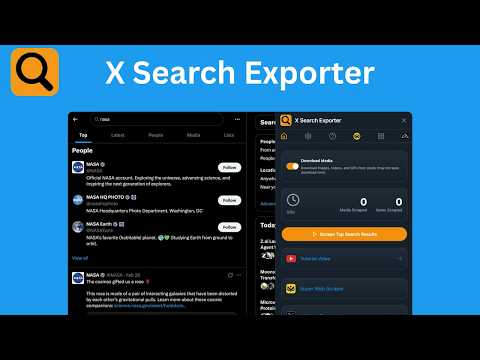
🚀 X Search Exporter – Export X (Twitter) Search Results to CSV, Excel, JSON X Search Exporter is a powerful browser extension that lets you quickly collect and download search results directly from X (Twitter). With one click, you can export tweets, user profiles, media posts, and lists into structured formats like CSV, Excel (XLSX), or JSON for analysis and reporting. It’s designed for anyone who needs to work with X data, including social media analysis, research, and content tracking. 1️⃣ Export X (Twitter) Search Results 🔎 Export data from X search pages, including: • Top posts • Latest tweets • People (user profiles) • Media (images & videos) • Lists Collected data includes: • Tweet text • Usernames and profile links • Post timestamps • Engagement metrics (likes, reposts, replies) • Media links 2️⃣ Export to CSV, Excel, or JSON 📊 Download your data in formats compatible with popular tools: • CSV for spreadsheets • Excel (XLSX) for deeper analysis • JSON for developers and automation Works seamlessly with: • Microsoft Excel • Google Sheets • Airtable • Data analysis tools 3️⃣ Download Images & Videos 🖼️🎥 Extract media from tweets, including: • Images • Videos • Media posts from search results Files are automatically organized for easy access. 4️⃣ Fast and Simple Export ⚡ No APIs or coding required. Just open X, run a search, and export results instantly. 📥 How It Works 1️⃣ Open X (Twitter) and run a search 2️⃣ Select a tab (Top, Latest, People, Media, or Lists) 3️⃣ Click the export button 4️⃣ Choose CSV, Excel, or JSON 5️⃣ Download your data 💡 Common Uses • Social media analysis • Market and trend research • Content tracking • Competitor monitoring 🔐 Privacy First All data is processed locally in your browser. ✔ No external data transfer ✔ No tracking ✔ Full control over your data ⚠️ Disclaimer This extension is an independent third-party tool and is not affiliated with or endorsed by X Corp.
5 out of 51 rating
Details
- Version1.1.0
- UpdatedSeptember 8, 2026
- Size241KiB
- Languages8 languages
- DeveloperWebsite
Email
superwebscraper.com@gmail.com - Non-traderThis developer has not identified itself as a trader. For consumers in the European Union, please note that consumer rights do not apply to contracts between you and this developer.
Privacy

X Search Exporter – Scrape & Export Twitter Search Results has disclosed the following information regarding the collection and usage of your data. More detailed information can be found in the developer's privacy policy.
X Search Exporter – Scrape & Export Twitter Search Results handles the following:
This developer declares that your data is
- Not being sold to third parties, outside of the approved use cases
- Not being used or transferred for purposes that are unrelated to the item's core functionality
- Not being used or transferred to determine creditworthiness or for lending purposes
Support
For help with questions, suggestions, or problems, visit the developer's support site