


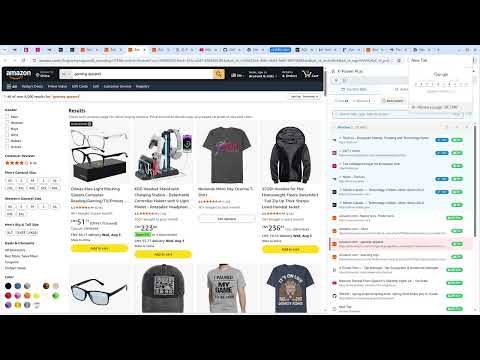
Overview
Tab manager, tab suspender, session manager, content search; bookmark dead-link & duplicate checks; Drive backup; 90d+ history.
X-Power Plus is one side panel that replaces a drawer full of single-purpose extensions: tab management, tab freezing, bookmark search, dead-link detection, a history archive that outlives Chrome's 90-day limit, and Google Drive backup — all in one place. TABS See every open window and tab in a single panel. Close by window, by domain, or duplicates only. Group tabs into "Spaces" and reopen a whole work, study, or gaming setup with one click. Freeze inactive tabs to free up memory, with a whitelist so the sites you actually care about never get frozen. Full-text search reaches inside your open tabs, not just their titles. Session snapshots let you restore everything exactly as it was after a crash or an accidental window close. BOOKMARKS Browse your bookmarks as a tree, a flat list, or a privacy-friendly view — with tags, auto-tagging rules, locking, and batch operations. Run a batch dead-link check across your whole collection (with smart handling for sites that hide behind bot-detection pages, so those aren't misreported as dead). Find and merge duplicates. Anything you delete lands in a recycle bin first, so mistakes are recoverable. HISTORY Chrome quietly deletes your browsing history after about 90 days. X-Power Plus keeps a local archive going back as far as you've had it installed, so nothing gets lost. Keyword search works for everyone. Pro unlocks a small query syntax (regex:, date:, count:, top:, is:, sg:, content:) that searches across bookmarks, tabs, history, and snapshots at once — type :help in any search box for the full reference. BACKUP Back up bookmarks, tags, settings, and your history archive to your own Google Drive — a hidden app folder that only X-Power Plus can read, not your regular Drive files. Do it manually or on a schedule. Restoring is free on every plan, forever; we don't hold your own data hostage behind a paywall. PRICING Every install gets full Pro features free for 30 days — no account, no card required. After that, core tab and bookmark features stay free indefinitely. Pro is $29/year or $59 once, covering up to 5 devices per license. Available in English, Simplified Chinese, Traditional Chinese, Japanese, and Korean.
5 out of 53 ratings
Details
- Version1.0.0
- UpdatedAugust 10, 2026
- Size1.25MiB
- Languages5 languages
- DeveloperLiao shijunWebsite
Hubian Community, Hubian Town 赣州市, 江西省 341000 CNEmail
xpowerbit@gmail.comPhone
+86 130 6289 6608 - TraderThis developer has identified itself as a trader per the definition from the European Union and committed to only offer products or services that comply with EU laws.
Privacy

X-Power Plus has disclosed the following information regarding the collection and usage of your data. More detailed information can be found in the developer's privacy policy.
X-Power Plus handles the following:
This developer declares that your data is
- Not being sold to third parties, outside of the approved use cases
- Not being used or transferred for purposes that are unrelated to the item's core functionality
- Not being used or transferred to determine creditworthiness or for lending purposes
Support
For help with questions, suggestions, or problems, visit the developer's support site