

X 推文导出与媒体下载器

概述
将 X/Twitter 推文导出为 CSV、XLSX 和 JSON 格式。一键批量下载视频、图片和 GIF 动图。
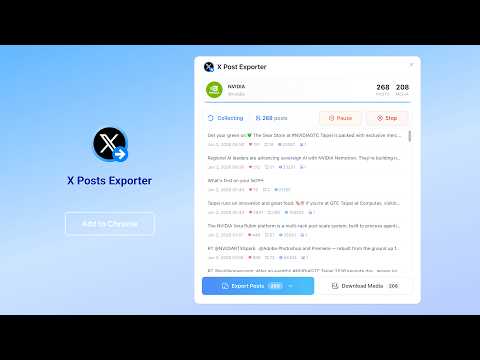
X Post Exporter is the easiest way to collect and export tweets from any X (Twitter) user profile. Open a profile, click the extension button, and the extension automatically collects posts page by page — no API key, no coding, no manual copy-pasting required. Whether you're doing content research, competitive analysis, sentiment analysis, brand monitoring, or archiving public posts for journalism, X Post Exporter turns raw tweet data into clean, structured files you can use directly in Excel, Google Sheets, Python, R, Airtable, and more. ✨ KEY FEATURES ✅ One-click post collection from any public X/Twitter profile ✅ Export to CSV, XLSX (Excel), and JSON formats ✅ Batch download all images and videos from collected posts ✅ Export up to 50,000 posts per profile ✅ Rich tweet data: full text, engagement metrics, media URLs, hashtags, mentions, and more ✅ Pause and resume collection at any time — no progress lost ✅ No X/Twitter API key required — works with your existing browser session ✅ 100% local processing — your data never leaves your browser 🎯 PERFECT FOR - Digital marketers analyzing competitor content strategy and engagement metrics - Researchers and academics building tweet datasets for NLP or sentiment analysis - Journalists archiving public figures' posts for reporting and fact-checking - Brand managers tracking influencer performance and brand mentions - Developers pulling structured tweet data (CSV/JSON) into pipelines or dashboards - Data analysts feeding clean tweet data into BI and visualization tools 📋 HOW TO USE 1. Open X (Twitter) and navigate to any public user profile (e.g. https://x.com/elonmusk) 2. Click the X Post Exporter icon in your browser toolbar 3. Click "Go to Export Posts" — the exporter panel opens on the profile page 4. Click "Start Collection" — the extension collects posts automatically, page by page 5. When done (or at any point), choose your format (CSV / XLSX / JSON) and download 6. Click "Download Media" to batch-save all images and videos from collected posts 💡 Tip: You can pause and resume collection at any time. Progress is saved automatically in the session. 📊 EXPORTED DATA FIELDS Each exported row includes: - Tweet ID, full text, tweet URL, created date/time, language - Reply count, retweet count, like count, quote count, bookmark count, view count - Media URLs, media types (photo / video / GIF), media count - Hashtags, @mentions, expanded URLs - Retweet/quote source: original author name, bio, follower count, verified status, and more 💎 FREE VS PRO FREE Features: ✓ Export up to 50 posts per profile ✓ Export format: CSV ✓ Pause / Resume collection PRO Features: ✓ Export up to 50,000 posts per profile ✓ Export formats: CSV / XLSX (Excel) / JSON ✓ Batch download all images and videos from posts ✓ Full data fields including all engagement metrics and source tweet details ✓ Priority support 🔒 PRIVACY NOTICE Your privacy is our priority. X Post Exporter does not collect, store, or transmit your personal data or browsing history. All tweet collection and file export processing happens locally in your browser. The extension only accesses public profile pages you can already view while logged into X. We use Paddle for secure payment processing and never store your payment information. ⚠️ DISCLAIMER This extension is an independent project and is not affiliated with, endorsed by, or associated with X Corp. or its affiliates. X is a registered trademark of X Corp. This tool is intended for legitimate research, analysis, and personal data management purposes only. Users must comply with X's Terms of Service and applicable laws in their jurisdiction. The responsibility for how exported data is used lies solely with the user. This software is provided "as is" without warranty of any kind. 💬 SUPPORT Have a question, found a bug, or want to request a feature? Contact us from within the extension or email us at hi@echobot.dev.
0 星(5 星制)无评分
详情
- 版本1.0.1
- 上次更新日期2026年6月5日
- 提供方AddonsNext
- 大小657KiB
- 语言54 种语言
- 开发者
邮箱
echobot.dev@gmail.com - 非交易者该开发者尚未将自己标识为交易者。欧盟地区消费者须知:消费者权利可能不适用于您与该开发者达成的合约。
隐私权

该开发者已声明,您的数据:
- 不会因未获批准的用途出售给第三方
- 不会为实现与产品核心功能无关的目的而使用或转移
- 不会为确定信用度或放贷目的而使用或转移