

X Group Tab

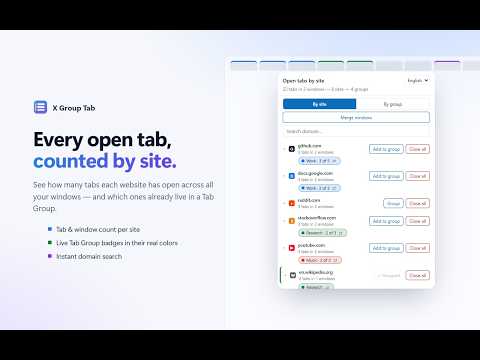
Overview
See open tabs per site, group them into Tab Groups, merge groups & windows, or close a whole site in one click.
Too many tabs? X Group Tab shows you exactly what's open — counted by website — and lets you group, merge or close them in one click. ★ SEE EVERYTHING • Every open tab counted by site, across all your windows • Tab and window count for each website • Live Tab Group badges in their real browser colors, e.g. "Work · 3 of 5" • Instant domain search • Expand any site to see its tabs; click to jump to one ★ GROUP A SITE IN ONE CLICK • "Group" pulls every tab of a site — even from other windows — into a named, colored Tab Group • "Add to group" gathers loose tabs into the group the site already uses • "Merge groups" combines a site's tabs that are scattered across several groups • Move any single tab to another group, into a new group, or out of its group ★ MANAGE YOUR TAB GROUPS • "By group" view: every Tab Group is one row with its color, tab count, sites and window • Merge any two groups • Ungroup while keeping the tabs • Close an entire group at once ★ CLEAN UP FAST • "Close all" closes every tab of a site in all windows • "Merge windows" moves every tab into the current window — pinned tabs stay pinned, empty windows close themselves, private windows are left alone ★ THOUGHTFUL DETAILS • Automatic light and dark theme • English and Persian (right-to-left) interface • Updates live as your tabs change ★ PRIVATE BY DESIGN No accounts, no analytics, no network requests. Your tab data never leaves your browser.
0 out of 5No ratings
Details
- Version2.0.0
- UpdatedOctober 1, 2026
- Offered byEhsan Shahmohammadi
- Size138KiB
- LanguagesEnglish
- Developer
Email
ehsun.ca@gmail.com - Non-traderThis developer has not identified itself as a trader. For consumers in the European Union, please note that consumer rights do not apply to contracts between you and this developer.
Privacy

This developer declares that your data is
- Not being sold to third parties, outside of the approved use cases
- Not being used or transferred for purposes that are unrelated to the item's core functionality
- Not being used or transferred to determine creditworthiness or for lending purposes
Support
For help with questions, suggestions, or problems, visit the developer's support site