

Writing Translator

Overview
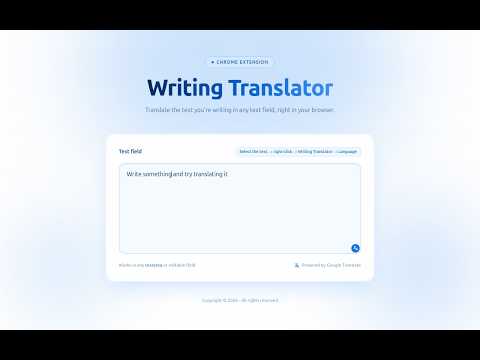
Translate the text you're writing in any text field, or any selected text on a page, right in your browser, using Google Translate.
**Writing Translator** helps you write in a language you're not fluent in. Type in your native language inside any text field on any website, then translate it in place — no copy-pasting into a separate tab required. You can also translate any text you select on a page: the translation replaces the original right where it is. # Three ways to translate ## Right-click menu Type your text in any input, textarea, or editable field. Right-click, choose "Translate text," pick a language from the list, and the text is translated in place — instantly. Works on the whole field or just a selected portion of it. ## Page selection Select any text on a page — an article, a comment, a product description — right-click, and pick a language. The selected text is replaced by its translation directly in the page, keeping the original layout and styling. Great for quickly reading foreign-language content without leaving the page. ## Instant Translator icon A small icon appears right inside the text field you're focused on. Set your input and output languages once (e.g. Portuguese → English) in the settings page, and from then on a single click translates the entire field between those two languages — perfect for chats, emails, forms, and social posts. # Built to stay out of your way - The icon lives inside the field itself, not a fixed corner of the page — no visual clutter, no floating buttons that follow you around. - Feedback happens on the icon itself (a spinner while translating, a checkmark on success, an alert on error) — no popups or banners interrupting your page. - Choose exactly which languages show up in your right-click menu from the settings page, so it only lists the ones you actually use. # Works everywhere Compatible with regular inputs, textareas, rich-text (contenteditable) fields, and regular page content — so it works across webmail, chat apps, social media, forms, CMS editors, articles, and more. # Privacy Writing Translator does not collect, store, or transmit any personal data. Text you choose to translate is sent only to Google Translate's public translation endpoint for the sole purpose of returning a translation, and your language/menu preferences are stored locally in your browser (via Chrome's sync storage) — never on any third-party server we control. # Changelog ## [1.3.0] — 2026-07-07 ### Added - **Page selection translation**: select any text on a page (not just in text fields), right-click, and pick a language — the selection is replaced by its translation directly in the page's HTML. A progress cursor is shown while the translation loads. - **Instant Translator toggle**: clicking the in-field icon now alternates between the two configured languages. The text's language is auto-detected; if it's already in the output language, it is translated back to the input language ("untranslate"). The icon tooltip shows `⇄` when toggling is available. ### Changed - Translations of page selections preserve the HTML structure: each text node is translated individually and written back in place, so paragraphs, list items, links, and inline formatting survive the translation. - The floating button only appears on fields where translation makes sense (textarea, contenteditable, and `text`/`search` inputs). Structured inputs (`email`, `url`, `tel`, `number`) no longer show it, but keep the right-click menu. - Default context-menu languages on a fresh install are now Portuguese, English, and Spanish. ### Fixed - The floating button now follows the field when its size or position changes (auto-growing textareas, corner-handle resizing, layout shifts), via `ResizeObserver`. - Translating a fully-selected paragraph no longer inserts the translation outside the original element. - Source-formatting line breaks inside selected page text no longer produce artificial `<br>` breaks in the translation. ## [1.1.1] — 2026-07-06 ### Added - Local test playground page (`test.html`). ### Changed - README updated with screenshot and brand color palette. - Manifest JSON reformatted. ## [1.0.0] — 2026-07-06 ### Added - Initial release of Writing Translator. - **Context menu**: right-click any input, textarea, or contenteditable field and translate the whole field — or just the selected portion — into a language chosen from the submenu. - **Instant Translator**: floating icon inside the focused text field that translates its content between a configured input/output language pair with one click, with spinner/success/error feedback on the icon itself. - **Settings page**: choose the context-menu languages, toggle the floating icon, and set the Instant Translator language pair. - Translation via Google Translate's public endpoint, with URLs and line breaks shielded so links and text structure survive the round trip. - Rich-text editor support (Slate, Draft.js, Lexical, ProseMirror) through simulated clipboard paste.
0 out of 5No ratings
Details
- Version1.3.0
- UpdatedJuly 10, 2026
- Offered byFabiano Couto
- Size142KiB
- LanguagesEnglish
- Developer
Email
facodeli@gmail.com - Non-traderThis developer has not identified itself as a trader. For consumers in the European Union, please note that consumer rights do not apply to contracts between you and this developer.
Privacy

This developer declares that your data is
- Not being sold to third parties, outside of the approved use cases
- Not being used or transferred for purposes that are unrelated to the item's core functionality
- Not being used or transferred to determine creditworthiness or for lending purposes
Support
For help with questions, suggestions, or problems, please open this page on your desktop browser