

WriteOnce: Text Expander, Snippets & Templates
1 rating
)
Overview
Text expander with fill-in forms for email templates, canned responses, quick replies and snippets in Gmail, Outlook and more.
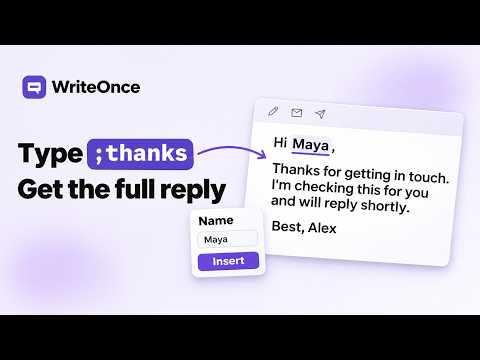
Stop retyping the same replies. Type a shortcut like ;thanks, fill in the name and details in a small form, and WriteOnce writes the whole message for you, ready to send. WriteOnce is a text expander for email templates, canned responses, quick replies and snippets. Write a message once, give it a shortcut, and reuse it everywhere you write, personalised every time. WHY PEOPLE PICK IT • Fill-in fields, not copy and paste: names, dates, dropdowns and optional paragraphs, with a preview before you insert • Private by design: no account needed and your library stays on your device; Pro's sync is end-to-end encrypted • One library on Chrome and Firefox • Keyboard first: type it, or open the palette (Ctrl+Shift+Space) to search and insert WHO IT'S FOR • Customer support: answer the same questions in seconds, personalised every time • Sales and recruiting: follow-ups with the name, the role, the time slot and the next step • AI chats: your best prompts, a few keystrokes away • Anyone who retypes the same message: text replacement and autotext for the phrases you type most HOW IT WORKS 1. Write a message and give it a shortcut, like ;thanks or ;followup 2. Type it where you write 3. Fill the blanks, check the preview, insert WORKS IN Webmail, social and chat apps, team chat, AI chats, CRMs and helpdesks. Ordinary text boxes and the common rich-text editors are covered by automated tests. Sites confirmed by hand on Chrome and Firefox: https://writeonce.andreiprojects.com/help/#sites FIELDS AND FORMATTING • Text fields, paragraphs, dropdowns, dates and on/off toggles • Sections that show only when a toggle is on or a dropdown has a given value • Bold, italic, links and lists, kept where the site supports them • A cursor marker, so your caret lands where you keep typing SWITCHING FROM ANOTHER TEXT EXPANDER Import from Text Blaze or TextExpander, or from CSV or JSON, and export at any time. No file yet? Download sample includes a prompt that helps an AI chat write your first messages. Daily snapshots let you restore an earlier library. WHY IT ASKS FOR ALL SITES WriteOnce runs where you type. It only watches for your own shortcuts, never stores or sends what you write on a page, and you can turn off any site in Settings. FREE AND PRO Free: 20 templates and 5 form inserts a day; messages without fields insert without limit. Pro, $3.49 a month or $30 a year (USD, applicable taxes added at checkout): unlimited templates and forms, sync between Chrome and Firefox, up to 10 versions of each message from the last 30 days, and folders. Sync is end-to-end encrypted with a recovery key only your browsers hold, so we cannot read your library. SEE IT IN ACTION A one-minute demo: https://youtu.be/Ps1DWy3Tztg Install it, make your first message in the short walkthrough that opens, and type less from today.
5 out of 51 rating
Details
- Version0.2.2
- UpdatedNovember 23, 2026
- FeaturesOffers in-app purchases
- Offered byAndreiProjects
- Size298KiB
- LanguagesEnglish
- Developer
Email
andrei.projects@proton.me - Non-traderThis developer has not identified itself as a trader. For consumers in the European Union, please note that consumer rights do not apply to contracts between you and this developer.
Privacy

WriteOnce: Text Expander, Snippets & Templates has disclosed the following information regarding the collection and usage of your data. More detailed information can be found in the developer's privacy policy.
WriteOnce: Text Expander, Snippets & Templates handles the following:
This developer declares that your data is
- Not being sold to third parties, outside of the approved use cases
- Not being used or transferred for purposes that are unrelated to the item's core functionality
- Not being used or transferred to determine creditworthiness or for lending purposes
Support
For help with questions, suggestions, or problems, visit the developer's support site