

WPCommand

Overview
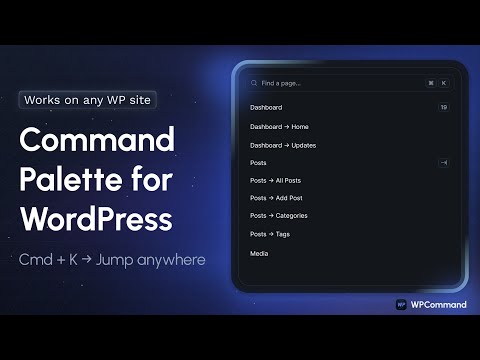
Command palette for WordPress. Press Cmd/Ctrl+K to jump anywhere and manage sites faster.
Press Cmd+K (Mac) or Ctrl+K (Windows) on any WordPress site where you're logged in as an admin, and instantly jump to pages, posts, users, settings, plugins, custom post types, and WooCommerce Products & Orders — all without digging through menus. Why WPCommand ✅ No plugin or code on your website WPCommand runs in your browser, so there’s nothing to install on the WordPress sites you manage. ✅ Works across unlimited WordPress sites Perfect for freelancers, agencies, and anyone managing multiple client websites. ✅ Fast navigation and quick actions Open Front-End or Back-End, launch your page builder, copy URL or ID, and more — right from the palette. ✅ Builder integrations built in Smart markers for Elementor, Bricks, and Divi are detected automatically. ✅ WooCommerce support Quickly access Products and Orders without hunting through the admin menu. ✅ Caching for speed Per-site caching keeps results fast, with options to refresh or clear cache anytime. Plans • 14-day free trial — no credit card required • Individual and Agency plans with multi-device activations • Pro Stats to track commands used, time saved, and money saved Learn more and start your trial: wpcommand.io
0 out of 5No ratings
Details
- Version1.1.2
- UpdatedMarch 19, 2026
- FeaturesOffers in-app purchases
- Offered bywpcommand.io
- Size1.01MiB
- LanguagesEnglish
- DeveloperMaksym Pospolita
pr. Svobody 17 Kyiv, місто Київ 04215 UAEmail
wpcommand.io@gmail.comPhone
+62 812-2524-1408 - TraderThis developer has identified itself as a trader per the definition from the European Union and committed to only offer products or services that comply with EU laws.
Privacy

WPCommand has disclosed the following information regarding the collection and usage of your data. More detailed information can be found in the developer's privacy policy.
WPCommand handles the following:
This developer declares that your data is
- Not being sold to third parties, outside of the approved use cases
- Not being used or transferred for purposes that are unrelated to the item's core functionality
- Not being used or transferred to determine creditworthiness or for lending purposes
Support
For help with questions, suggestions, or problems, visit the developer's support site