Item logo image for WOS Auto Downloader

WOS Auto Downloader

Item video thumbnail

Overview

Downloads Web of Science records automatically in 500-item batches

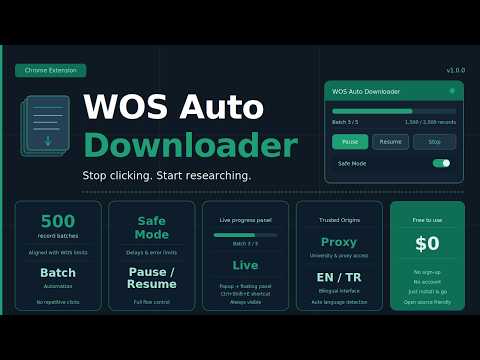
WOS Auto Downloader automates repetitive export clicks on Web of Science into a controlled batch workflow — so you can export thousands of records without sitting in front of your screen. WHAT IT DOES ──────────── Large Web of Science result sets require exporting in 500-record batches. This extension handles the full sequence automatically: it opens the export dialog, submits each batch, waits for the download, and moves to the next — repeating until your entire result set is downloaded. KEY FEATURES ──────────── ▸ Batch Automation Runs exports in 500-record increments aligned with WOS limits. No repetitive manual clicks for large result sets. ▸ Live Controls Start, pause, resume, and stop from the popup or the floating on-page panel. Progress and batch status are always visible. ▸ Keyboard Shortcuts Ctrl+Shift+E — Start / Stop Ctrl+Shift+P — Pause / Resume ▸ Safe Mode Reduces aggressive automation patterns with hourly batch limits, randomized delays, consecutive error thresholds, and cooldown options. ▸ Trusted Origins Works with university proxy and institutional access systems. Approve your active domain instead of relying on hardcoded URLs. ▸ EN / TR Interface The UI follows your system language — English and Turkish supported. WHO IS IT FOR ───────────── Researchers, librarians, and academics who regularly run large Web of Science exports for bibliometric analysis, systematic reviews, or literature mapping.

Details

  • Version
    1.0.0
  • Updated
    April 4, 2026
  • Size
    84.45KiB
  • Languages
    2 languages
  • Developer
    Website
    Email
    kadirkatirci@tedaitesnim.com
  • Non-trader
    This developer has not identified itself as a trader. For consumers in the European Union, please note that consumer rights do not apply to contracts between you and this developer.

Privacy

Manage extensions and learn how they're being used in your organization

WOS Auto Downloader has disclosed the following information regarding the collection and usage of your data. More detailed information can be found in the developer's privacy policy.

WOS Auto Downloader handles the following:

User activity

This developer declares that your data is

  • Not being sold to third parties, outside of the approved use cases
  • Not being used or transferred for purposes that are unrelated to the item's core functionality
  • Not being used or transferred to determine creditworthiness or for lending purposes

Support

Related

Action Replay

4.4

Automate browser interactions by recording and replaying user actions.

USave

4.9

Save webpage content to Notion with AI.

FlowForge Pro - Veo AI Automator

4.8

Automate video generation with Veo AI. Send prompts in batches and download all videos automatically.

AutoNest By CSVNest

4.7

Automate prompt submission and image download workflow

Grok Automation - Auto Grok on Grok.com

3.9

Auto Grok your prompts at scale. Batch generate and auto-download videos and images on grok.com.

Save All Resources

5.0

Automatically captures all resources loaded by any webpage and saves them as a ZIP file

Ideogram Automation Bulk Image Generation and prompt generation

0.0

Automate bulk image generation on Ideogram AI with batch processing , CSV export, and download management for ideogram

Markdown Printer

2.3

Save web pages as Markdown files to your Downloads folder. No setup required!

Naukri Resume Downloader

0.0

Automate downloading of applicant resumes from Naukri.com job postings

Adobe Stock AI Agent

3.8

Automate image tagging and titling within the Adobe Stock contributor portal using AI

Multi Page PDF Downloader: Bulk Download All PDFs from Website Pages

4.2

Bulk download all PDF files from multiple web pages. Scan entire websites to automatically extract and download all available PDFs.

General Download Renamer

4.0

Automatically rename downloaded files based on user-defined patterns

Action Replay

4.4

Automate browser interactions by recording and replaying user actions.

USave

4.9

Save webpage content to Notion with AI.

FlowForge Pro - Veo AI Automator

4.8

Automate video generation with Veo AI. Send prompts in batches and download all videos automatically.

AutoNest By CSVNest

4.7

Automate prompt submission and image download workflow

Grok Automation - Auto Grok on Grok.com

3.9

Auto Grok your prompts at scale. Batch generate and auto-download videos and images on grok.com.

Save All Resources

5.0

Automatically captures all resources loaded by any webpage and saves them as a ZIP file

Ideogram Automation Bulk Image Generation and prompt generation

0.0

Automate bulk image generation on Ideogram AI with batch processing , CSV export, and download management for ideogram

Markdown Printer

2.3

Save web pages as Markdown files to your Downloads folder. No setup required!

Google apps