

World Clocks Pro

Overview
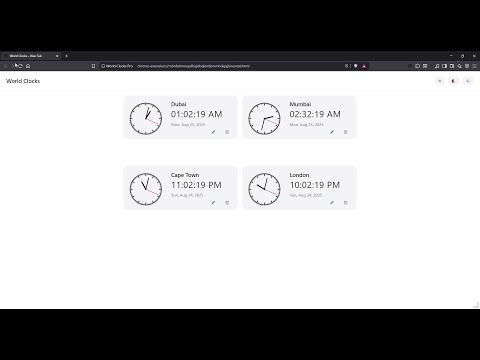
Multi-timezone clocks with digital & analog views, themes, layout options, and customizable icons.
Bring world time to life with a polished, customizable dashboard. Highlights • Digital AND analog clocks for any city/time zone • Drag to move, corner-resize tiles (snap-to-grid) • Full-tab dashboard + compact popup (toolbar) • Light/Dark/System themes, adaptive toolbar icon • Add/rename/reorder cities; layouts persist in Chrome Sync • Backup & Restore: Export your settings to JSON and import on another computer Notes • The extension does not collect, share, or sell personal data. • New Tab is NOT overridden — your default Chrome New Tab remains unchanged. • Optional: Open/reuse a full dashboard tab on browser startup (Settings → Behavior) • Added descriptive names for UTC offsets • Added daylight saving time (DST) support using IANA zones • Synced theme between popup and full-page views • Fixed bugs affecting multiple clocks and sorting * Fixed a packaging issue causing corruption.
0 out of 5No ratings
Details
- Version1.4.4
- UpdatedAugust 25, 2025
- Offered bynjrathod
- Size36.72KiB
- LanguagesEnglish
- DeveloperNILESHKUMAR JASHBHAI RATHOD
4640 Rae Street Unit Suite # 9 Regina, SK S4S 2S6 CAEmail
njrathod@gmail.comPhone
+1 639-997-9925 - TraderThis developer has identified itself as a trader per the definition from the European Union and committed to only offer products or services that comply with EU laws.
Privacy

This developer declares that your data is
- Not being sold to third parties, outside of the approved use cases
- Not being used or transferred for purposes that are unrelated to the item's core functionality
- Not being used or transferred to determine creditworthiness or for lending purposes
Support
For help with questions, suggestions, or problems, visit the developer's support site