


Overview
World clock, time zone converter and meeting planner. See everyone's work hours on one screen and find a time to meet.
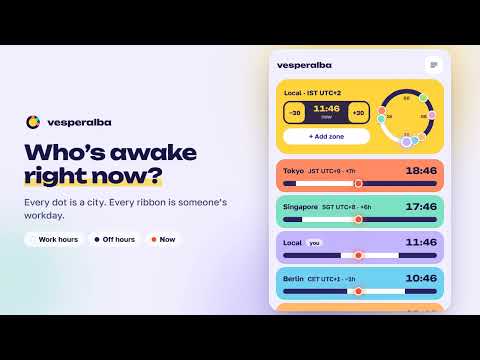
What time is it in Tokyo right now — and is anyone there still at work? Vesperalba is a world clock, time zone converter and meeting planner in one click from your toolbar. Open it and every city you care about is there, sorted east to west: the local time, the time zone abbreviation (EST/EDT, CET, IST), the UTC offset and the time difference from you. Under each city is a ribbon showing their work hours on your own clock, so you can see at a glance who is at work and who has gone home. NEW IN 4.0 A fresh, colourful design with a 24-hour dial. Prefer the old list? Switch back to Classic view in Settings. FIND A MEETING TIME ACROSS TIME ZONES • Type a time like "3pm" or "14:30", or hold −30 / +30 to scroll through the day — every zone converts at once • Move the time until every ribbon is white under the dot: that's when everyone is at work • One click on "back to now" returns to live time WHO'S AWAKE? ONE DIAL SHOWS IT • Every city is a dot on a 24-hour dial, placed at its own local hour • Dots on the bright arc are inside their work hours; hover a dot for its time ADD ANY TIME ZONE • Search by city, IANA name (Europe/Berlin), abbreviation (PST, CET, IST) or a raw UTC offset (+4, -3, +5:30) • Daylight saving time is handled automatically, including half-hour zones like India and Newfoundland • Rename cards after people ("Priya", "Jonas · Design"), not just cities • Two teammates in the same timezone? Give each their own card, or keep one card per zone MADE TO STAY OUT OF YOUR WAY • Set your work hours once; the ribbons and the dial follow • Light, dark or system theme • Removed a card by mistake? Undo • Keyboard-friendly: Enter renames, Delete removes PRIVATE BY DESIGN No account, no sign-up, no tracking, no ads. Everything runs on your device and works offline. The only permission is storage, used to remember your zones. Questions it answers in one click: What time is it in London? PST to EST? UTC to my local time? What's the time difference between New York and India? When is a good time for a call between Berlin and San Francisco?
0 out of 5No ratings
Details
- Version4.0.0
- UpdatedOctober 28, 2026
- Size309KiB
- LanguagesEnglish
- DeveloperDmitrii ShteimanWebsite
Eliezer Yafe Street 17 entrance bet, apt 5 Ra'anana 4345119 ILEmail
info@cranbena.comPhone
+972 53-865-8820 - TraderThis developer has identified itself as a trader per the definition from the European Union and committed to only offer products or services that comply with EU laws.
Privacy

This developer declares that your data is
- Not being sold to third parties, outside of the approved use cases
- Not being used or transferred for purposes that are unrelated to the item's core functionality
- Not being used or transferred to determine creditworthiness or for lending purposes
Support
For help with questions, suggestions, or problems, visit the developer's support site