

Workspace Pro: AI Tabs, Wiki & MCP

Overview
Workspaces, Wiki & AI Assistant. Mobile Companion, Drive sync & MCP agents.
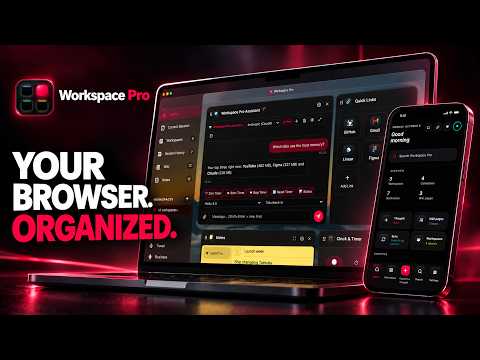
Workspace Pro turns browser tabs, saved research, and notes into organized, reusable workspaces. Save active projects as Workspaces and Collections, restore important sessions, build a searchable personal Wiki, use an optional AI Assistant, and continue on your phone with the Companion app — or connect MCP-capable agents such as Hermes and OpenClaw. 📱 MOBILE COMPANION APP (LIVE) Installable on iOS and Android at https://app.workspace-pro.app. Open Workspaces, Collections, and your Wiki on the go, paste or share links into your library, and use the Assistant on mobile. Synced encrypted through your own Google Drive. Included with Pro. 🔌 MCP SERVER & AGENT BRIDGE (PRO) Connect any MCP-capable AI harness — including Hermes, OpenClaw, Claude Desktop, Cursor, and Codex — to Workspace Pro. • Browser mode: agents can run supported tab, Workspace, Collection, Wiki, widget, and settings actions while Chrome is available (sensitive steps may ask for confirmation). • Drive mode: agents can work with your encrypted Drive sync data without keeping a browser session open. Setup stays on your devices: optional Agent Bridge, pairing flow, and your own tokens — no Workspace Pro cloud that stores your Workspace or Wiki content. 🤖 HERMES & OPENCLAW Hermes and OpenClaw are supported as MCP clients (not built into the extension). Paste the setup prompt or MCP config from Settings → Agent Bridge, reload MCP, and they can call the same Workspace Pro tool surface the in-app Assistant uses. Other MCP clients work the same way. 📂 WORKSPACES & COLLECTIONS Organize tabs by project, client, or topic. Save links with titles and notes, search across your browser work, and reopen a Collection or Workspace when you need it. 🧠 BUILT-IN PERSONAL WIKI Clip a page into a locally stored knowledge base with full-text search, tags, [[wikilinks]], backlinks, version history, import and export, and a visual graph of connected pages. Optional AI-assisted Wiki tools can compile selected notes, check selected pages for potential inconsistencies, or answer questions using the Wiki pages chosen for that request. AI-generated results can be inaccurate and should be reviewed. 💬 AI ASSISTANT Use the Assistant in the dashboard, popup, or Companion to chat and perform supported actions involving tabs, Workspaces, Collections, Wiki pages, widgets, timers, and settings. Available actions differ by surface; sensitive operations may require confirmation. Bring your own API key and choose Anthropic, OpenAI, or OpenRouter. AI features are optional and disabled until you configure and use them. ⚡ TAB AND SESSION TOOLS 🔎 Search open and saved tabs 💾 Save and restore browser sessions 📁 Group tabs by supported category, domain, or AI mode 📌 Move, pin, duplicate, close, and organize tabs 🔍 Search Workspaces, Collections, and — with Pro — Wiki pages 📊 RESOURCE MANAGER See which tabs are actually using your RAM. Workspace Pro tracks memory usage across your open tabs and shows a ranked "Top Memory Tabs" list. 📈 Total RAM usage across all open tabs 🏆 Ranked list of top memory-consuming tabs, with source/site icon 🧹 Jump to a heavy tab and close it to free up memory 🧩 CUSTOMIZABLE DASHBOARD Add and arrange widgets: clock, weather, news, notepad, countdowns, quick links, and the Assistant. Eight themes. English, German, and Spanish. ☁️ GOOGLE DRIVE BACKUP Pro: back up to a private Drive folder with versioned restore points. The same encrypted sync powers the Companion app and optional Drive MCP mode. 🔒 PRIVACY & AI DATA USE Workspace Pro stores data locally by default. No analytics, advertising, or selling of user data. Google Drive backup and the Companion app are optional; decryption keys stay on your devices. AI features are optional and use your API keys. Depending on the action, chat messages, instructions, memory, tab titles, URLs, or Wiki excerpts may be sent to Anthropic, OpenAI, or OpenRouter. MCP Agent Bridge / Drive MCP run under your control with Pro or trial; they do not replace your privacy policy obligations — review tool confirmations before approving sensitive actions. Privacy: https://workspace-pro.app/privacy-policy.html Support: support@workspace-pro.app Website: https://workspace-pro.app
5 out of 53 ratings
Details
- Version1.2.4
- UpdatedOctober 22, 2026
- FeaturesOffers in-app purchases
- Size46.39MiB
- LanguagesEnglish
- DeveloperTim Daniel DebieWebsite
c/o Postflex PFX-374-701 Emsdettener Str. 10 Greven 48268 DEEmail
support@workspace-pro.app - Non-traderThis developer has not identified itself as a trader. For consumers in the European Union, please note that consumer rights do not apply to contracts between you and this developer.
Privacy

This developer declares that your data is
- Not being sold to third parties, outside of the approved use cases
- Not being used or transferred for purposes that are unrelated to the item's core functionality
- Not being used or transferred to determine creditworthiness or for lending purposes
Support
For help with questions, suggestions, or problems, visit the developer's support site