


Overview
Never lose a tab: Workspaces, tasks, Pomodoro & calendar. Wiki, AI Assistant (incl. Ollama), Mobile Companion, Drive sync & MCP.
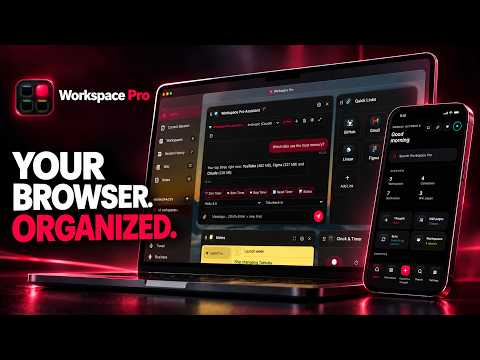
Stop losing tabs, research, and ideas. Workspace Pro saves your browser work as Workspaces you can reopen anytime — and puts tasks, a Pomodoro focus timer, a local calendar, a personal Wiki, and an optional AI Assistant into one dashboard. Free to start, no account needed. Pro is a one-time purchase — no subscription. Your data stays in your browser by default. No analytics, no ads. Use AI with your own key — or fully local with Ollama. WHAT YOU GET 📂 Never lose a project: save tabs as Workspaces and Collections, restore whole sessions in one click ✅ Plan your day: tasks, priorities, a Pomodoro focus timer, and a local calendar right next to your tabs 🧠 Remember what you read: clip pages into a searchable Wiki with backlinks and a graph 💬 Get help when you need it: an AI Assistant that can act on your tabs, Workspaces, Wiki, and tasks ✨ NEW IN 1.3.0 • Redesigned dashboard with a new sidebar, layout mode, and saved layouts • Tasks & Focus: Today, Tomorrow, and This Week views, priorities, time blocks, "Plan my day" and "End my day" • Pomodoro focus timer: 25/5, 50/10, or your own rhythm — focus time is logged on the task • Local calendar with .ics import and export • Brain dump: type what's on your mind, turn it into tasks and events • Ollama support: run the Assistant on your own machine, no API key needed • Paste or drop images into the Assistant • Your own prompt templates, plus a Stop button and live status while the Assistant works • Activity log with filters and undo, and a 30-day trash for deleted items • New widget catalog and a customizable Quick Actions bar 📂 WORKSPACES & COLLECTIONS Organize tabs by project, client, or topic. Save links with titles and notes, search across your browser work, and reopen a Collection or Workspace when you need it. Switch between Workspaces from the sidebar in one click. ⚡ TAB AND SESSION TOOLS 🔎 Search open and saved tabs 💾 Save and restore browser sessions — even after a crash or restart 📁 Group tabs by category or domain, or let AI do it (Pro) 📌 Move, pin, duplicate, close, and organize tabs ✅ TASKS, FOCUS & CALENDAR Capture tasks in seconds, set priorities from !1 (urgent) to !4 (low), and block time for them. "Plan my day" helps you pick what matters today; "End my day" moves unfinished tasks to Tomorrow, so nothing slips. When it's time to work, start a Pomodoro session: 25/5, 50/10, or your own intervals, with automatic breaks and a longer break after a few rounds. Without picking a task, the timer starts with your most important open one. Focus time is logged on the task, and you can tick it off when the session ends. Keep the timer on your dashboard as a widget, or ask the Assistant to start one for you. Keep appointments in local calendars, import .ics files, and export them again. Deleted events and tasks stay in the trash for 30 days, and every change can be undone from the activity log. 🧠 PERSONAL WIKI (PRO) Clip a page into a locally stored knowledge base with full-text search, tags, [[wikilinks]], backlinks, version history, images, import and export, and a visual graph of connected pages. Optional AI tools can compile selected notes, check selected pages for inconsistencies, or answer questions from the Wiki pages you choose. AI results can be inaccurate and should be reviewed. 💬 AI ASSISTANT (PRO) Chat in the dashboard, popup, or Companion app and let the Assistant handle supported actions for tabs, Workspaces, Collections, Wiki pages, tasks, the focus timer, widgets, and settings. Paste screenshots, save your best prompts as templates, organize chats in projects, and stop a running answer at any time. Sensitive actions ask for confirmation. Choose your provider: Anthropic (Claude), OpenAI, or OpenRouter with your own API key — or Ollama on your own computer or server, with no API key and no cloud. AI is optional and stays off until you set it up. Provider usage fees are not included. 🧩 DASHBOARD & WIDGETS (PRO) Pick widgets from the catalog — clock, weather, news, notepad, tasks, focus timer, countdowns, quick links, and the Assistant — and arrange them in layout mode. Save layouts and switch between them. Eight themes. English, German, and Spanish. 📊 TAB MEMORY VIEW (PRO) Find the tabs that slow your browser down. With your permission, Workspace Pro measures the JavaScript memory of each open tab and ranks the heaviest, so you can jump there and close them. Sleeping and protected tabs are listed separately, so the numbers stay honest. ☁️ GOOGLE DRIVE BACKUP & SYNC (PRO) Back up to a private folder in your own Google Drive, encrypted, with versioned restore points. When you restore, you decide whether deleted tasks and events come back. The same sync powers the Companion app and Drive MCP mode. Decryption keys stay on your devices. 📱 MOBILE COMPANION APP (PRO) Install it on iOS or Android at https://app.workspace-pro.app. Open Workspaces, Collections, and your Wiki on the go, share links into your library, and use the Assistant on mobile. 🔌 MCP SERVER & AGENT BRIDGE (PRO) Connect MCP-capable AI tools — including Hermes, OpenClaw, Claude Desktop, Cursor, and Codex — to Workspace Pro. • Browser mode: agents run supported tab, Workspace, Collection, Wiki, widget, and settings actions while Chrome is open (sensitive steps ask for confirmation). • Drive mode: agents work with your encrypted Drive sync data without a browser session. Setup stays on your devices: optional Agent Bridge, pairing, and your own tokens. There is no Workspace Pro cloud storing your Workspaces or Wiki. Hermes and OpenClaw connect as MCP clients: paste the setup prompt or config from Settings → Agent Bridge and reload MCP. 💳 FREE AND PRO Free, no account: 1 Workspace, 1 Collection, up to 50 saved sessions, live tab view, eight themes, three languages. Pro, one-time purchase - unlimited Workspaces and Collections plus everything marked (PRO) above. 🔒 PRIVACY & AI DATA USE Workspace Pro stores data locally by default. No analytics, advertising, or selling of user data. Google Drive backup and the Companion app are optional; decryption keys stay on your devices. With Anthropic, OpenAI, or OpenRouter, chat messages, images you add, instructions, memory, tab titles, URLs, or Wiki excerpts may be sent to that provider, depending on the action. With Ollama, requests go only to the Ollama server you set up. MCP Agent Bridge and Drive MCP run under your control; review tool confirmations before approving sensitive actions. Privacy: https://workspace-pro.app/privacy-policy.html Support: support@workspace-pro.app Website: https://workspace-pro.app
Details
- Version1.3.1
- UpdatedNovember 5, 2026
- FeaturesOffers in-app purchases
- Size58.6MiB
- LanguagesEnglish
- DeveloperTim Daniel DebieWebsite
c/o Postflex PFX-374-701 Emsdettener Str. 10 Greven 48268 DEEmail
support@workspace-pro.app - Non-traderThis developer has not identified itself as a trader. For consumers in the European Union, please note that consumer rights do not apply to contracts between you and this developer.
Privacy

This developer declares that your data is
- Not being sold to third parties, outside of the approved use cases
- Not being used or transferred for purposes that are unrelated to the item's core functionality
- Not being used or transferred to determine creditworthiness or for lending purposes
Support
For help with questions, suggestions, or problems, visit the developer's support site


