

Workload Tab 1.2
2 ratings
)
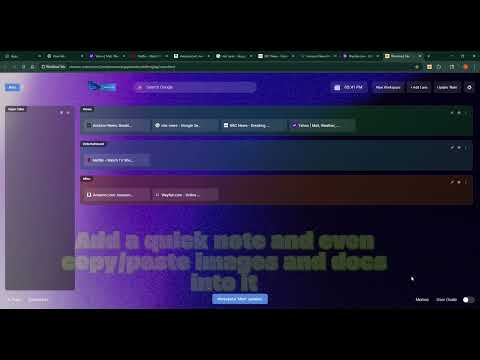
Overview
Organize browser tabs, notes, and ideas into logical workspaces with dedicated lanes and memo panels.
Welcome to Workload Tab! Core Concept Workload Tab provides a powerful dashboard to replace your new tab page. It's designed to help you organize your browser tabs, notes, and ideas into logical Workspaces. Each workspace contains Lanes for grouping related tabs and a dedicated Memo panel for your notes. Main Features & Controls 1. Workspaces Workspaces are the highest level of organization. Each workspace saves its own unique set of lanes, memos, and background theme. Switching Workspaces: Click any workspace button in the top-left to load it. New Workspace: Click the New Workspace button to create a new, blank workspace. You will be prompted for a name. Update Workspace: After making changes to your lanes (adding/removing tabs, renaming, etc.), click the Update 'Workspace Name' button to save your changes. Rename a Workspace: Right-click on any workspace button to rename it. Delete a Workspace: Click the vertical ellipsis (⋮) on a workspace button and confirm to delete it. Restore All Tabs: Triple-click on a workspace button to open all the tabs saved in all of its lanes. 2. Lanes & Tab Organization Lanes are containers within a workspace where you can group and save related tabs. Add a Lane: Click the + Add Lane button in the header. You will be prompted for a name. Saving Tabs: Drag and drop tabs from the Open Tabs panel on the left into any of your custom lanes to save them. Moving Tabs: Drag and drop saved tabs between lanes or within the same lane to reorder them. Lane Controls (icons appear on the right of the lane header): * 🚀 (Launch All): Opens all tabs saved in that lane. * 🎨 (Color Palette): Changes the background color/gradient of the lane. * ⋮ (More Options): Click to delete the entire lane. Rename a Lane: Click on the lane's title to rename it. 3. The "Open Tabs" Panel This special panel on the far left shows all of your currently open browser tabs in real-time. 🔄 (Refresh): Manually refreshes the list of open tabs. 🎨 (Color Palette): Changes the color of the "Open Tabs" panel itself. 4. The Memo Panel On the far right, you have a powerful memo and note-taking panel that is saved per-workspace. + New Memo: Clears the editor to start a new memo. Save Current Memo: Saves the current title and content. If it's a new memo, it will be added to the list on the left. If it's an existing memo, it will be updated. Delete: Deletes the currently selected memo. Memo List: The sidebar on the left of the memo panel shows all memos for the current workspace. Click one to load it. You can also drag and drop memos in this list to reorder them. Rich Text Editor: The editor supports text formatting (bold, italics, lists) and can even handle images pasted from your clipboard. Resizer: The vertical bar between the memo list and the editor can be dragged left and right to resize the panels. 5. Universal Search Bar The search bar in the header has two modes: ✨ (AI Mode): Searches using Perplexity.ai. 🔍 (Google Search Mode): Searches using Google. Toggle: Click the icon on the left of the search bar to switch between modes. 6. Footer and Other Tools Ai Tools: Opens a popup with a curated list of useful links for AI prompt engineering and research. Bookmarks: Opens a popup displaying your browser's bookmarks for easy access. Memos: Opens the memo panel for quick note-taking and organization. User Guide: Opens this comprehensive guide in a modal window. Theme Toggle: The switch on the far right toggles between light and dark mode for the UI. 7. Header Tools 📅 Date & Time: * Shows live-updating clock (hours and minutes) in the header * Click to open the calendar modal * Calendar features: * Monthly view with navigation arrows * Current date highlighted * Right-aligned modal design * Wide layout that covers memo panel if open ⚙️ Settings: Click the gear icon to open the settings panel * Background Theme: Select from pre-defined backgrounds or upload custom images * Theme settings are saved per-workspace
5 out of 52 ratings
Details
- Version1.2.0
- UpdatedJune 8, 2026
- Offered byShannonHiggins
- Size425KiB
- LanguagesEnglish (United States)
- DeveloperShannon D Higgins
706 South Fall Street Carson City, NV 89701 USEmail
shannonhiggins@outlook.com - Non-traderThis developer has not identified itself as a trader. For consumers in the European Union, please note that consumer rights do not apply to contracts between you and this developer.
Privacy

Workload Tab 1.2 has disclosed the following information regarding the collection and usage of your data. More detailed information can be found in the developer's privacy policy.
Workload Tab 1.2 handles the following:
This developer declares that your data is
- Not being sold to third parties, outside of the approved use cases
- Not being used or transferred for purposes that are unrelated to the item's core functionality
- Not being used or transferred to determine creditworthiness or for lending purposes