


ภาพรวม
Multi-column view for WorkFlowy
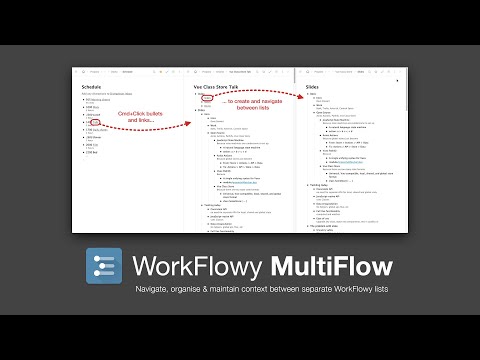
WorkFlowy MultiFlow adds a multi-column view to WorkFlowy, which enables you to maintain an overview of, or relationship between, several WorkFlowy documents at once. It can also make moving data within large lists easier, as you can open a new column and cut and paste between columns, rather than scrolling up and down or collapsing and uncollapsing bullets (note that MultiFlow does not – and cannot – support drag and drop between frames). Columns are opened by Cmd/Ctrl+Clicking on: - Bullets - Internal WorkFlowy links - Breadcrumb items - Left navigation items You can open as many columns as you need, change layouts, save and load sessions. See the home page for more info.
4.7 จาก 5 คะแนนการให้คะแนน 41 รายการ
รายละเอียด
- รุ่น3.0.0
- อัปเดตแล้ว21 มิถุนายน 2567
- นำเสนอโดยDave Stewart
- ขนาด97.56KiB
- ภาษาEnglish (United Kingdom)
- นักพัฒนาซอฟต์แวร์Dave Stewart
23B Ryde Vale Road London, England SW12 9JQ United Kingdomอีเมล
red.car8423@fastmail.com - ไม่ใช่ผู้ค้านักพัฒนาซอฟต์แวร์รายนี้ไม่ได้ระบุว่าตัวเองเป็นผู้ค้า สำหรับผู้บริโภคในสหภาพยุโรป โปรดทราบว่าสิทธิของผู้บริโภคไม่มีผลกับสัญญาระหว่างคุณกับนักพัฒนาซอฟต์แวร์รายนี้
ความเป็นส่วนตัว

นักพัฒนาซอฟต์แวร์รายนี้ประกาศว่าข้อมูลของคุณจะ
- ไม่ถูกขายไปยังบุคคลที่สามหากไม่ใช่ Use Case ที่ได้รับอนุมัติ
- ไม่ถูกใช้หรือถูกโอนเพื่อวัตถุประสงค์ที่ไม่เกี่ยวข้องกับฟังก์ชันการทำงานหลักของรายการ
- ไม่ถูกใช้หรือถูกโอนเพื่อพิจารณาความน่าเชื่อถือทางเครดิตหรือเพื่อวัตถุประสงค์การให้สินเชื่อ
สนับสนุน
โปรดไปที่เว็บไซต์สนับสนุนของนักพัฒนาซอฟต์แวร์ หากมีข้อสงสัย ต้องการขอคำแนะนำ หรือพบปัญหาใดๆ