


Overview
Automate Workday skills entry
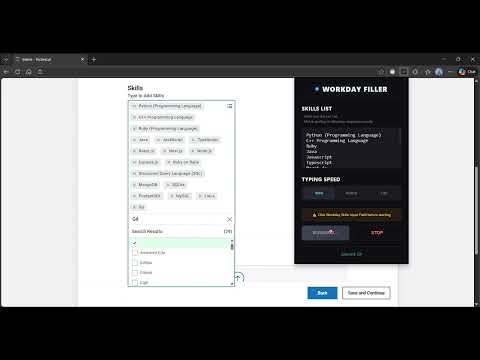
Workday Filler: The missing 'Apply' button for your skill set Tired of manually typing your skills into every Workday application? The "Skills" section is often the most time-consuming part of a job application. Workday Skill Filler is a specialized productivity tool that handles the heavy lifting for you. With a single click, it instantly populates the skills field in any Workday form with your pre-defined list. Why use Workday Skill Filler? ⚡ One-Click Filling: Skip the manual search-and-click process. Add your entire skill set to the form in a single second. 🎯 Consistent Profiles: Ensure you never miss a key competency by using a saved profile that includes all your relevant tags. 🔒 Local & Private: Your data stays in your browser. We don't store or see your personal professional data. 🪶 Lightweight: A zero-bloat extension that lives in your toolbar and only runs when you need it. How to use it: ➡️Set Your List: Open the extension popup and enter your standard list of skills (e.g., Python, React, Project Management). ➡️Open Workday: Navigate to the "Skills" or "Qualifications" section of any Workday job application. ➡️Click & Done: Hit the "Fill Skills" button in the popup and watch the tags populate instantly. Spend less time on forms and more time on your career.
4.6 out of 55 ratings
Details
- Version1.1
- UpdatedFebruary 25, 2026
- Size26.54KiB
- LanguagesEnglish
- DeveloperWebsite
Email
mrigyankroy@gmail.com - Non-traderThis developer has not identified itself as a trader. For consumers in the European Union, please note that consumer rights do not apply to contracts between you and this developer.
Privacy

This developer declares that your data is
- Not being sold to third parties, outside of the approved use cases
- Not being used or transferred for purposes that are unrelated to the item's core functionality
- Not being used or transferred to determine creditworthiness or for lending purposes
Support
For help with questions, suggestions, or problems, please open this page on your desktop browser