


Overview
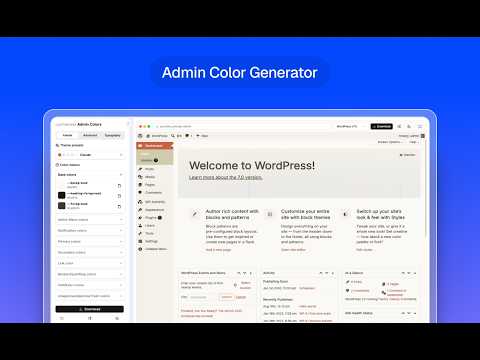
Design a WordPress admin color scheme from your toolbar: presets, color tokens, radius, sidebar width and fonts.
Design a custom WordPress admin color scheme without leaving the page you're on, then hand it to the full generator on wpadminify.com to preview and export as an installable plugin. WHAT IT DOES - 28 presets: the nine schemes WordPress ships (Default, Fresh, Midnight, Coffee, Ectoplasm, Ocean, Sunrise and friends) plus community palettes. - 25 color tokens, grouped the way the admin uses them: admin menu, notices, primary and secondary buttons, links, borders, table rows, comment actions. - Advanced: border radius, expanded and collapsed sidebar width. - Typography: 700 sans fonts, normal or italic. - Light and dark palettes, edited separately and switched with one button. - Shuffle for a random preset, and reset back to a preset or to the default. EXPORT Export opens wpadminify.com/tools/color-generator with your palette already loaded — as readable URL parameters you can read and edit by hand, not an opaque token. There you get the live mock dashboard, and can download the scheme as a WordPress plugin (Plugins → Add New → Upload Plugin). LIVE PREVIEW Your palette is painted onto the real WordPress dashboard as you design it, using the same stylesheet the exported plugin ships. It is preview only — the extension never writes to your site, and switching the preview off (or removing the extension) returns the admin to stock immediately. PRIVACY - No account, no sign-in, no setup. - Runs only on WordPress admin pages (*/wp-admin/*), and only to add a stylesheet. It reads no page content and no credentials. - Your palette is stored locally in the browser (chrome.storage) and is only ever sent anywhere when you press Export, which opens a link you can see.
5 out of 53 ratings
Details
- Version1.0.0
- UpdatedJuly 30, 2026
- Size48.45KiB
- LanguagesEnglish (United States)
- DeveloperWebsite
Email
litonice09@gmail.com - Non-traderThis developer has not identified itself as a trader. For consumers in the European Union, please note that consumer rights do not apply to contracts between you and this developer.
Privacy

This developer declares that your data is
- Not being sold to third parties, outside of the approved use cases
- Not being used or transferred for purposes that are unrelated to the item's core functionality
- Not being used or transferred to determine creditworthiness or for lending purposes
Support
For help with questions, suggestions, or problems, visit the developer's support site