


Overview
Save words, see synonyms, and master your vocabulary with active recall and contextual highlighting.
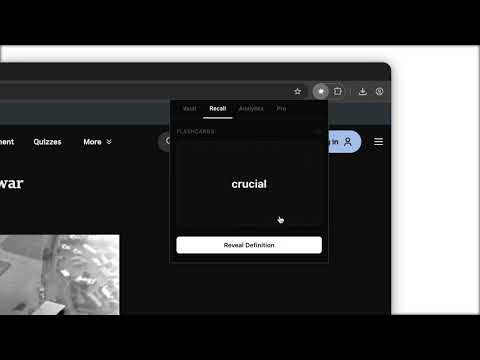
Stop struggling with rote memorization. Wordie is a privacy-first browser extension that transforms your daily browsing into an interactive language learning experience. By combining contextual highlighting with a built-in spaced repetition system (SRS), Wordie helps you master new words while you read news, articles, or social media. ⎯ WHY CHOOSE WORDIE FOR VOCABULARY BUILDING? Most language learners lose progress because they study words in isolation. Wordie solves this by keeping your learning in context. When you save a word, you create a dynamic connection that follows you across the web, reinforcing your memory every time that word appears again. ⎯ CORE FEATURES 1. Instant Vocabulary Saving Highlight any word or phrase on any webpage—from technical blog posts to news articles—and save it to your personal vault instantly. Wordie fetches definitions and synonyms, allowing you to build your vocabulary without interrupting your reading flow. 2. Smart Contextual Highlighting This is the core of the Wordie experience. Once a word is in your vault, the extension automatically highlights it whenever it appears on any other website you visit. Passive Review: Encounter saved words in dozens of different natural contexts throughout the day. Contextual Recall: Your brain recognizes the highlight and strengthens the memory link in real-time. 3. Integrated Spaced Repetition (SRS) Flashcards Move beyond simple word lists. Our built-in active recall system uses spaced repetition principles to optimize your study sessions. Review Levels: Track words from "Forgot" to "Easy." Memory Optimization: The system prioritizes difficult words for frequent review while phasing out mastered terms. 4. Advanced Progress Analytics Monitor your language learning journey through a dedicated dashboard: Mastery Tracking: Visual progress bars show your knowledge level for every saved word. Activity Heatmaps: Track your daily saving habits and lookup frequency. Searchable Vault: Manage, filter, and organize your entire vocabulary inventory in one place. 5. Privacy-First & Local Storage Your data remains yours. Wordie operates with a local-first philosophy: No Accounts Required: Start building your vocabulary in seconds. Offline Access: All words are stored locally on your device via Chrome Storage. No Tracking: We do not track your browsing history or sell user data. ⎯ IDEAL FOR EXAMS AND PROFESSIONALS Wordie is a powerful tool for anyone looking to improve their language proficiency: Test Prep: Build the academic vocabulary required for IELTS, TOEFL, GRE, and SAT exams. Professional Jargon: Save and master technical terminology, industry-specific phrases, and complex jargon. ESL Learners: Improve English fluency by seeing new words used in authentic, real-world content. ⎯ DATA PORTABILITY Maintain full ownership of your data. Export your entire vocabulary vault as a CSV or JSON file at any time for use in external spreadsheet software or other study tools. ⎯ QUICK START GUIDE Add Wordie to Chrome. Pin the extension for quick access. Highlight any word and use the right-click menu to "Save to Wordie." Continue browsing as usual and watch your vocabulary come to life through automated highlights.
0 out of 5No ratings
Details
- Version1.0.3
- UpdatedApril 6, 2026
- FeaturesOffers in-app purchases
- Size42.49KiB
- LanguagesEnglish
- DeveloperWebsite
Email
vusalmran@gmail.com - Non-traderThis developer has not identified itself as a trader. For consumers in the European Union, please note that consumer rights do not apply to contracts between you and this developer.
Privacy

This developer declares that your data is
- Not being sold to third parties, outside of the approved use cases
- Not being used or transferred for purposes that are unrelated to the item's core functionality
- Not being used or transferred to determine creditworthiness or for lending purposes
Support
For help with questions, suggestions, or problems, please open this page on your desktop browser