


Overview
Select a word or short phrase and get a dictionary-style explanation in the same language, powered by Gemini.
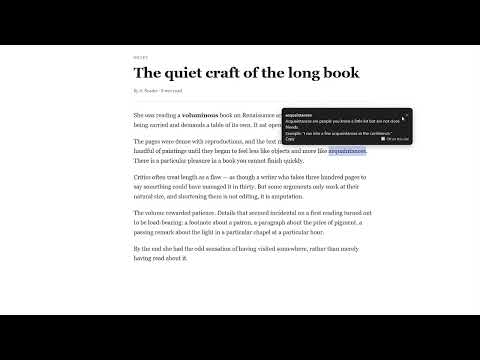
Highlight a word. Get an explanation — in the same language you're reading. Word Explainer is a reading companion for anyone who reads across languages, studies, or just wants a plain-language definition without leaving the page. Instead of translating a word into your native language, Word Explainer explains what the word means in the language it was written in — the way a good dictionary does, but written plainly and shown right where you're already reading. HOW IT WORKS 1. Highlight a word or short phrase (1–4 words) on any web page. 2. A small popup appears next to your selection. 3. Read a one-sentence explanation, plus an example sentence. Example: highlight "book" and you'll see — "a written or printed work consisting of pages bound together, in which an author presents information, a story, or ideas." Highlight "книга" and the explanation comes back in Russian. Highlight "libro" and it comes back in Spanish. The explanation always matches the language of the word you highlighted. FEATURES • Highlight-to-explain on any page — no copy-paste, no tab switching • Explanations in the original language, not translations • Works out of the box — no account, no API key, no setup • Two modes: Instant (explain as soon as you highlight) or Button (click to confirm) • Adjustable explanation level (CEFR A1–C2) to match your reading level • Keyboard shortcut: Ctrl+Shift+E (Cmd+Shift+E on Mac) • Per-site toggle — disable it on sites where you don't want it • Copy button to grab an explanation • Cached results, so repeat lookups are instant • Dark mode support • Popup rendered in an isolated layer, so it never breaks page styling HOW EXPLANATIONS ARE GENERATED Word Explainer sends the word you highlighted to a backend service, which routes each request across multiple AI providers. If one provider is rate-limited or temporarily unavailable, another answers instead — so your reading isn't interrupted. This is why the extension works without you supplying your own API key. PRIVACY Only the word or short phrase you highlight leaves your browser. It is sent to the Word Explainer backend, which forwards it to an AI provider to generate the explanation — nothing else. No page content, no browsing history, no personal information, no accounts, no analytics, no ads. Because the backend uses several AI providers for reliability, the text you highlight may be processed by different providers on different requests, each under its own data-retention policy. The full list of providers, links to their policies, and how to request deletion is in the privacy policy: https://wordexplainer.neptyn.space/privacy WHAT IT ISN'T Word Explainer doesn't translate text, and it isn't a page summarizer. It explains a word or short phrase you select — that's the whole job.
0 out of 5No ratings
Details
- Version1.0.1
- UpdatedNovember 5, 2026
- Size25.05KiB
- LanguagesEnglish
- DeveloperWebsite
Email
contact@neptyn.space - Non-traderThis developer has not identified itself as a trader. For consumers in the European Union, please note that consumer rights do not apply to contracts between you and this developer.
Privacy

Word Explainer has disclosed the following information regarding the collection and usage of your data. More detailed information can be found in the developer's privacy policy.
Word Explainer handles the following:
This developer declares that your data is
- Not being sold to third parties, outside of the approved use cases
- Not being used or transferred for purposes that are unrelated to the item's core functionality
- Not being used or transferred to determine creditworthiness or for lending purposes