

Wisper Tunnel

Overview
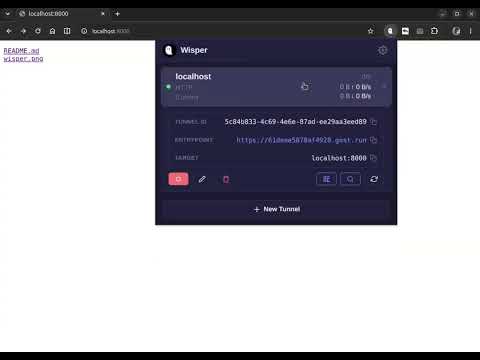
Expose local HTTP services to the internet via GOST tunnels. One click, no CLI.
Wisper Tunnel — Share Your Localhost with the World Wisper Tunnel is a lightweight Chrome extension that turns any local HTTP service (localhost, 127.0.0.1) into a public, secure URL in seconds. Powered by the GOST tunneling network, it needs no command line, no port forwarding, and no static IP — just your browser. Perfect for: - Demoing a local web app to a client or colleague - Testing webhooks, OAuth callbacks, and payment integrations - Quickly sharing a dev server that runs only on your machine - Mobile testing against your local backend How it works: 1. Click the Wisper Tunnel icon to open the side panel. 2. Enter a name and the local address of your service (e.g. localhost:8080). 3. Start the tunnel — you get a public HTTPS URL (https://<id>.gost.run) instantly. 4. Share the link, scan the QR code, or open it on any device. Key features: - One-click tunnels: create, start, stop, and delete HTTP tunnels right from the popup. - Public HTTPS URLs: every tunnel gets a secure *.gost.run endpoint automatically. - Live traffic stats: watch inbound/outbound bytes, transfer rate, and active connections in real time. - Basic Auth: protect your tunnel with a username and password. - Host rewrite: set a custom hostname so the correct virtual host is reached on your backend. - QR code sharing: generate a scannable QR code for the public URL. - GOST Inspector: jump straight to https://inspector.gost.run to inspect tunnel traffic. - Real-time status: see Connected, Connecting, Stopped, or Error at a glance. - Copy-to-clipboard: copy any endpoint or ID with one tap. - Light / Dark / System themes that follow your OS appearance. - Bilingual UI: English and 中文. Privacy & security: - Tunnels are established end-to-end through the GOST relay network over secure WebSocket (WSS). - Tunnel configuration is stored locally in your browser (chrome.storage.local) — nothing is sent to us except what is required to route your traffic through the relay. - You control every tunnel and can stop or delete it at any time. - Each tunnel has a Recording option with three levels: • Off (default) — No traffic data is captured. Only aggregate byte/connection counts are collected. Nothing leaves your device through the inspector pipeline. • Headers only — Request/response metadata (method, URL, status, headers) is recorded and transmitted to the Wisper server. Body content is excluded. • Full — Request/response headers and body are recorded for debugging, transmitted to and stored on the Wisper server (wisper.gost.run) for 7 days. - Recording is opt-in: it defaults to Off for every new tunnel, and you can change it per-tunnel at any time. Whether you're a developer, a DevOps engineer, or just need to show a local project to someone on another network, Wisper Tunnel makes it effortless. Install it, click once, and your localhost is online.
0 out of 5No ratings
Details
- Version1.1.0
- UpdatedJuly 25, 2026
- Offered byginuerzh
- Size82.16KiB
- LanguagesEnglish (United States)
- Developer
Email
ginuerzh@gmail.com - Non-traderThis developer has not identified itself as a trader. For consumers in the European Union, please note that consumer rights do not apply to contracts between you and this developer.
Privacy

This developer declares that your data is
- Not being sold to third parties, outside of the approved use cases
- Not being used or transferred for purposes that are unrelated to the item's core functionality
- Not being used or transferred to determine creditworthiness or for lending purposes
Support
For help with questions, suggestions, or problems, please open this page on your desktop browser