


Overview
Watch YouTube full-window without true fullscreen: tabs, taskbar and clock stay visible. Dock the comments beside the video.
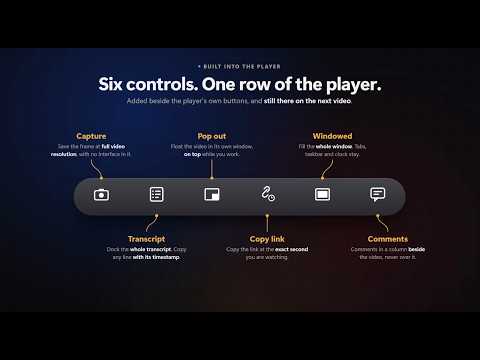
Native fullscreen traps you. The video takes over your display, and the moment you need a tab, a message, or the clock, you have to drop out of it. Windowed Fullscreen adds a second viewing mode right next to YouTube's own fullscreen button. The player expands to fill your entire browser window — the whole screen, once the window is maximized — but it never calls the browser's Fullscreen API. Nothing gets hidden. So your tab strip, address bar, taskbar, clock, and notifications all stay exactly where they are. Click across to another tab, deal with whatever came up, click back — the video is still right where you left it. No exiting, no re-entering, no losing your place. HOW TO USE IT • Click the windowed-fullscreen button beside YouTube's fullscreen control • Or use the toolbar popup • Or press Alt+Shift+F — Option+Shift+F on a Mac (rebindable at chrome://extensions/shortcuts) • Press Escape to exit — the page is restored exactly as it was COMMENTS AND DESCRIPTION, BESIDE THE VIDEO A second button docks everything from below the video — channel, subscribe, likes, description, comments — into a column beside the player. Beside, not on top: the panel takes its width from the video instead of covering it, so the player controls stay reachable and nothing sits behind an overlay. It is the real YouTube page, only repositioned, so liking, subscribing, sorting comments, and loading more comments all keep working. Press the button again to close it. THE MASTHEAD IS HIDDEN, NOT GONE Move your cursor to the top edge of the window and the search bar, hamburger menu, and notifications slide back in. Move away and they slide out again. Look up the next video without ever leaving the mode. TWO MODES, PICK ONE PER SITE • Cover (default) — the player owns the window and the page cannot scroll. Just the video, nothing else reachable. • Scrollable — the video still fills the screen when you enter, but the page keeps scrolling. Scroll down for the title, description, and comments; scroll back up and the video fills the screen again. ESCAPE WORKS ONE LAYER AT A TIME Escape closes the side panel first, then leaves the mode, restoring the page to exactly the state it was in before you entered. IT NEVER FIGHTS YOUTUBE'S OWN FULLSCREEN Press YouTube's fullscreen button while the mode is on and you get plain, untouched YouTube fullscreen. Leave it and you come straight back to windowed mode, comments and all, exactly as you left it. Nothing to set up again. LIVE CHAT DOCKS TOO On a livestream, chat docks beside the player the same way, taking width from the video rather than covering it. It follows YouTube's own chat toggle, so there is nothing extra to switch on. The comments can stay docked alongside it. ALSO FREE • Pop the video into the browser's own floating window, and press again to bring it back • Copy the video's link at the exact moment you are watching, in one click • The mouse cursor fades after a few seconds of stillness, and returns the instant you move • Optional per-site auto-apply: enter the mode automatically when a video loads • Stays active as you move between videos, no reload needed • Supports YouTube FREE, AND WHAT PRO ADDS Everything above is free, and stays free. None of it has ever moved behind the paywall, and none of it will. Pro is $10 once (lifetime) — no subscription, no account, no login: • Drag the comment, live chat, and transcript columns to any width you like • Dock the interactive transcript into a column of its own • Save the current frame at the video's original resolution, with no interface in the picture • Name your saved frames with your own template • Burn the exact playback time onto a saved frame • Light the letterbox bars from the video's own colours, in real time • Or set your own bar colour, or pick from six gradient themes One purchase covers several devices, and Remove key frees a device up again. The licence is for the lifetime of the product: it never expires and is never billed again. PRIVACY No accounts. No logins. No tracking. No analytics. Nothing sold or shared. Your settings are stored on your own device and never synced. Saving a frame is entirely local: the image is drawn from the video already playing in your browser and goes straight to your downloads or clipboard. If you buy Pro, the licence key you enter is sent to the payment provider that issued it, to confirm it — the key and nothing else, roughly once a fortnight. There is no server on our side, so there is nowhere for us to keep anything. Without a key, the extension makes no network requests at all. YouTube is a trademark of Google LLC. Use of this trademark is subject to Google Permissions.
5 out of 51 rating
Details
- Version2.0.1
- UpdatedOctober 24, 2026
- FeaturesOffers in-app purchases
- Size174KiB
- LanguagesEnglish (United States)
- DeveloperRohit TigerWebsite
hochar, kanke, ranchi Ranchi, Jharkhand 834006 INEmail
rohittiger2004@gmail.comPhone
+91 72948 25360 - TraderThis developer has identified itself as a trader per the definition from the European Union and committed to only offer products or services that comply with EU laws.
Privacy

This developer declares that your data is
- Not being sold to third parties, outside of the approved use cases
- Not being used or transferred for purposes that are unrelated to the item's core functionality
- Not being used or transferred to determine creditworthiness or for lending purposes
Support
For help with questions, suggestions, or problems, visit the developer's support site