


Overview
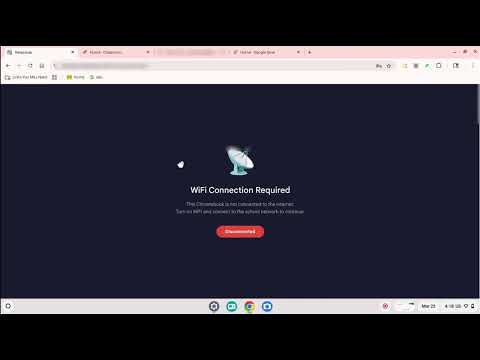
Blocks Chromebook use when students turn off WiFi. Full-screen overlay captures all input. Auto-recovers when WiFi reconnects.
WiFi Toggle Blocker prevents students from using their Chromebooks with WiFi turned off — stopping offline games, content filter bypasses, and going off-the-grid during class. There's no way to disable the *ability* to turn off WiFi, but you can make sure it annoys them if they do! When WiFi disconnects, the extension instantly: - Redirects all new page loads to a "Connect to WiFi" screen - Overlays every open tab with a full-screen blocker that captures all keyboard, mouse, and touch input - Prevents interaction with any cached content (like offline games running behind the blocker) - When WiFi reconnects, everything returns to normal automatically within about one second. ***DESIGNED FOR SCHOOL IT ADMINS*** - Force-install via Google Admin Console — students cannot remove it - Works on all managed Chromebooks - No configuration needed — just deploy and forget - Self-hosted update server included if you prefer not to use the Web Store HOW IT WORKS The extension uses two layers of protection: 1) Network request blocking via Chrome's declarativeNetRequest API redirects all new navigations to a block page 2) A content script injected into every open tab monitors connectivity and places an opaque, input-capturing overlay the instant WiFi drops Free and open source. Built by a school IT admin who got tired of kids turning off WiFi to play snake, and couldn't find any solutions on Reddit or from Google.
3 out of 52 ratings
Details
- Version1.3
- UpdatedApril 2, 2026
- Size8.62KiB
- LanguagesEnglish (United States)
- DeveloperWebsite
Email
akivaf@gmail.com - Non-traderThis developer has not identified itself as a trader. For consumers in the European Union, please note that consumer rights do not apply to contracts between you and this developer.
Privacy

This developer declares that your data is
- Not being sold to third parties, outside of the approved use cases
- Not being used or transferred for purposes that are unrelated to the item's core functionality
- Not being used or transferred to determine creditworthiness or for lending purposes
Support
For help with questions, suggestions, or problems, visit the developer's support site