

WhyTab? - Tab Saver & Organizer
1 rating
)
Overview
Save tabs with notes, organize them into folders, and never forget why you kept a tab open.
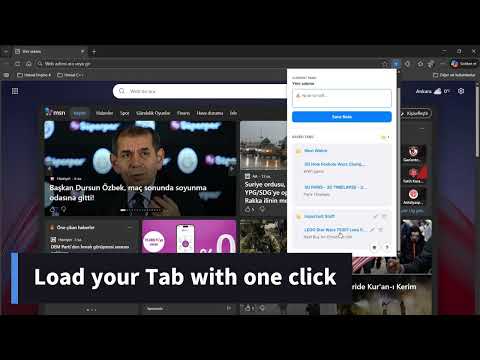
WhyTab? - Tab Saver & Organizer Never forget why you kept a tab open. Ever bookmarked a page to read later, only to forget why you saved it in the first place? WhyTab? solves this problem by allowing you to instantly save your current tab with a personal note, helping you remember the context behind every link. Designed for speed and productivity, WhyTab? keeps your browser clean and your mind organized. Key Features: 📝 Save with Context: Add a quick note to any tab before saving it. ⚡ Lightning Fast: Open the extension with Alt+S, type your note immediately (auto-focus enabled), and press Enter to save. No mouse required! 📂 Drag & Drop Organization: Easily reorder your saved items or drag them into Folders to keep projects separate. ✏️ Edit Anytime: Need to change a title or update a note? Just click the edit button to modify both the link title and your description. 🌙 Dark Mode: Switch between Light and Dark themes to suit your preference. 🌍 Multi-Language Support: Fully localized for English, Turkish, Chinese, Russian, Spanish, French, and Italian. 🔒 Privacy Focused: All your data is stored locally in your browser. No external servers, no accounts required. How to use: Press Alt+S (or click the icon). Type your note. Press Enter. Drag and drop to organize into folders! Stop cluttering your bookmarks bar with mystery links. Start using WhyTab? today.
5 out of 51 rating
Details
- Version1.0.1
- UpdatedJanuary 25, 2026
- Size156KiB
- Languages7 languages
- Developer
Email
timurozer04@gmail.com - Non-traderThis developer has not identified itself as a trader. For consumers in the European Union, please note that consumer rights do not apply to contracts between you and this developer.
Privacy

This developer declares that your data is
- Not being sold to third parties, outside of the approved use cases
- Not being used or transferred for purposes that are unrelated to the item's core functionality
- Not being used or transferred to determine creditworthiness or for lending purposes