

Whop Course Downloader - Whop Videos Downloader

Overview
Whop Course Downloader: Bulk Download Whop Videos & Course Lessons
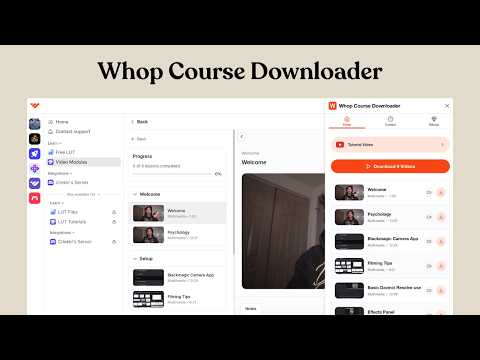
Whop Course Downloader: Download Whop Course Videos as MP4 📥🎓 Whop Course Downloader is a free Chrome extension that helps you download supported Whop course videos directly to your computer. Detect video lessons on Whop pages, save complete video-and-audio MP4 files, queue multiple videos from the current page, and upgrade to Pro for unlimited downloads, whole-course processing, and faster parallel downloading. 🆓 Get 3 successful MP4 downloads every week, free forever 🎬 Save supported Whop lessons as complete video-and-audio MP4 files 📥 Download one video or queue every supported video detected on the page 📚 Use Pro to download supported videos across an entire Whop course ⚡ Process up to 5 videos simultaneously for downloads up to 5x faster 🔄 View download, conversion, and saving progress inside the extension 🗂️ Organize downloaded lessons into convenient course folders 🔒 Keep supported downloads private with browser-based processing Use Whop Course Downloader to build a personal offline collection of course videos that you own or are authorized to save. 🆓 Get Three Free MP4 Downloads Every Week Whop Course Downloader includes a permanent free plan, allowing you to download supported Whop videos without purchasing a subscription. Every user receives: ✅ 3 successful MP4 downloads per week ✅ Free access with no expiration date ✅ No credit card required ✅ No paid subscription needed within the weekly allowance ✅ An automatic weekly reset ✅ A visible download allowance inside the extension ✅ Failed, canceled, skipped, or incomplete downloads do not use your allowance Simply open a supported Whop lesson, load the video, launch the extension, and download the lesson directly to your computer. The free weekly allowance is ideal for downloading individual lessons, testing the extension, or occasionally saving Whop course videos for authorized offline viewing. 🎬 Save Complete Whop Videos as MP4 Files Whop Course Downloader saves supported lessons as complete MP4 files containing both video and audio. You can use the extension to: 📥 Download supported Whop videos directly from Chrome 🎧 Preserve the lesson audio together with the video 💻 Play downloaded MP4 files using common desktop and mobile video players 📁 Store videos in your browser's regular download folder ✈️ Watch authorized lessons later without depending on a continuous internet connection 🎓 Create a personal offline study library There is no need to copy complicated video URLs or upload content to a third-party conversion website. The available download controls appear directly inside the extension. 📥 Download One Video or Queue Multiple Lessons Whop Course Downloader supports both individual video downloads and batch processing. For a single lesson, open the video and select its download button. When multiple supported videos are detected on the current page, you can queue them for processing instead of downloading each one separately. This makes it easier to: ✅ Save one specific Whop lesson ✅ Download multiple videos detected on the current page ✅ Reduce repetitive clicking ✅ Monitor queued, completed, skipped, and failed downloads ✅ Continue browsing while the extension manages the download workflow Availability depends on the Whop page structure, the video stream provided, and your permission to access and download the content. ⚡ Upgrade to Pro for Unlimited Whop Video Downloads Need to save more lessons or download a larger course? Whop Course Downloader Pro removes the weekly limit for supported MP4 downloads. Pro features include: 🚀 Unlimited supported Whop video downloads 📥 Batch downloading from the current page 📚 Whole-course video queue support ⚡ Up to 5 parallel download workers ⏱️ Bulk downloads up to 5x faster 🎓 Easier processing for courses containing many lessons 🗂️ Organized folders for downloaded course content 🔄 Detailed queue and download progress 💎 Monthly, annual, and lifetime purchase options displayed inside the extension A one-time lifetime plan may also be available. When offered, you can pay once and continue using supported Pro features without a recurring subscription. 📚 Bulk Download Supported Videos from an Entire Whop Course Downloading a course lesson by lesson can require a large amount of repetitive work. With Pro, Whop Course Downloader can queue supported videos across an entire course and process up to 5 lessons at the same time. Parallel processing can make large course downloads up to 5x faster than downloading every lesson individually. The whole-course downloader can help you: 📥 Queue multiple Whop course videos in one session ⚡ Download up to 5 supported lessons simultaneously 📚 Process courses containing multiple modules and chapters 🗂️ Create a more organized personal course archive ⏱️ Spend less time opening and downloading lessons manually 🎓 Prepare authorized learning materials for offline study 🔄 Track completed, skipped, and unsuccessful lessons 💾 Save supported course content directly to your device Whole-course functionality depends on how the course is structured, which videos are available to your account, the format of the provided streams, and whether you are authorized to save the content. 🔒 Private Browser-Based Video Processing Your privacy matters. Whop Course Downloader is designed to process supported video downloads through the extension's browser-based workflow. 🔐 No third-party online video converter required ☁️ No uploading course videos to an external conversion website 💻 Downloading and supported MP4 processing happen through Chrome 📁 Completed files save directly to your browser's download location 🛡️ Downloaded content remains stored on your own device 🔄 Progress can be monitored from the extension interface This approach provides a more convenient and private alternative to websites that require you to submit video links or upload files for conversion. 🖱️ How to Download a Whop Course Video Downloading a supported Whop lesson takes only a few steps: 1. 🎓 Open the Whop course or lesson page in Google Chrome 2. ▶️ Start or load the video so the extension can detect it 3. 🧩 Click the Whop Course Downloader icon in the Chrome toolbar 4. 📥 Select the download button for an individual video 5. 📚 Choose the batch or course download option when supported 6. 🔄 Follow the downloading, conversion, and saving progress 7. ✅ Open the completed MP4 file from your browser's downloads folder For easier access, pin Whop Course Downloader to the Chrome toolbar after installation. 💡 Why Use Whop Course Downloader? Whop Course Downloader is designed for users who need a convenient way to save Whop course videos that they are authorized to download. It can help you: 🎓 Build a personal offline learning library 📚 Organize lessons from courses, communities, and educational programs ✈️ Prepare course videos for travel or limited internet access 💾 Keep authorized training materials on your own device 🖥️ Avoid third-party video conversion websites ⏱️ Reduce repetitive work when saving several lessons 📥 Download individual videos or supported course collections ⚡ Process larger queues faster with Pro 🔄 Monitor each download from one extension Whether you need to download one Whop video, save multiple lessons from the current page, or process a supported course with Pro, Whop Course Downloader brings the necessary tools into a simple Chrome extension. 🔧 Supported Features and Availability Whop Course Downloader works with supported video formats and course structures currently available on Whop. Download availability may vary depending on: 🔹 The structure of the course or lesson page 🔹 The type of video player used 🔹 The stream format provided by the platform 🔹 Whether the video has loaded correctly 🔹 Your account's access to the course 🔹 Changes made to the Whop website 🔹 The permissions provided by the course creator Some lessons, protected streams, external video embeds, live events, or unsupported formats may not be available for download. ⚖️ Legal Disclaimer and Responsible Use Whop Course Downloader is an independent third-party Chrome extension. It is not affiliated with, endorsed by, sponsored by, approved by, or officially associated with Whop Inc. “Whop” is a trademark of its respective owner. The name is used only to identify the website and platform with which this independent extension is designed to work. Whop Course Downloader should only be used to save content that: ✅ You created or own ✅ You have received permission to download ✅ The creator has made available for downloading ✅ Is provided with download authorization ✅ You are otherwise legally entitled to save Purchasing, subscribing to, or accessing a course does not necessarily grant permission to copy, redistribute, republish, resell, or publicly share its content. Users are responsible for complying with applicable copyright laws, local regulations, creator permissions, platform policies, and the terms associated with each course. Please respect course creators and use Whop Course Downloader only for lawful, authorized, and personal purposes.
5 out of 52 ratings
Details
- Version3.2.0
- UpdatedSeptember 11, 2026
- Size9.94MiB
- Languages9 languages
- DeveloperWebsite
Email
superwebscraper.com@gmail.com - Non-traderThis developer has not identified itself as a trader. For consumers in the European Union, please note that consumer rights do not apply to contracts between you and this developer.
Privacy

Whop Course Downloader - Whop Videos Downloader has disclosed the following information regarding the collection and usage of your data. More detailed information can be found in the developer's privacy policy.
Whop Course Downloader - Whop Videos Downloader handles the following:
This developer declares that your data is
- Not being sold to third parties, outside of the approved use cases
- Not being used or transferred for purposes that are unrelated to the item's core functionality
- Not being used or transferred to determine creditworthiness or for lending purposes
Support
For help with questions, suggestions, or problems, visit the developer's support site