Item logo image for White Hat Password Generator

White Hat Password Generator

5.0(

1 rating

)
Item media 5 (screenshot) for White Hat Password Generator
Item media 6 (screenshot) for White Hat Password Generator
Item video thumbnail
Item media 2 (screenshot) for White Hat Password Generator
Item media 3 (screenshot) for White Hat Password Generator
Item media 4 (screenshot) for White Hat Password Generator
Item media 5 (screenshot) for White Hat Password Generator
Item media 6 (screenshot) for White Hat Password Generator
Item video thumbnail
Item media 2 (screenshot) for White Hat Password Generator
Item video thumbnail
Item media 2 (screenshot) for White Hat Password Generator
Item media 3 (screenshot) for White Hat Password Generator
Item media 4 (screenshot) for White Hat Password Generator
Item media 5 (screenshot) for White Hat Password Generator
Item media 6 (screenshot) for White Hat Password Generator

Overview

Generate cryptographically secure passwords fast, insert with a click. Try White Hat Password Generator and safely make passwords.

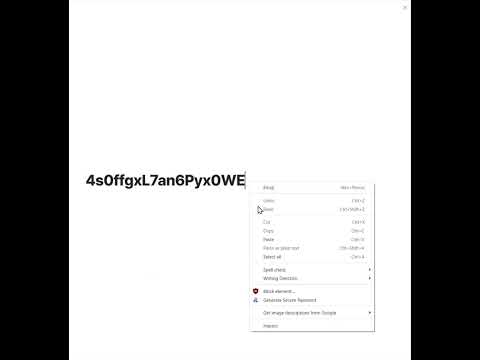
Elevate your password security, before it's too late! Easily Insert new passwords with one-click, on any password field (requires simply right-clicking and selecting Generate Secure Password from drop-down menu). Take control of the cybersecurity for your personal and business needs with White Hat Password Generator! The one-click passwords are pre-set to 18 characters and produce roughly 111-bits of security, making them suitable for most use-cases which may restrict the length beyond 18 characters. For those demanding even stronger (and longer) passwords (or shorter passwords that will be weaker), use the Chrome plugin interface for more advanced settings, including specifying your desired password length, character sets, and compute the resulting security level (i.e. 128-bit, 256-bit, 512-bit), and instantly see how strong or weak your password is to take control of your cybersecurity. In this digital age, it's more important than ever to use strong and unique passwords for each account to protect your sensitive data. With White Hat Password Generator, you can create cryptographically-secure passwords of various levels of strength in seconds, for both online and offline use. Why Trust this app? All the code in this plugin runs locally from your device, and all code dependencies are in-line, with no reliance on 3rd party websites. In other words, the passwords you create with this app remain locally on your device and aren't sent to any 3rd party websites or servers, etc.. In addition, there is no data that is being shared with anyone or collected by the developer, other than basic usage statistics provided on the Chrome webstore to developers, such as the number of installations. We believe the app to be ultra safe and trust the code which is open source and available on GitHub: https://github.com/hatgit/White-Hat-Password-Generator What makes this software safe? This Chrome plugin uses the 'getRandomValues' command which is a trusted cryptographic primitive from the W3C Crypto API (https://www.w3.org/TR/WebCryptoAPI/), which securely sources entropy as part of its Cryptographically-Secure Pseudo Random Number Generator (CSPRNG). Disclosure: The author of this software is a contributor to the above mentioned W3C Crypto API code base on GitHub (user: @hatgit). The use of this CSPRNG makes it unfeasible for a password generated with this software to be predicted or brute-force guessed, provided that you specify a sufficient length and character sets, so that the resulting security is strong (64-127 bits), very strong (over 128 bits), or stronger (+256 bits), where the stronger the security the less feasible it is for an attacker to guess your password. That said, users must still ensure their devices are secure and that no one is eavesdropping when they are performing related actions involving their cybersecurity (be sure to run anti-virus and anti-malware and have strong network passwords and cybersecurity measures and only install trusted applications). Features of this plugin: Insert Passwords with a Click: You can generate a secure password and insert it into any password field with a simple right-click. Advanced Settings: Choose your desired level of security, length, and character sets for complete control over the password generation process. The app will also show you how secure your password is with color-coded legends. Multiple Character Sets: Use uppercase and lowercase letters, numbers, and special characters to make your passwords even more complex and secure. White Hat Password Generator will calculate the entropy to show you the resulting security level. Easy to Use: With a simple interface, even non-technical users will find the app easy to navigate. Save Time: Generate strong passwords in seconds without spending time creating them on your own. Increase Security: By using strong and unique passwords for each account, you'll greatly increase the security of your online accounts and sensitive data. No More Password Reuse: Create unique passwords for each account to avoid being vulnerable to cyberattacks. Flexible Password Generation: Create numerical passwords, such as pins, of various lengths for increased security, or more character sets for increased entropy (the higher the entropy, the higher the resulting security level of your passwords, as measured in bits) With a default password length of 18 characters and a combination of uppercase, lowercase, numbers, and common special characters, resulting passwords have about 111 bits of security. However, you can customize your password to meet your security needs, such as 256-bits which is suitable for cryptography and cryptocurrency applications, or up to 511-bit security for quantum resistance, and even higher (but inevitably longer passwords). White Hat Password Generator is the ultimate solution for creating cryptographically-secure passwords of various levels of strength quickly and easily. Take control of your personal cybersecurity with the assurance that your passwords are safe and secure, while learning more about password security. About secure passwords: Just because a password is generated in a cryptographically-secure manner, doesn't mean it will be strong enough to be secure, if it doesn't carry sufficient entropy which is a measure of its strength using bits of security. This means a password with sufficient entropy is either long or sourced from a wide ranger of distinct characters, or has a combination of both. Unlike most password generators, White Hat Password Generator not only calculates the precise security strength of passwords it generates but also displays it to you, so that you can understand the level of security for the passwords you create with this software. Most software strength meters do not correctly calculate the actual strength the way we do. Below is a message from the creator of the White Hat Password Generator plugin, Steven Hatzakis: ["Most of us may have many hundreds of passwords for online services on the internet (I have over 1,000), and most passwords that many people use are inevitably weak, especially the ones you can easily remember. How you generate passwords is crucial. I created this app because I found myself constantly running custom Python code whenever I wanted to create a very strong password when logging into a new service or resetting a password for one of the hundreds of online services I use on the internet. I wanted to make it easy for myself, and people like you, to not only create secure passwords quickly and easily, but learn about password security during the process, so you can take control of your own cybersecurity and help make the internet a safer place. I call this method the White Hat Password System, and the White Hat Password Generator is an important tool as part of this system for approaching password security. Try the White Hat Password Generator app out today, and let us know what you think. Your feedback is valuable to help us improve our product over time, so we can help make your passwords and the world and safer place. Support the project: If you are a developer, feel free to fork our code and submit any pull request to help improve the plugin for everyone, or donate to support the project, thank you!"] White Hat Password Generator Use of this software is subject to terms and conditions, including license found at https://e20.io BSD-4 Clause License for White Hat Password Generator: Copyright (©) 2023, Steven Hatzakis LLC All rights reserved.

Details

  • Version
    0.3.401
  • Updated
    February 5, 2024
  • Offered by
    Steven Hatzakis
  • Size
    108KiB
  • Languages
    English (United States)
  • Developer
    Steven Joseph Hatzakis
    1541 Haverford Ln Sebastian, FL 32958-6572 US
    Email
    whitehatgenerator@gmail.com
    Phone
    +1 917-378-9374
  • Trader
    This developer has identified itself as a trader per the definition from the European Union and committed to only offer products or services that comply with EU laws.

Privacy

The developer has disclosed that it will not collect or use your data. To learn more, see the developer’s privacy policy.

This developer declares that your data is

  • Not being sold to third parties, outside of the approved use cases
  • Not being used or transferred for purposes that are unrelated to the item's core functionality
  • Not being used or transferred to determine creditworthiness or for lending purposes

Support

Related

Ghostery Tracker & Ad Blocker - Privacy AdBlock

4.6

Powerful and easy-to-use privacy extension. Block ads, trackers & speed up your web.

AdBlocker Ultimate

4.8

The ultimate adblock tool. Block ads on YouTube, Facebook, and all other websites for free!

Dashlane — Password Manager

4.7

Dashlane makes the internet easier. Save all your passwords, fill forms fast, and keep your data accessible and safe.

Surfshark VPN Extension

4.0

Browse the web freely with secure, private internet access for the Chrome browser extension.

uBlock Origin Lite

4.5

An efficient content blocker. Blocks ads, trackers, miners, and more immediately upon installation.

Online Security

3.8

Powering your web experience with a reliable, endpoint protection layer.

VPN for Chrome: NordVPN proxy protection

4.2

Connect to the fastest VPN out there — NordVPN. Hide your IP, block ads, and be safer online with our VPN proxy extension for Chrome

Malwarebytes Browser Guard

3.8

Block malware, scams, phishing and trackers for safer, faster browsing.

Urban VPN Proxy

4.7

Get the best secured Free VPN access to any website, and unblock content with Urban VPN

NordPass® Password Manager & Digital Vault

4.5

NordPass is your freedom from password stress. Generate and securely store strong passwords and autofill them with a single click.

Bitwarden Password Manager

4.4

At home, at work, or on the go, Bitwarden easily secures all your passwords, passkeys, and sensitive information

DuckDuckGo Search & Tracker Protection

4.2

Actively protects your data in your current browser.

Ghostery Tracker & Ad Blocker - Privacy AdBlock

4.6

Powerful and easy-to-use privacy extension. Block ads, trackers & speed up your web.

AdBlocker Ultimate

4.8

The ultimate adblock tool. Block ads on YouTube, Facebook, and all other websites for free!

Dashlane — Password Manager

4.7

Dashlane makes the internet easier. Save all your passwords, fill forms fast, and keep your data accessible and safe.

Surfshark VPN Extension

4.0

Browse the web freely with secure, private internet access for the Chrome browser extension.

uBlock Origin Lite

4.5

An efficient content blocker. Blocks ads, trackers, miners, and more immediately upon installation.

Online Security

3.8

Powering your web experience with a reliable, endpoint protection layer.

VPN for Chrome: NordVPN proxy protection

4.2

Connect to the fastest VPN out there — NordVPN. Hide your IP, block ads, and be safer online with our VPN proxy extension for Chrome

Malwarebytes Browser Guard

3.8

Block malware, scams, phishing and trackers for safer, faster browsing.

Google apps