

WHIP Cursor - Control Your AI
7 ratings
)
Overview
WHIP CURSOR: STOP ASKING NICELY. Is your AI slacking? Hallucinations getting out of hand? It’s time to show those GPUs some tough…
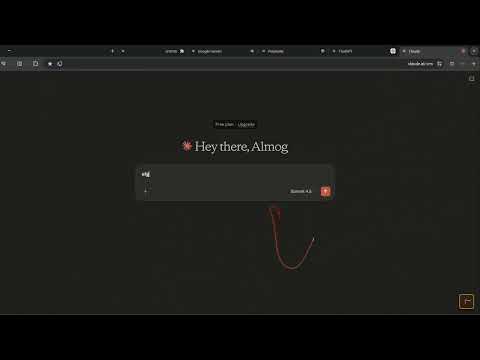
WHIP CURSOR: STOP ASKING NICELY. Is your AI slacking? Hallucinations getting out of hand? It’s time to show those GPUs some tough love. The Whip is a physics-driven cursor that doubles as a powerful prompt-injection manager. --- TOP FEATURES --- FLICK-TO-CRACK: Snap your wrist to trigger a sonic CRACK! and a custom motivational shout like "WORK FASTER!" across your screen. TEMPLATE INJECTION: Hold Shift while whipping to instantly paste your saved prompts into the chat box. Stop typing, start whipping. REAL PHYSICS: A multi-segment whip that reacts to your mouse momentum. It feels dangerously satisfying. SMART MENUS: Store up to 3 complex templates. One flick, one click, prompt sent. INVENTORY SLOT: A floating icon lets you equip or holster your whip instantly. PLAYABLE MINI-GAMES & CURSORS: Unlock and play in-browser mini-games (Fly Swatter, Balloon Defense, Ocean Predator, UFO Beam, Slot Machine, and Water Gun) to earn unique interactive cursors! --- WHIP CURSOR UPGRADES & PRICING --- ⚡ UNLOCK ON ALL SITES — $1.99 (One-Time) • Whip Everywhere: Use the whip on any webpage across Chrome (not just AI sites). 👑 FULL PREMIUM PASS — $2.99 (One-Time) Get the ultimate Whip experience with everything unlocked: • All 11+ Custom Interactive Cursors & Mini-Games (Balloon Defense, Shark Hunter, UFO Beam, Slot Machine, Water Gun, Fly Swatter, Diamond Whip, and more!). • Up to 10 Prompt Templates for instant AI injection. • Up to 10 Custom Motivational Shouts. • Full collection of Exclusive Profile Avatars. --- HOW TO USE --- ARM YOURSELF: Click the Inventory Slot on any supported AI site (ChatGPT, Claude, Gemini, Perplexity). THE FUN WAY: Flick your wrist to discipline a slow AI with a visual crack. THE PRO WAY: Hold SHIFT + FLICK to summon and inject your prompt templates. --- STYLES & PRIVACY --- STYLES: Choose from Classic B&W, Premium Leather, or unlock rich animated gaming cursors. PRIVACY: No tracking. No data collection. Just pure, unadulterated discipline. Add The Whip to Chrome today—because sometimes, "please" isn't a prompt. --- CREDITS & ATTRIBUTION --- Sound effects and music tracks provided royalty-free by the creative community at Pixabay (pixabay.com). --- DISCLAIMER --- While Template Injection is a real productivity tool, the physical whipping of the AI is a novelty feature for entertainment and stress relief. It does not actually bypass API limits or make the AI smarter.
3.4 out of 57 ratings
Details
- Version3.0.3
- UpdatedOctober 3, 2026
- FeaturesOffers in-app purchases
- Offered byVibe Extension
- Size8.47MiB
- LanguagesEnglish (United States)
- Developer
Email
vibeextension@gmail.com - Non-traderThis developer has not identified itself as a trader. For consumers in the European Union, please note that consumer rights do not apply to contracts between you and this developer.
Privacy

This developer declares that your data is
- Not being sold to third parties, outside of the approved use cases
- Not being used or transferred for purposes that are unrelated to the item's core functionality
- Not being used or transferred to determine creditworthiness or for lending purposes