


概述
Never lose track of what you've copied again!
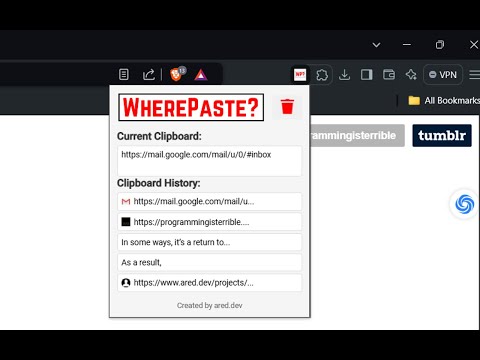
WherePaste? is a smart, efficient Chrome extension that revolutionizes your browsing and productivity by providing instant access to your recent clipboard items. With its intuitive interface and clever features, it's the ideal tool for anyone who frequently copies and pastes information while working or browsing. Never lose track of what you've copied again! 🔑 Key Features: 🖱️ Instant Clipboard Recall: View your current clipboard content with a single click. 🗂️ Clipboard History: Automatically tracks your 10 most recent unique clipboard items. 🔄 One-Click Copy: Easily copy any item from your history back to your clipboard. 🌐 Smart Link Detection: Automatically identifies and displays favicons for copied URLs. 🚀 Quick Link Opening: Open detected URLs directly in a new tab with a single click. 📏 Compact Design: A space-efficient popup interface that doesn't clutter your browser. 🔄 Auto-Refresh: Updates clipboard content each time you open the extension. 🎨 Smooth Animations: Provides subtle visual feedback for a polished user experience. 🔒 Privacy-Focused: Stores clipboard history locally in your browser for enhanced security. 🌍 Universal Compatibility: Works seamlessly across all web pages. Whether you're a 👩🎓 student compiling research, a 💼 professional managing multiple tasks, or simply someone who wants to keep their digital life organized, WherePaste? is your solution to efficient information management. Stop wondering "Where did I paste that?" and start working smarter! 💡
0 星(5 星制)无评分
详情
隐私权

该开发者已声明,您的数据:
- 不会因未获批准的用途出售给第三方
- 不会为实现与产品核心功能无关的目的而使用或转移
- 不会为确定信用度或放贷目的而使用或转移