


Overview
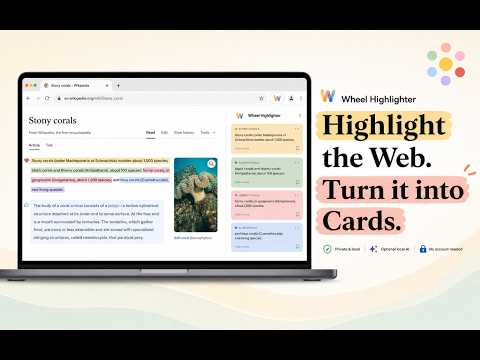
Highlight the web, react to text, and save ideas as local cards with notes, images, sources, and AI titles.
Wheel Highlighter is a local-first web highlighter for reading, research, studying, and saving what matters on the web. Select text on any webpage, mark it with a warm color palette, react with Heart, Like, or Dislike, and turn what you capture into organized cards. Cards can hold editable titles, notes, source links, image pockets, and copy controls. Everything stays in your browser storage. No account, no cloud sync, no ads, and no tracking. Main features: Highlight selected text with a seven-color palette. Save highlights automatically on the page. Turn highlights into editable cards. React to text with Heart, Like, or Dislike. Create themed reaction cards in React mode. Use Bullets or Numbers mode to gather multiple passages into one card. Organize cards into stacks for different projects, topics, or research trails. Drag images, links, or text onto cards as attachments and sources. Generate short card titles locally with on-device AI. Copy an entire stack as rich text for notes apps like Notion, Obsidian, Google Docs, Apple Notes, and more. Browse saved pages and return to what you marked. Highlight Mode: Use Highlight mode when you want classic web highlighting. Select text, choose a color, and save it as a card with an editable title, note area, and copy controls. React Mode: Use React mode when you want to mark your response to something you read. Heart, Like, and Dislike create their own visual marks on the page and their own themed cards in the panel. Bullets and Numbers: Switch to Bullets or Numbers mode when you want to collect several selections into one organized card. Select multiple passages, then commit them together. Stacks: Stacks let you keep different research trails separate. A stack can hold cards from different pages, so one topic can stay together across articles, forums, blogs, and references. Card Attachments: Drop an image, link, or text onto a card. Images appear as a small pocket preview, and links are saved as sources. Copy Stack: Copy a whole stack as rich text, including group headings, card titles, highlighted text, notes, source links, image previews, and reaction emojis. Paste it into your favorite note app to keep researching, writing, or studying. Privacy: Wheel Highlighter is local-first. It does not require an account, does not use a developer-run backend, and does not sell or track your data. Your highlights, cards, notes, attachments, and settings live in your browser storage. Wheel Highlighter is free to use. Optional support is available through Buy Me a Coffee.
5 out of 51 rating
Details
- Version1.4.0
- UpdatedJune 8, 2026
- Size1.32MiB
- LanguagesEnglish
- DeveloperWebsite
Email
wonderlast888@gmail.com - Non-traderThis developer has not identified itself as a trader. For consumers in the European Union, please note that consumer rights do not apply to contracts between you and this developer.
Privacy

Wheel Highlighter has disclosed the following information regarding the collection and usage of your data. More detailed information can be found in the developer's privacy policy.
Wheel Highlighter handles the following:
This developer declares that your data is
- Not being sold to third parties, outside of the approved use cases
- Not being used or transferred for purposes that are unrelated to the item's core functionality
- Not being used or transferred to determine creditworthiness or for lending purposes