


Overview
AI-powered assistant that helps you craft perfect WhatsApp responses using Gemini
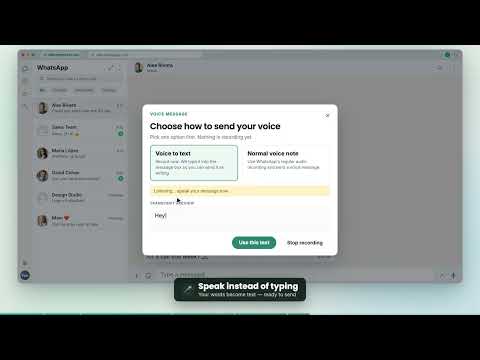
WhatsApp Web AI Response Helper Write better WhatsApp Web replies with Google Gemini 2.5 Flash. Generate responses, improve drafts, translate messages, hear messages aloud, and (on Pro) turn voice into text directly inside WhatsApp Web. Basic: sign in with Google and use monthly cloud credits for AI features. Pro: a larger monthly credits pool, optional bring-your-own Gemini API key (BYOK), and Pro-only extras like voice-to-text. Pro users who add a key can choose whether WhatsApp-side AI runs on plan credits or their API key. ✨ Main Features 🤖 AI reply suggestions Natural replies based on recent conversation context. ✍️ Improve your drafts Refines what you already typed without throwing away your intent. 🌍 Translate messages From the popup or from WhatsApp message menus. 🔊 Speak messages aloud “Speak” in the message menu using your browser’s text-to-speech. 🎙️ Voice to text (Pro) When you tap the mic, choose Voice to text or a normal voice note. Review the transcript, then insert it as text. (Requires Pro; uses your browser’s speech recognition.) 💬 Inline WhatsApp controls Generate from inside WhatsApp Web, preview, copy, or insert into the compose box. 🎭 Writing personas Professional, Casual, Friendly, Formal, Empathetic, or Concise. 🧑💼 Custom persona description Describe tone, role, audience, phrases to use or avoid. When you’re signed in, it can stay in sync with your account. 🗣️ Language control Reply language: Auto or fixed. Separate default translation language. ☁️ Cloud mode (Basic & Pro) Google sign-in, plan and remaining credits in the popup. Usage draws variable credits depending on how large each request is (longer chats / messages use more). 🔑 Own API key (Pro / BYOK) Add your Gemini API key from Google AI Studio. Optional encrypted backup to your account so you can restore it on another device after signing in. 🆕 Recent updates • Basic vs Pro plans with different monthly cloud credit pools • BYOK limited to Pro; clearer messaging when an upgrade is needed • Pro: choose cloud credits vs your own key when both are available • Voice-to-text choice dialog on the mic (Pro only) • Persona description can sync with your signed-in account • API key can be saved securely to your account (Pro) • Credit use scales with request size; balance and plan shown in the popup • Clearer errors for sign-in, Firebase setup, credits, and API issues • More resilient WhatsApp Web reading and text insertion 🚀 How it works Open WhatsApp Web and select a chat. Open the extension popup or use the inline AI control in WhatsApp. Generate a reply, improve a draft, translate, or (Pro) use voice-to-text. Review the result before copying or inserting. 🔒 Privacy & data • The extension reads the active WhatsApp Web chat when you use a feature, not on its own. • AI runs only when you trigger it. • In cloud mode, text goes to Firebase Cloud Functions, then to Google Gemini. • In BYOK mode, request text goes from your browser to Google Gemini. • Settings and optional data (e.g. API key locally; encrypted key backup on Pro) follow the paths shown in the extension. • The extension does not send messages automatically. ✅ Requirements • Google Chrome or another Manifest V3 Chromium browser • WhatsApp Web: https://web.whatsapp.com • A selected chat • Google sign-in for cloud features • Pro for BYOK and voice-to-text • Gemini API key (for Pro BYOK): https://aistudio.google.com/app/apikey ⚠️ Limitations • WhatsApp Web changes often; sometimes a refresh or extension update helps. • Replies and translations depend on Gemini availability, credits, quota, and API access. • Voice-to-text and Speak depend on browser speech support and permissions. • Voice-to-text is a Pro feature.
5 out of 51 rating
Details
- Version2.2
- UpdatedAugust 11, 2026
- FeaturesOffers in-app purchases
- Size229KiB
- LanguagesEnglish
- DeveloperWebsite
Email
05.visas-rehash@icloud.com - Non-traderThis developer has not identified itself as a trader. For consumers in the European Union, please note that consumer rights do not apply to contracts between you and this developer.
Privacy

WhatsApp AI Response Helper has disclosed the following information regarding the collection and usage of your data. More detailed information can be found in the developer's privacy policy.
WhatsApp AI Response Helper handles the following:
This developer declares that your data is
- Not being sold to third parties, outside of the approved use cases
- Not being used or transferred for purposes that are unrelated to the item's core functionality
- Not being used or transferred to determine creditworthiness or for lending purposes
Support
For help with questions, suggestions, or problems, visit the developer's support site