

What the Fetch
1 rating
)
Overview
Record browser evidence. Investigate with your model. Test with confidence.
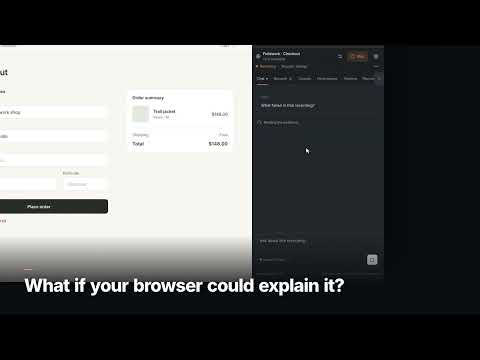
What the Fetch (WTF) helps developers investigate browser failures using captured evidence. Choose a page, press Record, and reproduce an issue. Inspect network requests, response bodies, console messages and performance observations in a Chrome side panel or a wider workbench. Ask AI to explain a failure, follow evidence citations, and inspect the relevant requests. - Record and inspect browser evidence without an AI key. - Connect Groq, OpenAI, Anthropic, Google Gemini, or a compatible hosted/local API using your own settings. - Use Included AI when available, with a limited allowance and no personal provider key. Shared capacity and provider limits apply; one investigation may use multiple model turns. - Review approvals before state-changing browser actions under the default autonomy setting. - Export HAR, cURL, Postman collections, investigation reports and portable recordings. - Keep recordings in your Chrome profile, and optionally save them to a folder you choose. You control what page is recorded and when recording stops. Captures can contain private content and credentials. Before sending evidence to AI, What the Fetch identifies the destination and asks for consent. Recognized credentials are masked by default, but masking is not comprehensive. Included AI sends text evidence through our Cloudflare-hosted gateway to the provider named in the prompt; your own-provider mode connects directly to the endpoint you choose. What the Fetch uses Chrome’s debugging permission to capture and inspect the selected tab. Browser actions can affect the live application. Only debug applications and data you are authorized to inspect, and review any actions that change state. AI explanations can be wrong; use the linked evidence to verify them. Published by josharsh. Support: harsh.joshi.pth@gmail.com.
5 out of 51 rating
Details
- Version0.7.0
- UpdatedNovember 2, 2026
- Offered byHarsh
- Size215KiB
- LanguagesEnglish
- DeveloperHarsh Joshi
B112 VARS Parkwood Dodenakalli Road,Near Adarsh Palm Bangalore, Karnataka 560035 INEmail
harsh.joshi.pth@gmail.com - Non-traderThis developer has not identified itself as a trader. For consumers in the European Union, please note that consumer rights do not apply to contracts between you and this developer.
Privacy

What the Fetch has disclosed the following information regarding the collection and usage of your data. More detailed information can be found in the developer's privacy policy.
What the Fetch handles the following:
This developer declares that your data is
- Not being sold to third parties, outside of the approved use cases
- Not being used or transferred for purposes that are unrelated to the item's core functionality
- Not being used or transferred to determine creditworthiness or for lending purposes
Support
For help with questions, suggestions, or problems, please open this page on your desktop browser