Item logo image for Weeklyer - Productivity Tab

Weeklyer - Productivity Tab

4.8(

4 ratings

)
Item media 4 (screenshot) for Weeklyer - Productivity Tab
Item video thumbnail
Item media 2 (screenshot) for Weeklyer - Productivity Tab
Item media 3 (screenshot) for Weeklyer - Productivity Tab
Item media 4 (screenshot) for Weeklyer - Productivity Tab
Item video thumbnail
Item media 2 (screenshot) for Weeklyer - Productivity Tab
Item media 3 (screenshot) for Weeklyer - Productivity Tab
Item media 4 (screenshot) for Weeklyer - Productivity Tab

Overview

Weeklyer - A simple productivity tool

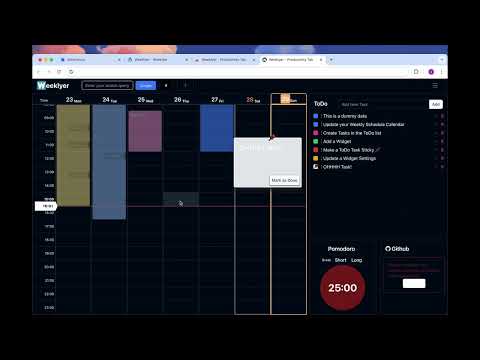
*In Beta Testing* *I did it thinking about my needs, but that is not the law, your opinion and feedback are more than welcome* 📅 Weeklyer ------------------------------------------------------------ Looking for something to help you stay organized and boost your productivity? Meet Weeklyer. Forget about the "zen" of a pretty pictures, that's for dreaming about where you'll go once the work is done. Weeklyer is a tool I created for myself, so it gets straight to the point. It's perfect for people like me who can get a little distracted, focus too much on one task and forget about others, or simply lose track of tasks or notes written down in who knows which app. That’s why I find it helpful: I can see exactly my main daily tasks every time, and when I open a new tab, I can quickly write things down and have them right in front of me. ⭐️ Features: ------------------------------------------------------------ 💲 It's Free !! 🗓️ Weekly Routine Calendar:: Add your routine by days and hours. - Google Calendar:: Conect your GCalendar with Weeklyer ✅ To-Do List:: For specific tasks you want to add. - 📌Make them sticky if you need them more visible! ⏰ Pomodoro:: Prefer to focus for 25 minutes at a time? Just hit the button. 🔗 Quick Links:: Add links to your most visited sites. 🕵️‍♀️ API Monitor:: (Maybe a bit personal) If you’re a developer who needs to monitor several systems, you can set up an endpoint and keep track of them here. 🫸 GitHub Wall:: For developers who like to keep an eye on their streak. 🛠️ Customization: Adjust the app’s appearance (some) and add extra widgets as needed. 👅 Multilingual:: The main language is English, but I’ll be gradually adding more languages based on user feedback. 🛡️ Privacy & Security ------------------------------------------------------------ Weeklyes is an extension that work in the "new tab" page. No registration/login/signup/... is required. And the extension do not collect or share any data. Doesn't do any kind of user tracking. All user settings are stored currently in localstorage, so everything will be safe as long as you don't share your computer. In the future, probably will add more useful features, including the option to sign up and save your data in the cloud, so you can sync your settings across multiple computers. *Remember, I develop and maintain this extension in my free time. I’ll keep it free as long as it doesn’t demand too much time or money, and will respond to feedback and bug reports as quickly as possible in my free time.

Details

  • Version
    1.1.1
  • Updated
    March 18, 2025
  • Offered by
    @jRausell
  • Size
    2.3MiB
  • Languages
    English
  • Developer
    Email
    jrauselldev@gmail.com
  • Non-trader
    This developer has not identified itself as a trader. For consumers in the European Union, please note that consumer rights do not apply to contracts between you and this developer.

Privacy

The developer has disclosed that it will not collect or use your data.

This developer declares that your data is

  • Not being sold to third parties, outside of the approved use cases
  • Not being used or transferred for purposes that are unrelated to the item's core functionality
  • Not being used or transferred to determine creditworthiness or for lending purposes

Support

Related

Reflect New Tab

4.1

Replace Google Chrome's default new tab page with a beautiful dashboard of customizable widgets. You can see an overview of your…

Brite Daily Planner App | To do list, calendar & habits in one app

5.0

Get your life organized and achieve your goals with Daily Planner App.

Dashy New Tab Dashboard and Side Panel

4.8

New Tab Dashboard and Side Panel that integrates widgets and productivity tools.

To-do List Chrome Extension

4.8

To-do List Chrome Extension - A free to-do list app and task manager right in your browser. Organize tasks, boost your productivity.

Shade Calendar – Time Blocking for Google Calendar

4.5

Color-code your time blocks in Google Calendar. Make your schedule easier to read, plan, and manage 📆

New Tab Page Extension

4.3

Transform your Chrome New Tab with PresentBoard! Pick from stunning dashboards or create your own with free, customizable widgets.

Time Blocking with TaskBlock

3.0

The easiest way to boost productivity by time blocking right on your calendar.

Freework Time Tracking & Task Management

5.0

Extends the Freework Web-App to track your Time and manage your Timesheet from the Browser!

boost. Task management made simple

4.2

Organize and manage tasks with drag and drop cards

Synchro: Productivity Manager for Students

5.0

Synchro is a simple and intuitive task tracker built specifically for students to stay productive and organized.

DailyPlanner

0.0

Start your productivity journey by achieve goals, build habits, prioritize tasks, and reflect daily.

Briefmatic Task Manager for Google Chrome™

5.0

Briefmatic is a task manager that connects you with tasks from all of your work files and collaboration tools.

Reflect New Tab

4.1

Replace Google Chrome's default new tab page with a beautiful dashboard of customizable widgets. You can see an overview of your…

Brite Daily Planner App | To do list, calendar & habits in one app

5.0

Get your life organized and achieve your goals with Daily Planner App.

Dashy New Tab Dashboard and Side Panel

4.8

New Tab Dashboard and Side Panel that integrates widgets and productivity tools.

To-do List Chrome Extension

4.8

To-do List Chrome Extension - A free to-do list app and task manager right in your browser. Organize tasks, boost your productivity.

Shade Calendar – Time Blocking for Google Calendar

4.5

Color-code your time blocks in Google Calendar. Make your schedule easier to read, plan, and manage 📆

New Tab Page Extension

4.3

Transform your Chrome New Tab with PresentBoard! Pick from stunning dashboards or create your own with free, customizable widgets.

Time Blocking with TaskBlock

3.0

The easiest way to boost productivity by time blocking right on your calendar.

Freework Time Tracking & Task Management

5.0

Extends the Freework Web-App to track your Time and manage your Timesheet from the Browser!

Google apps