


Overview
Your Friday update, drafted for you: a weekly report or standup from your tasks, notes and (optional) tabs. Stays on your computer.
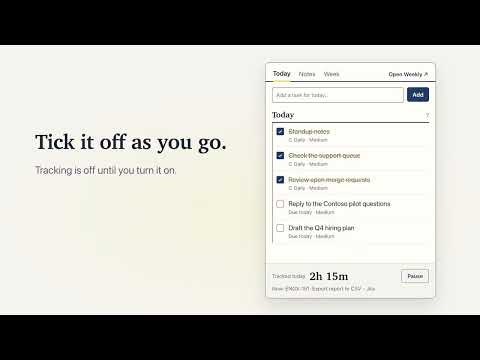
Every Friday you open a blank doc and try to remember what you did. Weekly keeps the receipts. Weekly drafts your weekly update or daily standup from the tasks you ticked off, the notes you took and, if you turn it on, the tabs you worked in. You untick what you do not want, edit the rest, and copy it. It stays on your computer. WHAT YOU GET (an example) Done - Ship the CSV export to beta - Write the ENGX-162 postmortem - Standup notes (5 of 5 days) Tickets - ENGX-151: Export report to CSV - MR: web !418: Add CSV export endpoint Other work - Sprint planning: agreed scope for 4.2 Next week - Roll the CSV export out to everyone Built for engineers and product managers: Jira tickets, GitLab and GitHub merge requests and pipelines are grouped under the ticket they belong to (for example ENGX-151), with live status if you allow it. It also groups other kinds of work (QA, support and more). HOW IT FILLS ITSELF IN - Tasks you finish lead the update. Add one in a line from the side panel; a quick-add line understands due dates like "tomorrow" and "every weekday", and priority. - Notes you take come last, as Other work. Alt+N writes a note on the page you are on. - Tracking is optional. Turn it on and Weekly also lists the tickets, merge requests, docs, deals, candidates and support cases you spent time on, so the update includes work that never made it onto a task list. - Copy it as plain text, or for Slack, email, or Docs and Notion. Post to Slack through your own webhook. Or "Copy for ChatGPT or Claude" if you want an assistant to polish it. - Weekly update (Monday to Friday) or standup (yesterday, today, blockers). SHORTCUTS Alt+T opens the side panel. Alt+Shift+T opens Weekly in a tab. Alt+N writes a note on the page you are on. Change them at chrome://extensions/shortcuts. TRACKING IS OFF UNTIL YOU TURN IT ON Weekly asks "Track my week?" once. Say no and it records no browsing at all; it is a task and notes app with reminders. Say yes and Chrome asks for "Read your browsing history". - Weekly records the address and title of the active tab in the focused window, and for how long, only while you are at the keyboard. It stops when you go idle or lock your screen. - While you work in another app (your IDE, a terminal, the Zoom app), it counts only the minutes, as "Outside Chrome", never which app. You can turn this off. - It never reads page content, keystrokes or screenshots. - "Hide people and customer names" turns candidates and customers into Candidate 1, Customer 2 before you paste an update anywhere. - Turn tracking off in Settings whenever you like. Activity is deleted after 90 days. YOUR DATA STAYS ON YOUR COMPUTER No account, no analytics, no ads, no servers of ours. Nothing leaves your computer unless you copy or post your update, export a backup, or turn on live Jira, GitLab or GitHub status. ALSO INCLUDED Tasks with priorities, daily repeats, a month calendar, a morning brief at 9:00 and an evening check at 18:00 (both optional), notes with PIN-protected private notes (encrypted on your computer, never in your update), and Chrome's on-device AI (Gemini Nano) if you want it to tidy the draft. LIMITS A Chrome extension cannot see which desktop app you are in (IDE, Slack desktop, the Zoom app): that time shows as "Outside Chrome", and a note says what it was. Weekly cannot add its on-page note to Chrome's own pages or the Chrome Web Store; use the Notes tab in the side panel there. Imports from Daybook (tasks, reminders) and ForgetMeNot (notes): export from the old app, then Import a backup under Settings, Your data. ``` ## Permission justifications (for the reviewer) Paste each into the matching field on the Privacy practices tab. The first eight are granted at install; none of them shows a warning about browsing history.
0 out of 5No ratings
Details
- Version3.1.0
- UpdatedNovember 5, 2026
- Size238KiB
- LanguagesEnglish
- DeveloperSharaj RewooWebsite
Hinjawadi Phase 1 Rd Pune, Pimpri-Chinchwad, Maharashtra 411057 INEmail
srewoo@gmail.com - Non-traderThis developer has not identified itself as a trader. For consumers in the European Union, please note that consumer rights do not apply to contracts between you and this developer.
Privacy

This developer declares that your data is
- Not being sold to third parties, outside of the approved use cases
- Not being used or transferred for purposes that are unrelated to the item's core functionality
- Not being used or transferred to determine creditworthiness or for lending purposes
Support
For help with questions, suggestions, or problems, please open this page on your desktop browser