

WebVoice - Web Page Reader

Overview
Read selected text or articles aloud. Adjust speed, translate, choose voices, and export cloud TTS audio.
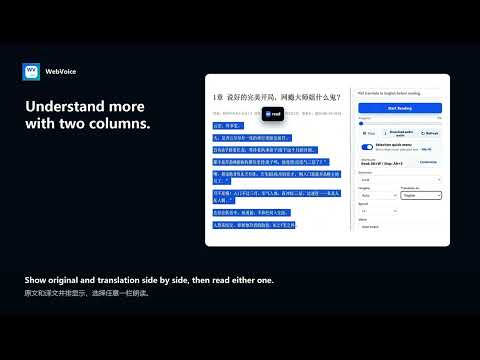
WebVoice lets you listen to selected text or the main content of a web page. You can change playback speed, translate before listening, choose an available voice, and export audio when your configured cloud provider supports it. WebVoice turns busy web pages into focused reading and listening sessions. Start from a passage you select or let the extension identify the main article. Review the temporary reading view before playback, decide what should be spoken, and keep the original page unchanged. Reading and cleanup - Extract the main article or use your current selection. - Review headings, paragraphs, lists, quotations, code, and tables before listening. - Remove sections you do not need and restore them when necessary. - Decide whether the title or author information should be included. - Copy the cleaned source text or translated text with one click. Translation and bilingual reading When you choose a target language that differs from the source, WebVoice can show the original and translation together and prepare the translated text before playback. The current sentence or paragraph remains visible while you listen. Translation requests are sent only to the provider you configure and only when you choose to translate. Local book reader Open compatible local book and text files in a temporary reader. When a table of contents is available, you can move between chapters and read one chapter at a time. Imported content remains in the active browser session and is not saved as a permanent WebVoice library. Encrypted or DRM-protected books are not supported. The Support page lists the currently compatible file formats. Playback controls Play, pause, resume, or stop at any time. Move between sections, jump through longer content with the progress control, change speed, choose an available voice, and optionally follow the current passage as it is spoken. Keyboard shortcuts and the selected-text quick menu make common actions easy to reach. Voice options and cloud features Free local reading uses voices provided by Chrome or your operating system. Optional cloud text-to-speech and audio export depend on the provider you configure. Some providers require your own API key and may charge separately. WebVoice does not collect your payment card number. Checkout is handled on Stripe-hosted pages. Privacy Local page cleanup, reading, and book processing take place in the browser whenever possible. Page text is not sent to the WebVoice license service. Text is sent to a third-party speech or translation provider only when you configure and use that provider. Provider credentials are stored in Chrome extension storage on your device. Purchase verification uses the checkout email and a device identifier to check your license and enforce the current device limit. It does not receive the full page text or imported book content. Some Chrome internal pages, the Chrome Web Store, protected frames, browser PDF viewers, canvas-rendered text, or closed Shadow DOM content may be unavailable because of browser security restrictions. Privacy Policy: https://jackpan010203.github.io/webvoice/privacy/ Support: https://jackpan010203.github.io/webvoice/support/
0 out of 5No ratings
Details
- Version0.3.2
- UpdatedAugust 21, 2026
- FeaturesOffers in-app purchases
- Offered bypdx010203
- Size226KiB
- LanguagesEnglish (United States)
- Developer潘登学
黄河大街 包头市, 内蒙古自治区 014000 CNEmail
pdx010203@gmail.comPhone
+86 151 4727 9693 - TraderThis developer has identified itself as a trader per the definition from the European Union and committed to only offer products or services that comply with EU laws.
Privacy

WebVoice - Web Page Reader has disclosed the following information regarding the collection and usage of your data. More detailed information can be found in the developer's privacy policy.
WebVoice - Web Page Reader handles the following:
This developer declares that your data is
- Not being sold to third parties, outside of the approved use cases
- Not being used or transferred for purposes that are unrelated to the item's core functionality
- Not being used or transferred to determine creditworthiness or for lending purposes
Support
For help with questions, suggestions, or problems, visit the developer's support site