

Website Color Picker & Design Inspector - CaIoT

Overview
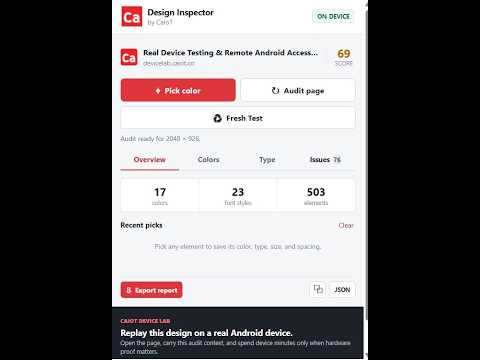
Pick colors, inspect fonts and spacing, audit contrast and responsive issues, then test on real Android devices.
Website Color Picker & Design Inspector by CaIoT helps you inspect colors and design details directly from any webpage. Pick colors from a page, copy HEX/RGB values, inspect visual styles, and review layout details while working on websites. It is useful for design review, frontend development, QA checks, and quick visual debugging. Key features: - Pick colors from any webpage - Copy HEX and RGB color values - Inspect design and style details - Review spacing and layout consistency - Lightweight tool for everyday website review
0 out of 5No ratings
Details
- Version1.5.0
- UpdatedOctober 9, 2026
- Offered byCaIoT Inc.
- Size92.13KiB
- LanguagesEnglish
- DeveloperCAIOT INC.
2906 Westbury Ct Mississauga, ON L5M 6B2 CAEmail
team@caiot.coPhone
+1 437-733-4868 - TraderThis developer has identified itself as a trader per the definition from the European Union and committed to only offer products or services that comply with EU laws.
- D-U-N-S243334733
Privacy

Website Color Picker & Design Inspector - CaIoT has disclosed the following information regarding the collection and usage of your data. More detailed information can be found in the developer's privacy policy.
Website Color Picker & Design Inspector - CaIoT handles the following:
This developer declares that your data is
- Not being sold to third parties, outside of the approved use cases
- Not being used or transferred for purposes that are unrelated to the item's core functionality
- Not being used or transferred to determine creditworthiness or for lending purposes
Support
For help with questions, suggestions, or problems, visit the developer's support site