


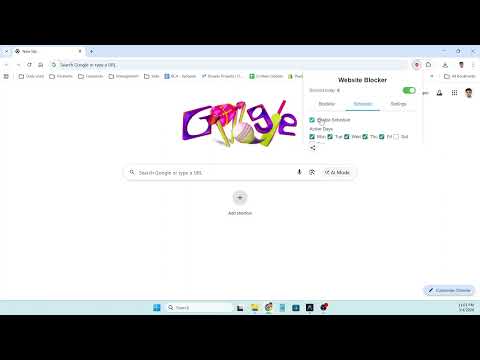
Overview
Block distracting websites to boost your productivity. Features scheduling, whitelist mode, quick-add, and blocked attempt tracking.
Website Blocker is a lightweight and powerful Chrome extension that helps you stay focused by blocking distracting websites. Whether you need to concentrate during work hours or limit time on social media, Website Blocker gives you full control over your browsing habits. Key Features: - Block Any Website: Add any domain to your blocklist and it will be blocked instantly. Simply type the domain name and click Add. - Block Current Tab: One-click button to instantly block the website you are currently visiting. No need to type the URL manually. - Keyword Blocking: Block all websites containing a specific keyword. Just type a keyword without a dot and all matching domains will be blocked automatically. - Scheduling: Set specific days and time ranges for blocking. Choose active days from Monday to Sunday and set start and end times. Blocking activates only during your scheduled hours. - Whitelist Mode: Switch from blocklist to whitelist mode. In whitelist mode, all websites are blocked except the ones you add to your list. Perfect for strict focus sessions. - Master Toggle: Enable or disable all blocking with a single toggle switch. Your blocklist and settings are preserved when blocking is turned off. - Blocked Page: When you visit a blocked website, you see a clean blocked page with a motivational quote to keep you inspired and focused. - Daily Blocked Count: Track how many times blocked websites were attempted today. The counter resets automatically each day. - Import and Export: Export your blocklist and settings as a JSON file. Import a previously exported file to restore your setup or transfer it to another browser. - Clean Interface: Simple and intuitive popup design with three tabs for Blocklist, Schedule, and Settings. No clutter, no distractions. - Privacy Focused: All data is stored locally on your device. No data is sent to any external server. No tracking, no analytics, no ads. - Lightweight: Minimal resource usage. The extension uses Chrome declarativeNetRequest API for efficient blocking without slowing down your browser. How It Works: 1. Click the Website Blocker icon in your toolbar. 2. Add websites you want to block by typing the domain or clicking Block This Site. 3. Optionally set a schedule for when blocking should be active. 4. Stay focused and let the extension handle the rest. Website Blocker is perfect for students, professionals, freelancers, and anyone who wants to reduce distractions and get more done.
0 out of 5No ratings
Details
- Version1.0.0
- UpdatedMarch 6, 2026
- Size47.23KiB
- LanguagesEnglish
- DeveloperGagan SahayWebsite
84/1 Nai Basti Abdullapur Meerut Meerut, Uttar Pradesh 250001 INEmail
gagansahay695@gmail.comPhone
+91 97617 38451 - TraderThis developer has identified itself as a trader per the definition from the European Union and committed to only offer products or services that comply with EU laws.
Privacy

This developer declares that your data is
- Not being sold to third parties, outside of the approved use cases
- Not being used or transferred for purposes that are unrelated to the item's core functionality
- Not being used or transferred to determine creditworthiness or for lending purposes
Support
For help with questions, suggestions, or problems, please open this page on your desktop browser