

WebShot A4

Overview
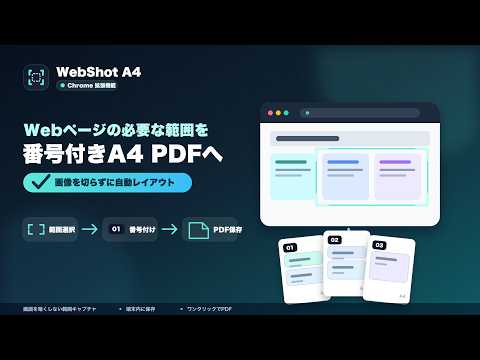
画面を暗くせずに範囲キャプチャし、番号付きのA4 PDF・PNG・JPGとして書き出します。
WebShot A4は、Webページの必要な範囲だけをスクリーンショットとして保存し、番号付きのA4資料にまとめてダウンロードできる拡張機能です。 ページ左下の小さなボタンから、画面を暗くせずに範囲を選択できます。複数のスクリーンショットを保存した後、A4サイズへ自動配置してPDF・PNG・JPG形式で書き出せます。 【主な機能】 ・Webページ上で必要な範囲だけを、撮影音なしでキャプチャ ・キャプチャ中も画面を暗くしないシンプルな範囲選択 ・スクリーンショットを端末内へ保存 ・保存した画像の並べ替え、個別削除、一括削除 ・各スクリーンショットへ01、02、03…の番号を自動付与 ・1枚のスクリーンショットを途中で分割せず、A4ページへ自動配置 ・PDFは複数ページを1つのファイルとして保存 ・PNGとJPGはZIPにせず、A4ページごとの画像を連続ダウンロード 【使い方】 1. Webページ左下のキャプチャボタンを押します。 2. 保存したい範囲をドラッグして選択します。 3. 必要なスクリーンショットを続けて保存します。 4. 左下の書き出しボタンを押すと、番号付きA4 PDFがダウンロードされます。 5. 並べ替えやPNG・JPG出力が必要な場合は、拡張機能のメニューを開きます。 【プライバシー】 撮影した画像はブラウザ内のローカルストレージにのみ保存されます。画像や閲覧内容を外部サーバーへ送信することはありません。 【ご注意】 キャプチャできるのは、現在ブラウザ画面に表示されている範囲です。Chromeの設定ページ、Chromeウェブストアなど、ブラウザによって保護されているページでは利用できません。
0 out of 5No ratings
Details
- Version1.3.2
- UpdatedOctober 24, 2026
- Size35.43KiB
- Languages日本語
- Developer
Email
saito.takeshi.2004@gmail.com - Non-traderThis developer has not identified itself as a trader. For consumers in the European Union, please note that consumer rights do not apply to contracts between you and this developer.
Privacy

WebShot A4 has disclosed the following information regarding the collection and usage of your data. More detailed information can be found in the developer's privacy policy.
WebShot A4 handles the following:
This developer declares that your data is
- Not being sold to third parties, outside of the approved use cases
- Not being used or transferred for purposes that are unrelated to the item's core functionality
- Not being used or transferred to determine creditworthiness or for lending purposes