


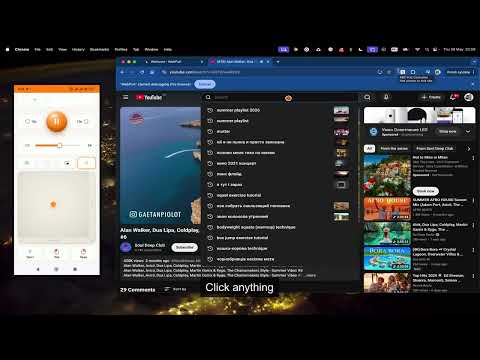
Overview
Use your phone as a remote and trackpad for your laptop browser: control video playback, volume, scrolling, mouse and keyboard.
Your laptop is the TV. Your phone is the remote. If you watch movies, series, YouTube, Twitch or any browser video on your laptop — or project it onto a wall — you know the problem: you're on the couch, the laptop is across the room, and there's no remote. WebPult is that remote. How it works: 1. Click the WebPult icon in Chrome — you'll see a short-lived pairing code and a QR code. 2. On your phone, point the camera at the QR (or open webpult.com/join and type the code). 3. Tap buttons on your phone. Video on your laptop reacts instantly (<200 ms). No app to install on the phone. No account. No setup. What you can control: • Play, pause, seek ±10 s, fullscreen • Volume slider (0–100) and mute (remembers and restores your volume) • Playback speed — 0.5× to 2× (stays put across YouTube navigation) • Picture-in-Picture — pop the video out into a floating, always-on-top window • Next / previous track — playlist and radio/mix navigation on YouTube • Subtitles & quality on YouTube — toggle captions (incl. auto-translated), pick resolution • Scroll up / down • Switch tabs, open a new tab with a URL or search query, reload the current tab • Trackpad mode — move the cursor, left / right / double-click, scroll wheel, adjustable speed • Keyboard mode — type text from your phone into the focused input on the laptop WebPult only remote-controls playback and browser controls that are already on the page you have open — it doesn't host, stream, download, or provide access to any video itself. Snap a shot: • Capture the current video frame straight to your phone with one tap — a single still image, not a recording. Save it or share via the OS share sheet. Keeps a local gallery of your last 5 shots. Reconnect & install: • Trusted devices — paired laptops reconnect silently, no code needed after the first time • Install it — "Add to Home Screen" on iPhone or Android; the remote opens like a native app Works with any HTML5 video. Optimized adapters for YouTube, Twitch and Vimeo. DRM-protected video (Netflix, some streaming services) may partially or fully fail — that's a platform restriction we can't bypass. Privacy first: • No account, no email, no tracking cookies, no analytics. • Pairing codes are short-lived and single-use. • Session state is ephemeral. No browsing history is recorded. • Learn more at https://webpult.com. Made by WD-Studio (https://wd-studio.com.ua). Questions: support@webpult.com or @WebPult_Bot on Telegram. Demo: https://youtu.be/qVbwyZjeQgo
0 out of 5No ratings
Details
- Version1.7.0
- UpdatedSeptember 20, 2026
- Size218KiB
- LanguagesEnglish
- DeveloperWebsite
Email
fedyay.prg@gmail.com - Non-traderThis developer has not identified itself as a trader. For consumers in the European Union, please note that consumer rights do not apply to contracts between you and this developer.
Privacy

WebPult has disclosed the following information regarding the collection and usage of your data. More detailed information can be found in the developer's privacy policy.
WebPult handles the following:
This developer declares that your data is
- Not being sold to third parties, outside of the approved use cases
- Not being used or transferred for purposes that are unrelated to the item's core functionality
- Not being used or transferred to determine creditworthiness or for lending purposes