

Webpage Carbon Scanner

Overview
Make webpages lighter, faster and more efficient. Scan page weight, CO₂e impact and image optimization potential in one click.
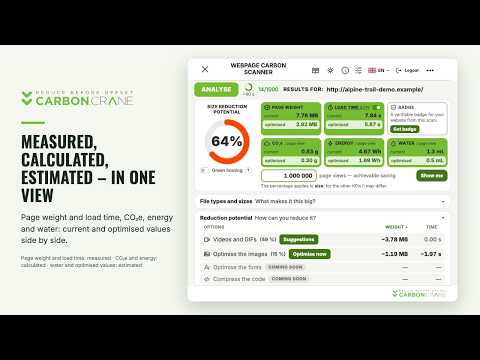
Carbon.Crane Webpage Carbon Scanner Discover how much data, energy and CO₂e emissions a webpage generates each time it loads, and where to start optimizing it. The Carbon.Crane Webpage Carbon Scanner analyzes the webpage you currently have open, directly in your Chrome browser. It shows what the page is made of (images, videos, text, fonts and more), its estimated environmental impact, and how you can reduce its size, improve loading performance and lower its estimated environmental impact. All in just a few clicks, with no coding skills required. WHAT DOES THE SCANNER SHOW? • Page weight: the actual amount of data downloaded when the page loads, measured directly in your browser with caching disabled. • Loading time (optional): measures how long it takes for the page's main content to appear (Largest Contentful Paint). The test runs under simulated moderate network conditions (4 Mbps, 80 ms latency) in desktop view. • CO₂e emissions and energy consumption: calculated from measured data using the Carbon.Crane model, taking into account the selected visitor countries and the proportion of returning visitors. • Water consumption: estimated water use associated with data center cooling – a Carbon.Crane modeling assumption based on international research data. • Current vs. optimized values: compare the page's current and estimated optimized environmental impact for any number of page loads. Everyday comparisons, such as the carbon emissions associated with driving a certain distance, help put the results into perspective. • Page composition: explore how downloaded data is distributed across different file types, with a pie chart and detailed table. WHO IS IT FOR? Anyone who wants to reduce their website's data usage and environmental impact while improving loading performance. No coding skills required. HOW DOES IT WORK? 1. Open the webpage you want to analyze in Chrome. 2. Click the Webpage Carbon Scanner icon and sign in. 3. Click the ANALYSE button to start the analysis. A scan takes approximately 20 seconds, or around 40 seconds with loading time measurement enabled. 4. Explore the results and identify opportunities for optimization. The page reloads during the scan. Do not navigate away or open Chrome DevTools on that tab while the scan is running. WHERE SHOULD YOU START OPTIMIZING? The Scanner goes beyond measuring your page's current impact. It helps you identify where the greatest opportunities for improvement lie. Images Find out which images deserve attention first, with unnecessarily large files prioritized, and see how much data could potentially be saved by optimizing them. Images under 100 KB are not counted. You can even test WebP conversion instantly. The extension converts images locally in your browser and displays the resulting file size. Your images are never uploaded to an external server. Videos and animated GIFs The Scanner identifies video codecs, resolution and frame rates from file headers, without downloading the entire video. It estimates potential data savings from re-encoding, resizing or replacing animated GIFs with modern video formats. Impact on loading time See how much of the potentially reducible data is downloaded before the page's main content appears, helping you prioritize your optimization efforts. Exportable results Download the detailed media list as an Excel spreadsheet to easily share optimization tasks with developers or content editors. A BADGE FOR YOUR WEBSITE After completing a scan, you can request a dated, verifiable badge confirming that your webpage has been analyzed with the Webpage Carbon Scanner. The badge confirms that a scan took place. It is not an environmental rating or certification. An active subscription is required to obtain a badge. If you request a badge, the scanned page's URL and results are shared with Carbon.Crane, but only after your explicit confirmation, and they are visible to anyone on the badge's public verification page. MEASURED, CALCULATED OR ESTIMATED: WHAT'S THE DIFFERENCE? The Scanner clearly distinguishes between measured, calculated and estimated values. • Measured: downloaded data volume and loading time. • Calculated: energy consumption and CO₂e emissions, derived from measured data using modeling factors. • Estimated: water consumption and potential savings from optimization. The results are designed to support informed decisions and practical optimization. They do not represent a certified carbon footprint. Results may vary depending on the device and network environment used for testing. Dynamic content, such as rotating advertisements, may also cause differences between consecutive scans. PRIVACY Your name and email address are required to sign in. For energy and CO₂e calculations, the extension only transmits the data size information, your user identifier and your selected settings. The scanned webpage's URL is not transmitted. The page URL and scan results are only shared with Carbon.Crane if you request a badge and explicitly confirm the submission. For more information, please see our Privacy Policy: https://carboncrane.io/privacy-policy-extension?lang=en
5 out of 53 ratings
Details
- Version4.2.1
- UpdatedNovember 21, 2026
- FeaturesOffers in-app purchases
- Offered byCarbon Crane
- Size454KiB
- Languages2 languages
- DeveloperCarbon.Crane Zrt.
Munkácsy utca 10/2 Budaörs 2040 HUEmail
info@carboncrane.ioPhone
+36 20 577 7577 - TraderThis developer has identified itself as a trader per the definition from the European Union and committed to only offer products or services that comply with EU laws.
- D-U-N-S301664455
Privacy

Webpage Carbon Scanner has disclosed the following information regarding the collection and usage of your data. More detailed information can be found in the developer's privacy policy.
Webpage Carbon Scanner handles the following:
This developer declares that your data is
- Not being sold to third parties, outside of the approved use cases
- Not being used or transferred for purposes that are unrelated to the item's core functionality
- Not being used or transferred to determine creditworthiness or for lending purposes