

WebP to JPG & PNG Converter — PixelPort

Overview
Convert WebP and AVIF to JPG or PNG. Batch resize images, adjust quality and download a ZIP. Private, offline image conversion.
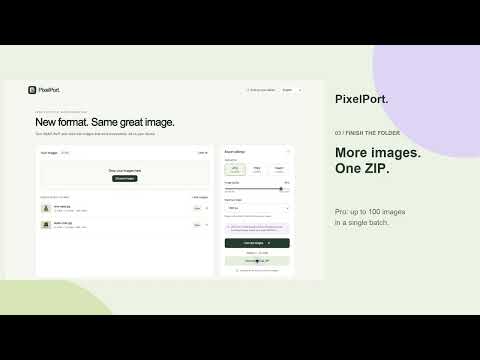
WebP to JPG & PNG Converter — PixelPort Convert WebP and AVIF to JPG or PNG. Batch resize images, adjust quality and download a ZIP. Private, offline image conversion. Convert up to 100 images together and download one ZIP with PixelPort Pro. Single-image conversion is free. 1. Choose images or drag them into PixelPort. 2. Select JPG, PNG or WebP, then set quality and maximum dimensions. 3. Convert and save your image. Pro adds batch conversion and ZIP downloads. On a website? Right-click an image → Convert image with PixelPort. Only this image’s host needs permission. Conversion stays on your device. Your files stay yours. Conversion happens in your browser. Local files work completely offline. PixelPort converts images on your device. It does not upload images to us, collect analytics, sell data or use advertising. Your language and export preferences are saved locally. Images and conversion results remain in memory until you clear the queue or close the tab. Downloads are saved on your device. JPG uses a white background for transparent areas. PNG keeps transparency. Quality adjustment is not needed. Animated images export as a single still frame. 100 images · 40 MB each · 160 MB per batch · 40 megapixels each PixelPort Pro $19 USD once, plus applicable tax. One user. No subscription. Online activation and a license check every 30 days are required. Stripe processes payments. Paste the purchase code shown after checkout. PixelPort sends it to its license service to verify payment; images never leave your device. smarteytan@gmail.com
0 out of 5No ratings
Details
- Version1.0.2
- UpdatedNovember 1, 2026
- FeaturesOffers in-app purchases
- Offered bysmarteytan@gmail.com
- Size97.52KiB
- Languages10 languages
- Developer
Email
smarteytan@gmail.com - Non-traderThis developer has not identified itself as a trader. For consumers in the European Union, please note that consumer rights do not apply to contracts between you and this developer.
Privacy

WebP to JPG & PNG Converter — PixelPort has disclosed the following information regarding the collection and usage of your data. More detailed information can be found in the developer's privacy policy.
WebP to JPG & PNG Converter — PixelPort handles the following:
This developer declares that your data is
- Not being sold to third parties, outside of the approved use cases
- Not being used or transferred for purposes that are unrelated to the item's core functionality
- Not being used or transferred to determine creditworthiness or for lending purposes
Support
For help with questions, suggestions, or problems, visit the developer's support site