

WebNotary — Evidence-Grade Web Capture
4 ratings
)
Overview
Tamper-evident web capture: MHTML + screenshot, SHA-256 digests, RFC 3161 trusted timestamps, chain-of-custody PDF. 100% local.
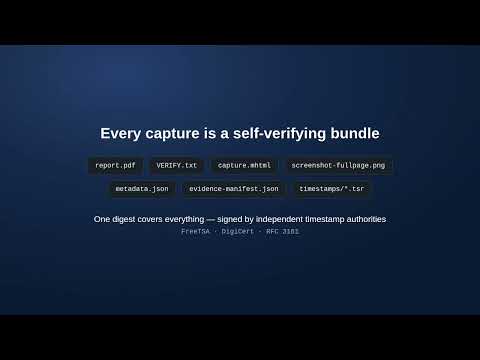
Turn "screenshot it" into evidence. WebNotary captures the page in front of you as a self-verifying evidence bundle — built for solo and small-firm litigators, insurance adjusters, HR and compliance teams, private investigators, and brand-protection teams who need defensible captures without enterprise pricing. WHAT ONE CLICK PRODUCES Each capture saves a single ZIP to Downloads/WebNotary containing: • A complete MHTML archive of the page (DOM, styles, images, frames) • A full-page screenshot — one atomic render, no scroll-stitching artifacts • SHA-256 digests of every artifact, tied together in an evidence manifest • RFC 3161 trusted timestamps from independent authorities (FreeTSA and DigiCert by default; Sectigo, Certum, or your own eIDAS-qualified TSA optional) • A chain-of-custody PDF report with verification instructions and an operator signature block • Forensic metadata: URLs, timings, browser details, timezone, and the full subresource list PRIVATE BY DESIGN Everything happens locally in your browser. The only bytes that ever leave your machine are a 32-byte hash sent to the timestamp authorities — never the page, never your data. No account. No telemetry. No server. VERIFIABLE FOREVER, BY ANYONE Bundles verify with standard tools (sha256sum, openssl ts) — the exact commands and expected values ship inside every bundle — or with the built-in drag-and-drop Verify page, which re-checks every digest and timestamp token entirely offline. No WebNotary software is needed to prove a capture is authentic. BUILT FOR LEGAL DEFENSIBILITY The hash + trusted timestamp + documented automated process is designed to support authentication of electronic evidence (e.g., FRE 901(b)(9)) and the self-authentication routes of FRE 902(13)/(14). Admissibility is always determined by the tribunal; WebNotary is not legal advice. HOW TO USE 1. Click the WebNotary icon (or press Alt+Shift+S, or right-click and choose "Capture this page as evidence"). 2. Optionally add a matter/case reference and notes. 3. Click "Capture evidence" — the bundle lands in Downloads/WebNotary within seconds. 4. Set your operator name once in Settings; it is recorded in every chain-of-custody report. A note on permissions: WebNotary uses Chrome's debugging API to take a single atomic full-page screenshot, so Chrome shows its standard info bar for the moment of capture. Prefer not to? Switch to viewport-only mode in Settings and the debugger is never used.
5 out of 54 ratings
Details
- Version0.1.0
- UpdatedAugust 14, 2026
- Offered byfarhad
- Size59.69KiB
- LanguagesEnglish
- Developer
Email
farhadabtahi91@gmail.com - Non-traderThis developer has not identified itself as a trader. For consumers in the European Union, please note that consumer rights do not apply to contracts between you and this developer.
Privacy

This developer declares that your data is
- Not being sold to third parties, outside of the approved use cases
- Not being used or transferred for purposes that are unrelated to the item's core functionality
- Not being used or transferred to determine creditworthiness or for lending purposes