

WebCopilot.ai - Use GPT on any input box

Tổng quan
Use the power of ChatGPT anywhere on the web.
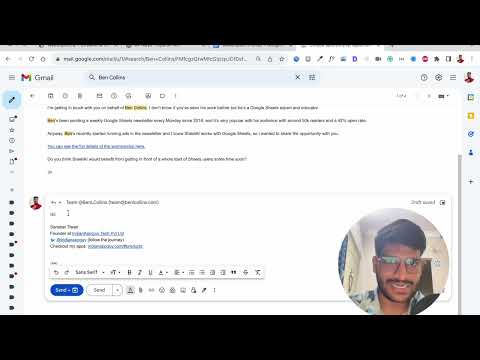
Make writing a breeze by integrating GPT assistance into your daily browsing. From tweets to emails, elevate your writing experience effortlessly! 🐦📧🌍 Key Features: 🔹 Seamless Integration: Utilize GPT assistance on any website's input fields - Twitter, Facebook, LinkedIn, Gmail, and more! 🌐 🔹 Quick Commands: Simply type "/ai:" followed by your desired action and end with ; for instant magic. 💫 🔹 Customizable: Personalize your experience with settings and preferences. ⚙️ 🔹 User-Friendly: No coding required! Just install the extension and go. 🛠️ Possible Use Cases: 📝 Writing Professionals: Enhance pitches, proposals, and articles with creative suggestions. 🖊️ 💼 Business & Entrepreneurs: Generate engaging marketing copy and social media content effortlessly. 🚀 👩💻 Developers & Designers: Boost workflow with auto-generated code snippets and design inspiration. 🎨 📚 Students & Academics: Create well-researched essays and brainstorm project ideas. 🧠 🗣️ Language Learners: Improve language skills with grammar and vocabulary suggestions. 🌍 Examples: Twitter: "/ai write a funny tweet about Elon Musk" 😂🚀 LinkedIn: "/ai suggest a professional congratulatory message for a job promotion" 🎉👩💼 Gmail: "/ai draft a follow-up email after a networking event" 🤝📨 Facebook: "/ai create an engaging caption for a travel photo" 📸🌴 Pros: 🟢 Save Time: Write faster and more efficiently with GPT assistance. ⏱️ 🟢 Boost Creativity: Explore new ideas and styles with AI-generated suggestions. 🎨 🟢 Improve Accuracy: Enhance grammar, punctuation, and spelling. 📚 🟢 Enhance Communication: Write effectively across platforms. 💬 Cons: 🔴 Internet Connection: Requires stable internet for real-time suggestions. 🌐 🔴 Limited Offline Support: GPT features may be limited without internet. ⚠️ Experience the future of writing with WebCopilot.ai! Install the extension and supercharge your writing in any field. Join the revolution and write like a pro! 💻✍️ #AI #WritingAssistant #Productivity Common Questions about WebCopilot.ai: 1. What is WebCopilot.ai? WebCopilot.ai is an innovative Chrome extension that integrates GPT assistance into your browsing experience, making writing easier and more enjoyable. 2. How can WebCopilot.ai help me? WebCopilot.ai allows you to access GPT assistance on any website's input fields, helping you with tasks like drafting emails, creating social media captions, writing articles, and much more. 3. Is WebCopilot.ai easy to use? Absolutely! Simply install the extension, and you're ready to go. No coding or technical expertise required. 4. Which platforms are compatible with WebCopilot.ai? WebCopilot.ai works seamlessly with popular platforms such as Twitter, Facebook, LinkedIn, Gmail, and many others. 5. Can I customize WebCopilot.ai according to my preferences? Yes, WebCopilot.ai offers customizable settings and preferences to tailor the experience to your liking. 6. Does WebCopilot.ai require an internet connection? Yes, a stable internet connection is necessary to access real-time GPT suggestions with WebCopilot.ai. 7. Are there any limitations to WebCopilot.ai's offline support? While offline, some of WebCopilot.ai's features may be limited or unavailable, as it heavily relies on the internet for GPT assistance. 8. Can WebCopilot.ai help me with my writing projects? Definitely! Whether you're a writer, business professional, developer, student, or language learner, WebCopilot.ai can boost your productivity and help you craft compelling content. 9. How does WebCopilot.ai save me time? WebCopilot.ai accelerates the writing process with AI-generated suggestions, reducing the time spent on crafting various types of content. 10. How do I get started with WebCopilot.ai? To get started, simply install the WebCopilot.ai Chrome extension from the Chrome web store, and begin experiencing the power of AI-assisted writing. Top Google Search Queries Solved by WebCopilot.ai: 1. How to draft professional emails efficiently? Answer: Use WebCopilot.ai on Gmail to get AI-generated suggestions and streamline your email drafting process. 2. How to write engaging social media captions? Answer: Enhance your social media captions with WebCopilot.ai by using the AI-generated suggestions available on platforms like Facebook. 3. How to improve grammar and punctuation in writing? Answer: WebCopilot.ai, when used on various platforms, can offer AI-powered assistance to improve grammar and punctuation in your writing. 4. How to generate creative ideas for articles? Answer: Create unique and creative article ideas with the help of WebCopilot.ai's GPT suggestions on platforms like LinkedIn. 5. How to draft professional messages on LinkedIn? Answer: Utilize WebCopilot.ai while messaging on LinkedIn to get prompt AI-generated suggestions for crafting professional messages. 6. How to generate code snippets quickly? Answer: WebCopilot.ai can assist developers by providing auto-generated code snippets when used on platforms supporting input fields. 7. How to write well-researched essays more efficiently? Answer: Improve your essay-writing process with the AI-powered suggestions offered by WebCopilot.ai on various platforms. 8. How to enhance language skills with writing? Answer: WebCopilot.ai's GPT assistance can help language learners by providing grammar and vocabulary suggestions as they write. 9. How to save time while writing emails and articles? Answer: With WebCopilot.ai, you can save time by leveraging AI-generated suggestions to speed up your writing process. 10. How to write compelling marketing copy easily? Answer: Simplify the process of crafting engaging marketing copy by using WebCopilot.ai's GPT suggestions on various platforms.
2,5/513 lượt xếp hạng
Chi tiết
- Phiên bản2.2.0
- Đã cập nhật31 tháng 7, 2023
- Kích thước80.02KiB
- Ngôn ngữEnglish
- Nhà phát triểnIndianAppGuy Tech Pvt LtdTrang web
Damodar kutir Ward No. 1pipri Nowgong Chhatarpur Chhatarpur, Madhya Pradesh 471201 INEmail
sanskar@webcopilot.co - Người bán phi thương mạiNhà phát triển này không tự nhận mình là người bán. Đối với người tiêu dùng ở Liên minh Châu Âu, xin lưu ý rằng các quyền của người tiêu dùng không được áp dụng trong hợp đồng giữa bạn và nhà phát triển này.
Quyền riêng tư

WebCopilot.ai - Use GPT on any input box đã công bố thông tin sau đây liên quan đến việc thu thập và sử dụng dữ liệu của bạn. Bạn có thể xem thêm thông tin chi tiết trong privacy policy của nhà phát triển.
WebCopilot.ai - Use GPT on any input box xử lý dữ liệu sau:
Nhà phát triển này tuyên bố rằng dữ liệu của bạn
- Không được bán cho bên thứ ba, ngoài những trường hợp sử dụng đã được phê duyệt
- Không được sử dụng hoặc chuyển nhượng cho các mục đích không liên quan đến chức năng chính của mặt hàng
- Không được sử dụng hoặc chuyển nhượng để xác định khả năng thanh toán nợ hoặc phục vụ mục đích cho vay
Hỗ trợ
Nếu bạn có câu hỏi, ý kiến đề xuất hoặc gặp vấn đề, hãy truy cập trang web hỗ trợ của nhà phát triển để được trợ giúp