


Overview
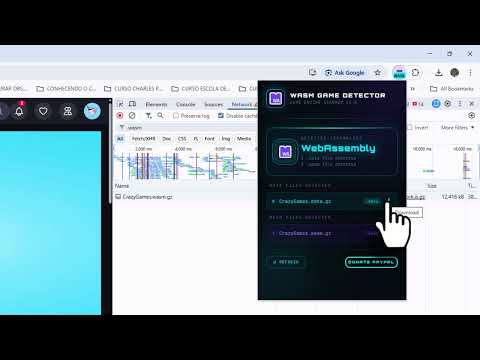
Detects if a web game uses WebAssembly (Unity) or HTML5. Identifies .wasm and .data files in real time.
WEBASSEMBLY GAME DETECTOR Advanced Web Technology Scanner for HTML5 & WebAssembly Applications WebAssembly Game Detector is a lightweight Chrome extension that identifies whether a website or web-based game is using WebAssembly (.wasm), .data asset files, or traditional HTML5 technology. It's useful for developers, QA professionals, security researchers, and anyone who needs quick insight into the underlying technology of web applications. **🚀 Key Features** **🔍 Automatic Detection** Monitors network requests from the active tab and detects .wasm (WebAssembly) files, .data files (commonly used in Unity WebGL builds), and standard HTML5 environments. **📂 File Listing** Displays all detected WebAssembly and data files directly inside the extension popup. **⬇ Direct File Access** Provides quick access to detected files for inspection and download. **⚡ Real-Time Analysis** Re-scan the active page at any time with a single click. **🎨 Modern Interface** Clean and responsive UI with dynamic status indicators, animated feedback, and clear detection states. **🛡 Privacy & Security** No personal data is collected. All processing happens locally in your browser — no external servers, no tracking. The extension only analyzes network requests from the active tab. **⚙ How It Works** Open any website or web-based game, click the extension icon, and it will scan the active tab's network activity and report which technology is detected. Any identified files are displayed directly in the popup. **🌐 Compatibility** Works with Google Chrome and Chromium-based browsers. Manifest V3 compliant. ▶️ YouTube — www.youtube.com/@cheatenginebrazil 📘 Facebook — www.facebook.com/officialrafaellima 📸 Instagram — www.instagram.com/rafael_limacg 💬 WhatsApp — 55 21 98061-9476
5 out of 52 ratings
Details
- Version1.0.0
- UpdatedJune 24, 2026
- Size41.58KiB
- Languages4 languages
- DeveloperWebsite
Email
rafaellima.enterjovem@gmail.com - Non-traderThis developer has not identified itself as a trader. For consumers in the European Union, please note that consumer rights do not apply to contracts between you and this developer.
Privacy

This developer declares that your data is
- Not being sold to third parties, outside of the approved use cases
- Not being used or transferred for purposes that are unrelated to the item's core functionality
- Not being used or transferred to determine creditworthiness or for lending purposes
Support
For help with questions, suggestions, or problems, please open this page on your desktop browser