


Overview
Stop retyping. Export Jira & Notion to PPTX. Local processing. No login. Optional anonymous stats (opt-in).
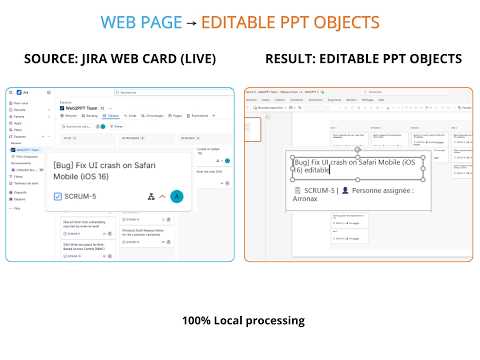
⚡️ TL;DR Turn your Jira and Notion views into fully editable PowerPoint slides in one click, with clean pagination. 100% local, no AI rewriting. Your data never leaves your browser. --- 😩 THE PROBLEM Your Steering Committee or Sprint Review starts in 30 minutes. The backlog and the project database need to become clean, board-ready slides. So you start copy-pasting: - Text breaks and the layout gets messy - Tables overflow and become unusable - Every manual update is a chance for a typo --- 🚀 THE SOLUTION — WEB2PPT Web2PPT rebuilds what you see as native PowerPoint objects. No screenshots, no retyping. - Text stays text, tables stay tables - Long lists are paginated automatically, with repeated headers - Apply your corporate template and present --- 📊 WHAT YOU GET - SteerCo-ready reports: a Jira backlog or list, or a Notion database, becomes a summary slide followed by a paginated table. - Highlight changes since your last export (Table mode): modified, added and removed cells stand out in colour. - Multi-Deck: collect several pages (a board, a backlog, a database…) and export them as a single file. - Adapts to your view: board, list or database, with zero configuration. - Works on other pages too: dashboards, articles and data grids export in the same editable way. --- 🎯 BUILT FOR - Product managers and delivery leads preparing sprint reviews and steering committees - Consultants and business analysts turning client dashboards into decks - Anyone presenting work tracked in the browser, under time pressure --- ⚠️ KNOWN LIMITATIONS Best results on structured data: boards, lists and databases. Not designed for: - Figma, Miro and other canvas-based apps - Very long infinite-scroll pages - Timeline / roadmap (Gantt) views - Content not loaded yet on generic pages (scroll down first) --- 🔒 PRIVACY & SECURITY — LOCAL-FIRST - Page content is converted inside your browser and never sent to any server. - Files are saved directly to your device. No account required. - Optional anonymous usage statistics, off by default: sent only if you accept, with no identifier, no URL and no site name. - Anonymous crash reports (no page content, no URL, no IP address) help us fix bugs. Full Privacy Policy: https://www.web2ppt.com/pages/privacy.html
5 out of 57 ratings
Details
- Version3.6.5
- UpdatedSeptember 27, 2026
- Size772KiB
- LanguagesEnglish
- DeveloperWebsite
Email
hello@web2ppt.com - Non-traderThis developer has not identified itself as a trader. For consumers in the European Union, please note that consumer rights do not apply to contracts between you and this developer.
Privacy

Web2PPT: Export Jira & Notion to PPTX has disclosed the following information regarding the collection and usage of your data. More detailed information can be found in the developer's privacy policy.
Web2PPT: Export Jira & Notion to PPTX handles the following:
This developer declares that your data is
- Not being sold to third parties, outside of the approved use cases
- Not being used or transferred for purposes that are unrelated to the item's core functionality
- Not being used or transferred to determine creditworthiness or for lending purposes
Support
For help with questions, suggestions, or problems, please open this page on your desktop browser