

Web TL;DR for NotebookLM - Page Summary
1 rating
)
Overview
Import the current webpage into NotebookLM and automatically get a TL;DR summary
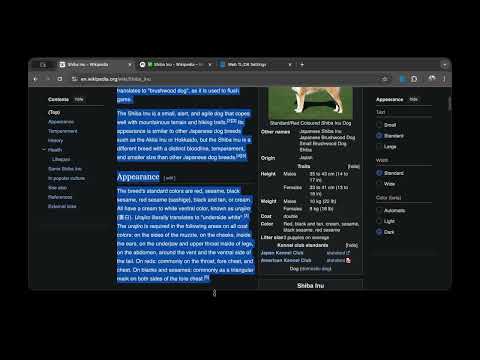
Make Google NotebookLM a seamless part of your daily browsing. This extension eliminates the repetitive work of copying URLs and switching tabs, letting you send content directly to your notebook for instant analysis. Unlike other tools, this extension handles the entire workflow automatically. It imports the source and immediately inputs the summary prompt for you, saving you valuable steps during deep research sessions. Key Features: - Instant Page Analysis: Click the extension icon to import and summarize the webpage you are currently viewing. - Link Summarization: Right-click any link to get the gist of the content without opening a new tab. - Focused Analysis: Highlight specific text, right-click, and send just that segment to NotebookLM. - Visual Feedback: Clear status indicators keep you updated on the progress. How to Use: 1. Summarize a Page: Click the extension icon in your toolbar. 2. Summarize a Link: Right-click a link and select "Summarize with NotebookLM". 3. Summarize Selection: Highlight text, right-click, and choose "Summarize with NotebookLM". Prerequisites: You need a valid Google Account and active access to Google NotebookLM: https://notebooklm.google.com Open Source & Privacy: This project is completely open source. You can verify the code, contribute, or report issues on our GitHub repository. Source Code: https://github.com/Jasonnor/web-tldr
5 out of 51 rating
Details
- Version1.3.8
- UpdatedMay 9, 2026
- Offered byJasonnor
- Size307KiB
- Languages8 languages
- Developer
Email
wujason810@gmail.com - Non-traderThis developer has not identified itself as a trader. For consumers in the European Union, please note that consumer rights do not apply to contracts between you and this developer.
Privacy

Web TL;DR for NotebookLM - Page Summary has disclosed the following information regarding the collection and usage of your data. More detailed information can be found in the developer's privacy policy.
Web TL;DR for NotebookLM - Page Summary handles the following:
This developer declares that your data is
- Not being sold to third parties, outside of the approved use cases
- Not being used or transferred for purposes that are unrelated to the item's core functionality
- Not being used or transferred to determine creditworthiness or for lending purposes
Support
For help with questions, suggestions, or problems, please open this page on your desktop browser